TRIGGERcmd
    • Categories
    • Recent
    • Tags
    • Popular
    • Users
    • Groups
    • Search
    • Register
    • Login
    1. Home
    2. Popular
    Log in to post
    • All Time
    • Day
    • Week
    • Month
    • All Topics
    • New Topics
    • Watched Topics
    • Unreplied Topics

    • All categories
    • D

      Contents of command.json getting lost

      Watching Ignoring Scheduled Pinned Locked Moved Raspberry Pi
      9
      0 Votes
      9 Posts
      2k Views
      D
      Russ, is there any other information that you need or anything else that I can do or provide to help determine what to do to get my commands.json commands into TRIGGER.cmd on my RasPi Zero W?
    • F

      Issue with TriggerCMD Commands Not Updating on Website

      Watching Ignoring Scheduled Pinned Locked Moved Windows
      9
      0 Votes
      9 Posts
      3k Views
      RussR
      @Tony-Seaback, I see from your other posts you're using the background service. I assume the foreground service is sync'ing foreground commands just fine? I just found out the background service is broken on Windows version 1.0.45. I'm working on the fix now. EDIT: Please upgrade to version 1.0.46. It should fix the windows background service. Sorry about the bug.
    • G

      Is there a way to open more than one program with a single command?

      Watching Ignoring Scheduled Pinned Locked Moved General Discussion
      9
      0 Votes
      9 Posts
      1k Views
      RussR
      @Gabriel, great. You're welcome.
    • I

      Installer wont start

      Watching Ignoring Scheduled Pinned Locked Moved General Discussion
      9
      0 Votes
      9 Posts
      2k Views
      RussR
      @Rob-Turing, I don't know. I use Windows Defender and I wasn't able to reproduce the issue.
    • G

      Crashing & translocation & ARM

      Watching Ignoring Scheduled Pinned Locked Moved Mac
      9
      0 Votes
      9 Posts
      2k Views
      RussR
      @gajahduduk, that's great. Thank you for testing it and letting me know.
    • J

      Issues following installation instructions

      Watching Ignoring Scheduled Pinned Locked Moved Raspberry Pi
      9
      0 Votes
      9 Posts
      2k Views
      RussR
      @jcksnftsn, awesome.
    • G

      Ubuntu 22 - Installation throws permission denied, no prompt for token

      Watching Ignoring Scheduled Pinned Locked Moved Linux
      9
      0 Votes
      9 Posts
      3k Views
      G
      @Russ the restart and status check worked! I used apt for the removal and node update. Thanks again for your help!
    • Vinicius Gimenez FiguerolaV

      [BUG] I`m adding new commands and it`s executes the command but Alexas threats as a doorbell

      Watching Ignoring Scheduled Pinned Locked Moved General Discussion
      9
      0 Votes
      9 Posts
      122 Views
      RussR
      Awesome @Vinicius-Gimenez-Figuerola. Thanks for letting me know it's working for you.
    • RussR

      Google Assistant integration

      Watching Ignoring Scheduled Pinned Locked Moved Announcements
      8
      0 Votes
      8 Posts
      11k Views
      RussR
      @Viktor-Kanev, I had my friend with an iPhone try it. It worked for him. I suspect maybe you installed the Google Home app but maybe not the Google Assistant app yet?
    • N

      MonoAMP from monoprice 6 zone amplifier

      Watching Ignoring Scheduled Pinned Locked Moved Windows
      8
      1
      0 Votes
      8 Posts
      5k Views
      K
      @nate-hales said in MonoAMP from monoprice 6 zone amplifier: Check out this video for detailed instructions: https://www.youtube.com/watch?v=fHB_gjc1w8Q Change volume of a zone: curl "http://localhost:50233/api/Value?Channel=0&command=Volume&value=15" Change input (aka channel) of zone 0: curl "http://localhost:50233/api/Value?Channel=0&Property=CH&value=1" Power on zone 0: curl "http://localhost:50233/api/Value?Channel=0&Property=PR&value=1" Are these the only commands that you have? Thanks Ken
    • RussR

      Open or close Kodi with a SmartThings virtual switch

      Watching Ignoring Scheduled Pinned Locked Moved Windows
      8
      0 Votes
      8 Posts
      6k Views
      RussR
      @Carlos-Ignacio-Ponce-Brito, yes, you could use that if "%1"=="on" and if "%1"=="off" in a .bat file to open and close any program. Or instead of using a .bat file, now you can use the Off Command field instead like this: [image: 1617279088479-bce550bc-8dec-4f58-8bf6-4aca5c7abfe9-image.png] You have to set Allow Parameters to true before you can use the Off Command field.

    • ?

      X10 Commander & Smartthings

      Watching Ignoring Scheduled Pinned Locked Moved General Discussion
      8
      0 Votes
      8 Posts
      4k Views
      RussR
      @caulford, you don't have to change your IP address. As long as your computer has access to the Internet this should work. I recommend going to the cmd prompt and running the batch file from there. That way if the batch file is failing, you'll get to see the error. It should prompt for a token like this: D:\tools\test>triggercmdagent.bat D:\tools\test>node D:\tools\test\agent --console Daemon install: false No token exists. Login to request one. prompt: token: You'll need to copy/paste the token from the Instructions page. If it's not prompting for your token, please send a screenshot of the output you see.
    • ?

      "Can't Find ..."

      Watching Ignoring Scheduled Pinned Locked Moved General Discussion
      8
      0 Votes
      8 Posts
      3k Views
      RussR
      @rbmcgee, good job troubleshooting. I didn't even think of that. I programmed the Alexa skill to use the word on to split the command word(s) from the computer word(s). The idea is if you have a bunch of computers you need to say "on macbook" or "on downstairs" to specify which computer to run the command on. The trial is programmed to behave the same way, although with the trial you can only have one computer so there's no point in saying "on macbook."
    • P

      Installation Failed, Failed to extract installer

      Watching Ignoring Scheduled Pinned Locked Moved General Discussion
      8
      0 Votes
      8 Posts
      5k Views
      RussR
      @phil-davenport, awesome. I'm glad that worked. Sorry I didn't think of that right away.
    • O

      Can't do TriggerCMD through Google Home/Assistant since last night.

      Watching Ignoring Scheduled Pinned Locked Moved General Discussion
      8
      0 Votes
      8 Posts
      2k Views
      RussR
      @oloryn, please try this - put a space in the Voice Reply field for the command. That tells Alexa or Google Assistent to say nothing.
    • M

      Failed while trying to add a trigger

      Watching Ignoring Scheduled Pinned Locked Moved General Discussion
      8
      0 Votes
      8 Posts
      2k Views
      RussR
      @MarkW, awesome. I'm glad that worked.
    • kellanistK

      TriggerCMD suddenly stopped processing commands on all devices

      Watching Ignoring Scheduled Pinned Locked Moved General Discussion
      8
      0 Votes
      8 Posts
      2k Views
      RussR
      @kellanist, wow 2 minutes is a long time. Way too long. I just tested and it's immediate for me. I saw your chat. I'll answer more there..
    • ?

      Trigger from iOS Shortcuts not working

      Watching Ignoring Scheduled Pinned Locked Moved General Discussion
      8
      2
      0 Votes
      8 Posts
      2k Views
      RussR
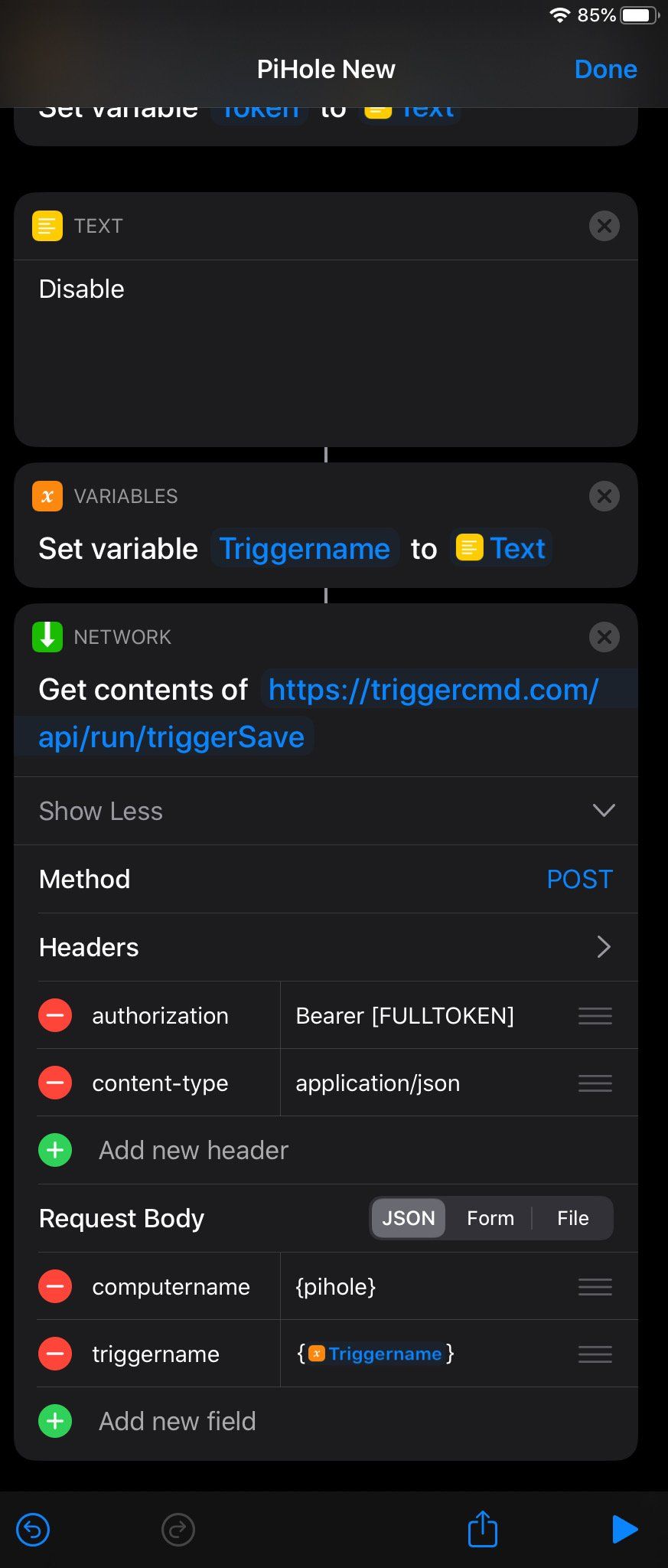
      @user01010, I'm working on getting an iOS device so I can take some screenshots, but in the meantime you can look at the screenshots above, and change these things: Remove the "authorization" header Add "token" under Request Body and paste your token from the Instructions page in as the value. Remove the } and { characters. Optional: change computername and triggername to computer and trigger. Example: computer=macbook trigger=calculator token=(token from the instructions page)
    • Oliver OßwaldO

      Raspberry Pi set commands

      Watching Ignoring Scheduled Pinned Locked Moved General Discussion
      8
      0 Votes
      8 Posts
      2k Views
      RussR
      @Oliver-Oßwald, awesome.
    • Ricardo MachadoR

      Lock your screen Mac

      Watching Ignoring Scheduled Pinned Locked Moved Mac
      8
      0 Votes
      8 Posts
      4k Views
      Daniel GarciaD
      @Russ said in Lock your screen Mac: osascript -e 'tell app "System Events" to key code 12 using {control down, command down}' Gracias,ya me funciono