TRIGGERcmd
    • Categories
    • Recent
    • Tags
    • Popular
    • Users
    • Groups
    • Search
    • Register
    • Login

    Open or close Kodi with a SmartThings virtual switch

    Scheduled Pinned Locked Moved Windows
    8 Posts 5 Posters 6.1k Views 1 Watching
    Loading More Posts
    • Oldest to Newest
    • Newest to Oldest
    • Most Votes
    Reply
    • Reply as topic
    Log in to reply
    This topic has been deleted. Only users with topic management privileges can see it.
    • RussR Offline
      Russ
      last edited by Russ

      Create a batch file in c:\scripts called kodi.bat with these contents:

      if "%1"=="on" "C:\Program Files (x86)\Kodi\kodi.exe"
      if "%1"=="" "C:\Program Files (x86)\Kodi\kodi.exe"
      if "%1"=="off" taskkill /im kodi.exe
      

      Go here to setup the TRIGGERcmd SmartApp in SmartThings.

      Use the SmartApp to create a virtual switch for Kodi.

      Say:

      Alexa, turn on Kodi
      Alexa, turn off Kodi
      

      Profit.

      Russell VanderMey

      1 Reply Last reply Reply Quote 0
      • ? Offline
        [[global:former-user]]
        last edited by

        Kodi as a name works fine for me. even spelled it Kodi vs Cody or something. not sure what the issue may be on your end.

        RussR 1 Reply Last reply Reply Quote 0
        • RussR Offline
          Russ @Guest
          last edited by Russ

          @Neflhiem, yea you're right. I was testing it before I told Alexa to discover my new Kodi virtual switch. I assumed it was failing because Alexa didn't hear Kodi right. I was wrong.

          Sorry about that. I re-recorded that video too: https://www.youtube.com/watch?v=qYHbT05UMQc

          Russell VanderMey

          E 1 Reply Last reply Reply Quote 0
          • E Offline
            esco0909 @Russ
            last edited by

            @russ

            Hey Russ

            Need some quick help when you have a moment

            I setup everything to voice control apps with alexa and I can get everything running but when I say alexa turn off kodi....nothing happens.

            I tried to create a batch file to force close kodi but nothing happens when i test it on the command gui command editor

            RussR 1 Reply Last reply Reply Quote 0
            • RussR Offline
              Russ @esco0909
              last edited by

              @esco0909, does it work from the SmartThings app? I mean can you toggle the switch on or off to see Kodi open or close.

              Also, I wonder if it works from the www.triggercmd.com website when you click the Parameters button and type on or off?

              Russell VanderMey

              1 Reply Last reply Reply Quote 0
              • Mario Anibal Yaranga ColquicochaM Offline
                Mario Anibal Yaranga Colquicocha
                last edited by

                This post is deleted!
                1 Reply Last reply Reply Quote 0
                • Carlos Ignacio Ponce BritoC Offline
                  Carlos Ignacio Ponce Brito
                  last edited by

                  if "%1"=="on" it works for another program?

                  RussR 1 Reply Last reply Reply Quote 0
                  • RussR Offline
                    Russ @Carlos Ignacio Ponce Brito
                    last edited by

                    @Carlos-Ignacio-Ponce-Brito, yes, you could use that if "%1"=="on" and if "%1"=="off" in a .bat file to open and close any program.

                    Or instead of using a .bat file, now you can use the Off Command field instead like this:
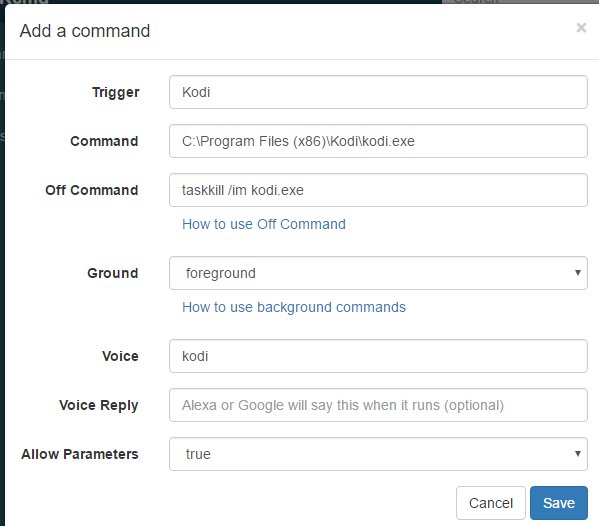
                    bce550bc-8dec-4f58-8bf6-4aca5c7abfe9-image.png

                    You have to set Allow Parameters to true before you can use the Off Command field.

                    Russell VanderMey

                    1 Reply Last reply Reply Quote 0

                    Hello! It looks like you're interested in this conversation, but you don't have an account yet.

                    Getting fed up of having to scroll through the same posts each visit? When you register for an account, you'll always come back to exactly where you were before, and choose to be notified of new replies (either via email, or push notification). You'll also be able to save bookmarks and upvote posts to show your appreciation to other community members.

                    With your input, this post could be even better 💗

                    Register Login
                    • First post
                      Last post