TRIGGERcmd
    • Categories
    • Recent
    • Tags
    • Popular
    • Users
    • Groups
    • Search
    • Register
    • Login
    1. Home
    2. Example Commands
    3. Windows
    Log in to post
    Load new posts
    • Recently Replied
    • Recently Created
    • Most Posts
    • Most Votes
    • Most Views
    • RussR

      Download a Youtube video by passing the URL as a parameter

      panel parameter python • • Russ
      1
      0
      Votes
      1
      Posts
      793
      Views

      No one has replied

    • RussR

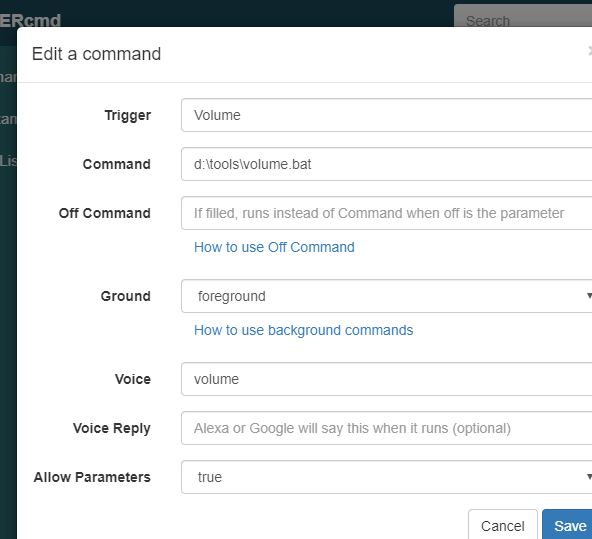
      Volume script

      • • Russ
      5
      0
      Votes
      5
      Posts
      2.5k
      Views

      RussR

      @Meximistas, I think Alexa would accept one of these:

      establecer volumen 90 subir el volumen a 90

      You'd make the Voice field volumen instead of volume.

    • RussR

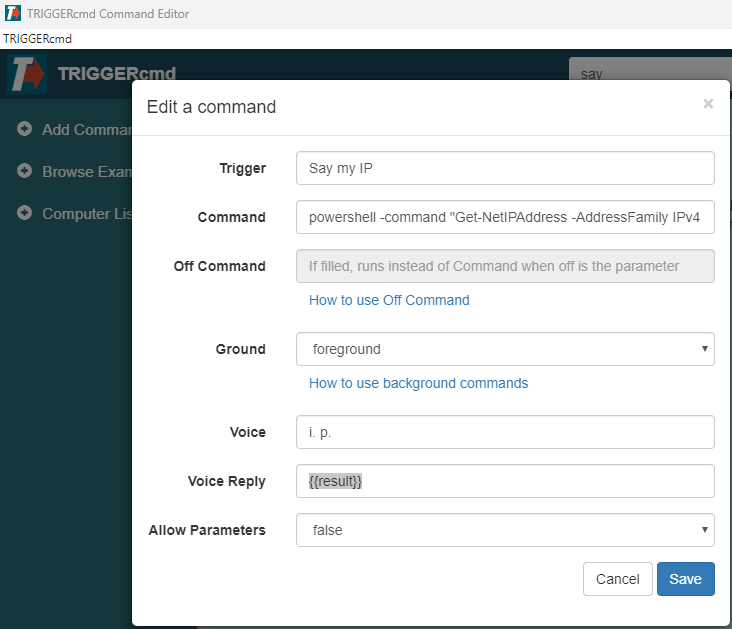
      Say my IP

      result • • Russ
      1
      0
      Votes
      1
      Posts
      1.0k
      Views

      No one has replied

    • Alisson TeixeiraA

      é possivel desligar o Computador e Monitor com um comando?

      • • Alisson Teixeira
      2
      0
      Votes
      2
      Posts
      34
      Views

      RussR

      @Alisson-Teixeira, I translated that as:

      "I would like to know if it's possible to turn off the monitor and the computer at the same time with just one command? In the free version? With the example command, the monitor enters power saving mode, but doesn't turn off completely...

      Question for Windows please"

      You can run multiple commands in one command by putting && between commands, like this:

      nircmd.exe monitor off && shutdown /s /t 10
    • RussR

      TRIGGERcmd Misson Control app

      • • Russ
      1
      0
      Votes
      1
      Posts
      30
      Views

      No one has replied

    • R

      Turn PC on/off

      • • Rodney Mathee
      4
      0
      Votes
      4
      Posts
      154
      Views

      RussR

      @Rodney-Mathee, I'm glad you told me it's wifi, not wired ethernet. That changes things. For one, that WakeMeOnLan.exe tool from Nirsoft won't work because it doesn't support wireless networks.

      I've never tried "wake-on-wlan" but in theory it's possible with the right hardware.
      https://documentation.ubuntu.com/core/explanation/system-snaps/network-manager/how-to-guides/configure-the-snap/wake-on-wlan/

    • D

      Abort shutdown

      • • Dinas
      5
      0
      Votes
      5
      Posts
      708
      Views

      H

      @Jhon-Piñeres
      The answer is probably found elsewhere since you asked your question, but because this was the first thread i found i think i post my solution here:

      Command for shutting down:
      shutdown /s /t 120

      I choose 2 Minutes because thats the a longer time i need to leave but so normaly enough time to stop if i forgot something.

      Off Command:
      shutdown /a

      Now i can tell my alexa to shut down my pc, by switching on shutdown, but i have also 2 minutes to cancel the shutdown by telling alexa to turn off shutdown.

    • RussR

      Python script to change my wifi color LED light bulb state

      • • Russ
      1
      0
      Votes
      1
      Posts
      242
      Views

      No one has replied

    • RussR

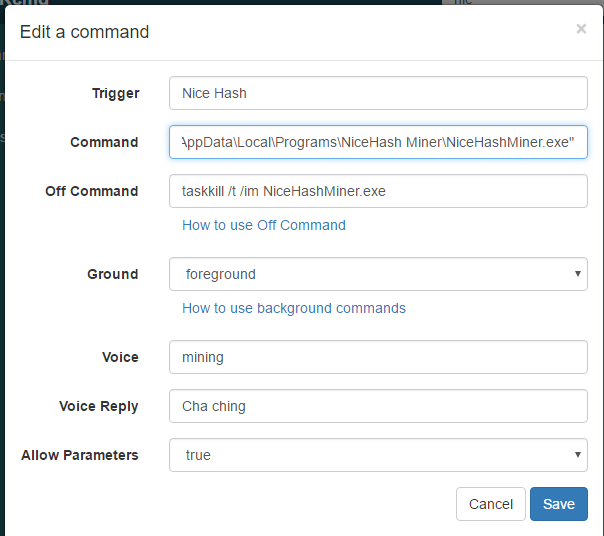
      Start and stop crypto mining with NiceHash

      • • Russ
      4
      0
      Votes
      4
      Posts
      896
      Views

      RussR

      Thanks @Xander .

    • RussR

      Use Claude Desktop to lookup and play a Youtube video on your Roku

      • • Russ
      1
      0
      Votes
      1
      Posts
      479
      Views

      No one has replied

    • RussR

      Upgrade all of your software.

      • • Russ
      1
      0
      Votes
      1
      Posts
      691
      Views

      No one has replied

    • Eliseu JoséE

      How to UNLOCK the Windows screen?

      • • Eliseu José
      4
      0
      Votes
      4
      Posts
      2.6k
      Views

      C

      @Russ There has to be a way. Many systems, like VNC for example, use this feature.

    • Carlos JuniorC

      Add two commands in a single trigger

      • • Carlos Junior
      2
      0
      Votes
      2
      Posts
      611
      Views

      RussR

      @Carlos-Junior, you could create a script with two commands in it like this:

      taskkill /f /fi "USERNAME eq %USERNAME%" /fi "WINDOWTITLE ne" shutdown /s /f /t 0

      Then your command would run that script with a command like this:

      c:\scripts\close_all_shutdown.bat

      If you don't want to create a script, you can generally run multiple commands with one command line by separating the commands with && like this:

      taskkill /f /fi "USERNAME eq %USERNAME%" /fi "WINDOWTITLE ne" && shutdown /s /f /t 0
    • E

      The sleep comand doesnr suspend the pc its hibernating

      • • Ego95
      6
      0
      Votes
      6
      Posts
      1.3k
      Views

      RussR

      @Diego-Ulises-Pérez-Ruiz, maybe you need to specify the full path to nircmd.exe in your command, like c:\tools\nircmd.exe ...

      Also, by manually, I assume you mean when you run it manually from the command line it works. What if you run it manually via TRIGGERcmd using the green Trigger button on the website, or from the green Play arrow in the GUI Editor ? We should make sure those work before attempting Alexa.

    • E

      Turn Off only second Monitor

      • • Ego95
      1
      0
      Votes
      1
      Posts
      690
      Views

      No one has replied

    • Oliver RO

      Command to Windows Hibernating

      • • Oliver R
      2
      0
      Votes
      2
      Posts
      623
      Views

      E

      @Oliver-R Thanks a lot

    • Alejandro BerrocalA

      How to change to 1 screen to 2 screens

      • • Alejandro Berrocal
      3
      1
      Votes
      3
      Posts
      1.3k
      Views

      Lucas RosasL

      @Floor_kicker Thank you very much for helping.

    • Giuseppe SbirziolaG

      Reinstallation problem

      • • Giuseppe Sbirziola
      6
      0
      Votes
      6
      Posts
      1.1k
      Views

      RussR

      @Giuseppe-Sbirziola , I got your direct message. I'm glad that worked.

    • Rafael EstevamR

      Alexa ask to say turn on and after command

      • • Rafael Estevam
      2
      0
      Votes
      2
      Posts
      568
      Views

      RussR

      @Rafael-Estevam, what you say to Alexa will make more sense if you make the Voice field just computer instead of turn off computer.

      The formula is, "Alexa, turn on/off [voice word]."

      That's assuming you're using the TRIGGERcmd Smart Home skill.

      In this example, I can say

      "Alexa, turn on calculator." to open it.
      "Alexa, turn off calculator." to close it.

      7d94e408-a352-4c03-b195-3c512a638539-image.png

    • S

      How do I do this? I copy and pasted the command into the "command" box and I tried using it with my alexa but it isnt working.

      • • Sxve__
      8
      0
      Votes
      8
      Posts
      1.1k
      Views

      S

      @Russ bet man thank you so much for all of your help 🙂 im new to this coding stuff its super weird to me, Im definitely gonna learn alot from being in this community lol