Download a Youtube video by passing the URL as a parameter
-
I made this YouTube video to show how this works.
Make sure to adjust the folder paths. I doubt you'll put your script in d:\appdev\triggercmd\youtube-dl or put your downloaded files in m:\videos\youtube like I did.
Create a folder, open a cmd window in that folder, and type these to create the virtual environment with the yt_dlp python module:
python3 -m venv myenv
myenv\Scripts\activate.bat
pip3 install yt_dlp
youtube-dl.bat contents:
setlocal enabledelayedexpansion

:: This version of the script differs from the one in the Youtube video in that it handles any of these Youtube URL formats:
:: https://www.youtube.com/watch?v=KqfRiPy5gFs
:: https://youtu.be/KqfRiPy5gFs
:: KqfRiPy5gFs

:: Combine all arguments into a single string
set "input="
for %%A in (%*) do (
    set "input=!input! %%A"
)

:: Remove leading spaces
set "input=%input:~1%"

:: Check if the input contains "youtu.be" format and extract the video ID
echo %input% | findstr /C:"youtu.be" >nul
if not errorlevel 1 (
    set "id=%input:~17%"  :: Strip "https://youtu.be/"
)

:: Check if the input contains "youtube.com/watch?v=" format and extract the video ID
if not defined id (
    echo %input% | findstr /C:"youtube.com/watch?v=" >nul
    if not errorlevel 1 (
        set "id=%input:~32%"  :: Strip "https://www.youtube.com/watch?v="
    )
)

:: If input is just the ID, no need for stripping
if not defined id (
    set "id=%input%"
)

:: Ensure the ID is exactly 11 characters long
set "id=%id:~0,11%"

echo YouTube Video ID: %id%

:: Go to the folder where I want the files to be created
cd /d m:\videos\youtube

:: Activate the Python virtual environment that has the yt_dlp module installed
call d:\appdev\triggercmd\youtube-dl\myenv\Scripts\activate.bat

:: Run the python script to download the video and metadata
python d:\appdev\triggercmd\youtube-dl\youtube-dl.py %id%  > debug.log 2>&1
youtube-dl.py contents:
import yt_dlp
import json, uuid, sys

def download_video_metadata(video_url):
    ydl_opts = {
        'quiet': True,
        'skip_download': True,
        'force_generic_extractor': False,
    }

    with yt_dlp.YoutubeDL(ydl_opts) as ydl:
        try:
            info_dict = ydl.extract_info(video_url, download=False)
            return info_dict
        except Exception as e:
            print(f"Error: {e}")
            return None

def download_video(video_url):
    ydl_opts = {
        'quiet': False,
        'outtmpl': '%(title)s.%(ext)s',
    }

    with yt_dlp.YoutubeDL(ydl_opts) as ydl:
        try:
            ydl.download([video_url])
        except Exception as e:
            print(f"Error: {e}")

if __name__ == "__main__":
    if len(sys.argv) != 2:
        print("Usage: python3 youtube-dl.py <YouTube Video URL>")
        sys.exit(1)

    video_url = sys.argv[1]
    metadata = download_video_metadata(video_url)

    if metadata:
        print("Metadata:")

        filename=metadata.get('title', uuid.uuid4()) + ".json"
        with open(filename, "w") as file:
            json.dump(metadata, file, indent=4)

        print("Downloading video...")
        download_video(video_url)
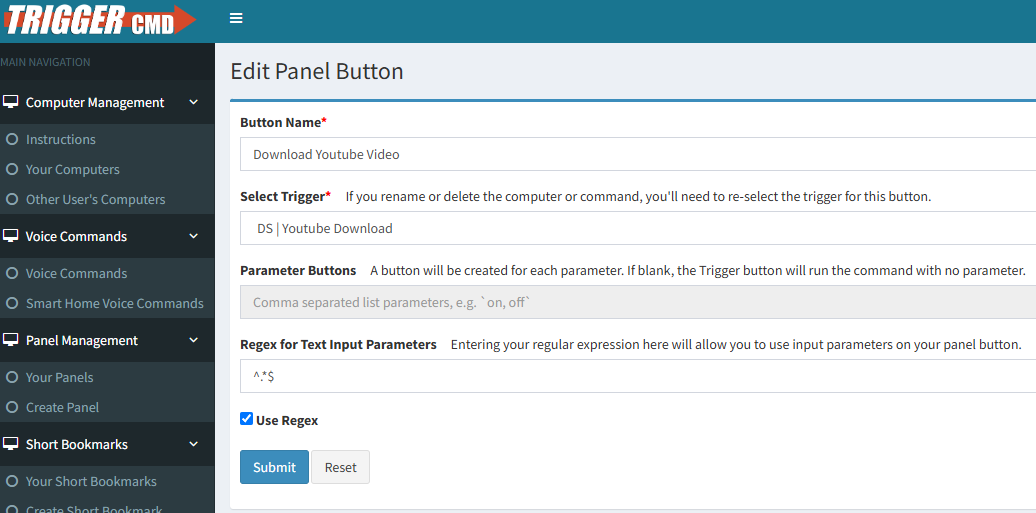
Make sure you enable parameters:

If you want to create a panel, you can use this regex to accept any text: ^.*$
-
 R Russ pinned this topic on
Hello! It looks like you're interested in this conversation, but you don't have an account yet.
Getting fed up of having to scroll through the same posts each visit? When you register for an account, you'll always come back to exactly where you were before, and choose to be notified of new replies (either via email, or push notification). You'll also be able to save bookmarks and upvote posts to show your appreciation to other community members.
With your input, this post could be even better 💗
Register Login