• How to run a program?

    2
    0 Votes
    2 Posts
    4k Views
    RussR
    @Felipe-Martins-Araruna, can you give some details? Are you using Windows? What's the program? I'll assume Windows, and give some steps that generally work: Use Windows search to find the program's icon. In this example I searched for chrome. Right-click that icon and select Open file location [image: 1590939817566-99cba1df-cd65-4394-864f-a53b94730e74-image.png] Right-click the shortcut and click Properties [image: 1590939898815-2daa68e7-7934-453e-ba41-b2fc60814683-image.png] Copy the Target [image: 1590939968074-6791c31b-5f7e-46a9-8386-ce679c61252b-image.png] Right-click the TRIGGERcmd tray icon, click GUI Command Editor, add a command, and paste that Target in the Command field: [image: 1590940079455-29df2b7a-085d-42a4-998b-75a0dba4ce93-image.png] For example, the Target in my Chrome icon is: "C:\Program Files (x86)\Google\Chrome\Application\chrome.exe"

  • Combine two commands

    Moved
    4
    0 Votes
    4 Posts
    3k Views
    XanderX
    You should just be able to add an "Exit" command at the end of your batch. Or, you can 'pipeline' your commands by putting the | command in between them: cd /d C:\Users\%USERNAME%\AppData\Local\Google\Chrome\User Data | del /s History*
  • Have your Google Home speak some text

    Moved
    3
    0 Votes
    3 Posts
    1k Views
    RussR
    @F4u5t, yea I thought so too. It's not exactly a TRIGGERcmd thing but figured people on this forum might find it useful.
  • Opening specific netflix movie with alexa problems

    Moved
    2
    0 Votes
    2 Posts
    2k Views
    RussR
    @bignoob, does it work if you run the command yourself, in a cmd window? You can copy that chromedriver exe into a new folder, then add that folder to your PATH environment variable, or just copy the exe into C:\windows folder which is already in your PATH by default.
  • How to run a disk test with CHKDSK

    Moved
    4
    0 Votes
    4 Posts
    1k Views
    RussR
    @fcovalls, that's odd. It worked for me as a background command. It should work because background commands run in the context of the TRIGGERcmdAgent Windows service which runs as Local System, which should allow elevated commands to run. [image: 1579382446201-8177f80e-4d75-412e-8df1-6dcf4d01615c-image.png] This is what I see in the log when I ran it via TRIGGERcmd: D:\tools>type chkdsk.log The type of the file system is NTFS. Stage 1: Examining basic file system structure ... 1139968 file records processed. File verification completed. 6948 large file records processed. 0 bad file records processed. Stage 2: Examining file name linkage ... 725 reparse records processed. 1477194 index entries processed. Index verification completed. 0 unindexed files scanned. 0 unindexed files recovered to lost and found. 725 reparse records processed. Stage 3: Examining security descriptors ... Security descriptor verification completed. 168614 data files processed. CHKDSK is verifying Usn Journal... 37970336 USN bytes processed. Usn Journal verification completed. Windows has scanned the file system and found no problems. No further action is required. 732469247 KB total disk space. 614040080 KB in 964604 files. 410280 KB in 168615 indexes. 0 KB in bad sectors. 1267367 KB in use by the system. 65536 KB occupied by the log file. 116751520 KB available on disk. 4096 bytes in each allocation unit. 183117311 total allocation units on disk. 29187880 allocation units available on disk.
  • EventGhost

    Moved
    4
    0 Votes
    4 Posts
    5k Views
    E
    @Russ You are AWESOME!!! Thank you sir!
  • How to play a single MP3 file

    Moved
    4
    0 Votes
    4 Posts
    3k Views
    RussR
    @benzil, I switched to a computer where Groove is my default mp3 player, and it worked for me to use the quoted full path to he mp3 file, but then I googled and found this page that suggested this command line: cmd /c start "explorer.exe shell:C:\Program Files\WindowsApps\Microsoft.ZuneMusic_3.6.25021.0_x64__8wekyb3d8bbwe!Microsoft.ZuneMusic" "C:\Users\Russ\Music\03 - Take a Chance on Me.mp3"
  • Kill Google Chrome

    Moved
    1
    0 Votes
    1 Posts
    2k Views
    No one has replied
  • vlc just start but

    Moved
    1
    0 Votes
    1 Posts
    819 Views
    No one has replied
  • Last reboot date

    Moved
    1
    0 Votes
    1 Posts
    2k Views
    No one has replied
  • Report your Windows PC's processor info to the Runs log

    Moved
    3
    0 Votes
    3 Posts
    2k Views
    RussR
    @marcelo-v, did you see this post yet? You should be able to find it just by saying, "Hey Google, talk to trigger C M D." You might actually prefer the new TRIGGERcmd Smart Home skill.
  • Execute python script on Mac or Windows

    Moved
    2
    0 Votes
    2 Posts
    2k Views
    RussR
    @chaochao-yan, I tested it, and it worked for me on my Windows 10 PC. I had to close and re-open the TRIGGERcmd agent before I could run python commands because when you install python it adds itself to your PATH environment variable, but environment variables don't get updated for each process until you restart them. Anyway, here's my test python script in case you're interested: f= open("c:\\users\\russe\\test.txt","w+") for i in range(10): f.write("This is line %d\r\n" % (i+1)) f.close() Here's my command that TRIGGERcmd ran: python c:\users\russe\test.py
  • Search And Play A Movie By Title, Subtitle or Random

    Moved
    2
    0 Votes
    2 Posts
    2k Views
    RussR
    @a-mcf, I hope you don't mind. I re-formatted your post a little bit. I just added ``` before and after the big code block to make it look like code. Also, nice job on the movie player script!
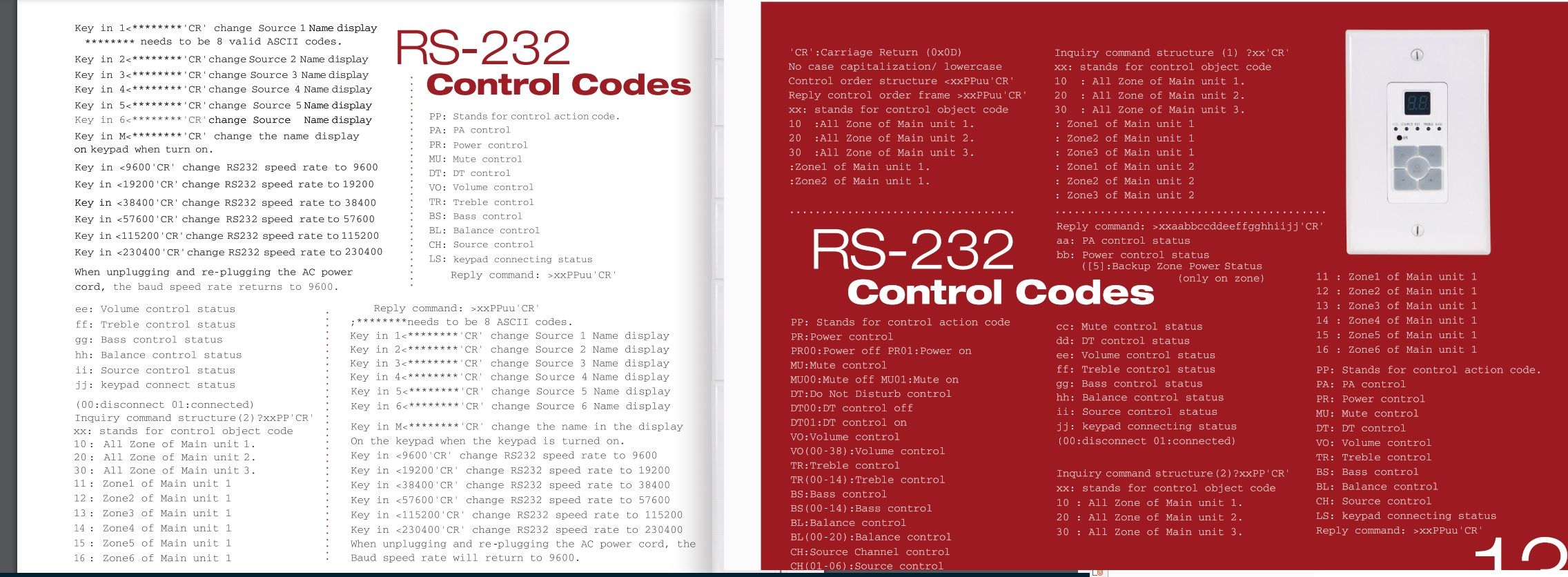
  • MonoAMP from monoprice 6 zone amplifier

    Moved
    8
    1
    0 Votes
    8 Posts
    5k Views
    K
    @nate-hales said in MonoAMP from monoprice 6 zone amplifier: Check out this video for detailed instructions: https://www.youtube.com/watch?v=fHB_gjc1w8Q Change volume of a zone: curl "http://localhost:50233/api/Value?Channel=0&command=Volume&value=15" Change input (aka channel) of zone 0: curl "http://localhost:50233/api/Value?Channel=0&Property=CH&value=1" Power on zone 0: curl "http://localhost:50233/api/Value?Channel=0&Property=PR&value=1" Are these the only commands that you have? Thanks Ken
  • My command to open Windows Media Player

    Moved
    1
    0 Votes
    1 Posts
    4k Views
    No one has replied
  • Basic cleanup

    Moved
    2
    0 Votes
    2 Posts
    4k Views
    RussR
    Great idea @Xander! I added this to the examples list in the GUI editor. Here's a URL to cleanmgr docs: https://ss64.com/nt/cleanmgr.html cleanmgr = Automated cleanup of Temp files, Internet files, downloaded files, recycle bin. Run this to bring up the GUI and setup profile #1: cleanmgr /sageset:1 This command runs profile #1: cleanmgr /sagerun:1 This is what the GUI looks like: [image: cleanmgr.png]
  • Commands that use Nircmd.exe (toggle mute, say stuff, etc.)

    Moved
    14
    0 Votes
    14 Posts
    13k Views
    ?
    @Nate-Hales you said "I have alexa on the "Line in" with "Listen" enabled, so I can hear her and whatever is running on my windows 10" I tried this with alexa and got some odd noises when she was listening so i had to unplug her. Did you have that problem and find a fix or just didnt have it? im in the same setup.. htpc does all the sound.
  • Take a photo with your webcam

    Moved
    1
    0 Votes
    1 Posts
    3k Views
    No one has replied
  • Backup your Documents folder

    Moved
    1
    0 Votes
    1 Posts
    3k Views
    No one has replied
  • Make a playlist of mp3's in a folder, and play them

    Moved
    1
    0 Votes
    1 Posts
    3k Views
    No one has replied