• This topic is deleted!

    1
    4
    0 Votes
    1 Posts
    5 Views
    No one has replied
  • Hi i live in brazil

    2
    0 Votes
    2 Posts
    561 Views
    RussR
    @marciosenaf, for the TRIGGERcmd Smart Home skill to create devices, your commands need the voice field filled in, and the computer needs the voice field field in unless it's your default computer. I suspect your first computer was the default computer but your new one is not. If so, you could fix this by setting your new computer as your default computer in your profile. Click your name in the upper-right, and click Profile, then use the Default Computer pulldown to select your computer. [image: 1700484811205-6bac0cd6-45e0-472c-af6a-4da8221a0f99-image.png]
  • Cannot subscribe: Stripe link down

    3
    0 Votes
    3 Posts
    752 Views
    RussR
    @ayoubshadi, what country are you from? And what payment methods do people use there? I'd like to start working on a plan B in case my Stripe appeal doesn't work out.
  • Win11 - I put token nothing happened

    3
    0 Votes
    3 Posts
    612 Views
    V
    It worked, @Russ !!!!!!
  • This topic is deleted!

    2
    0 Votes
    2 Posts
    9 Views
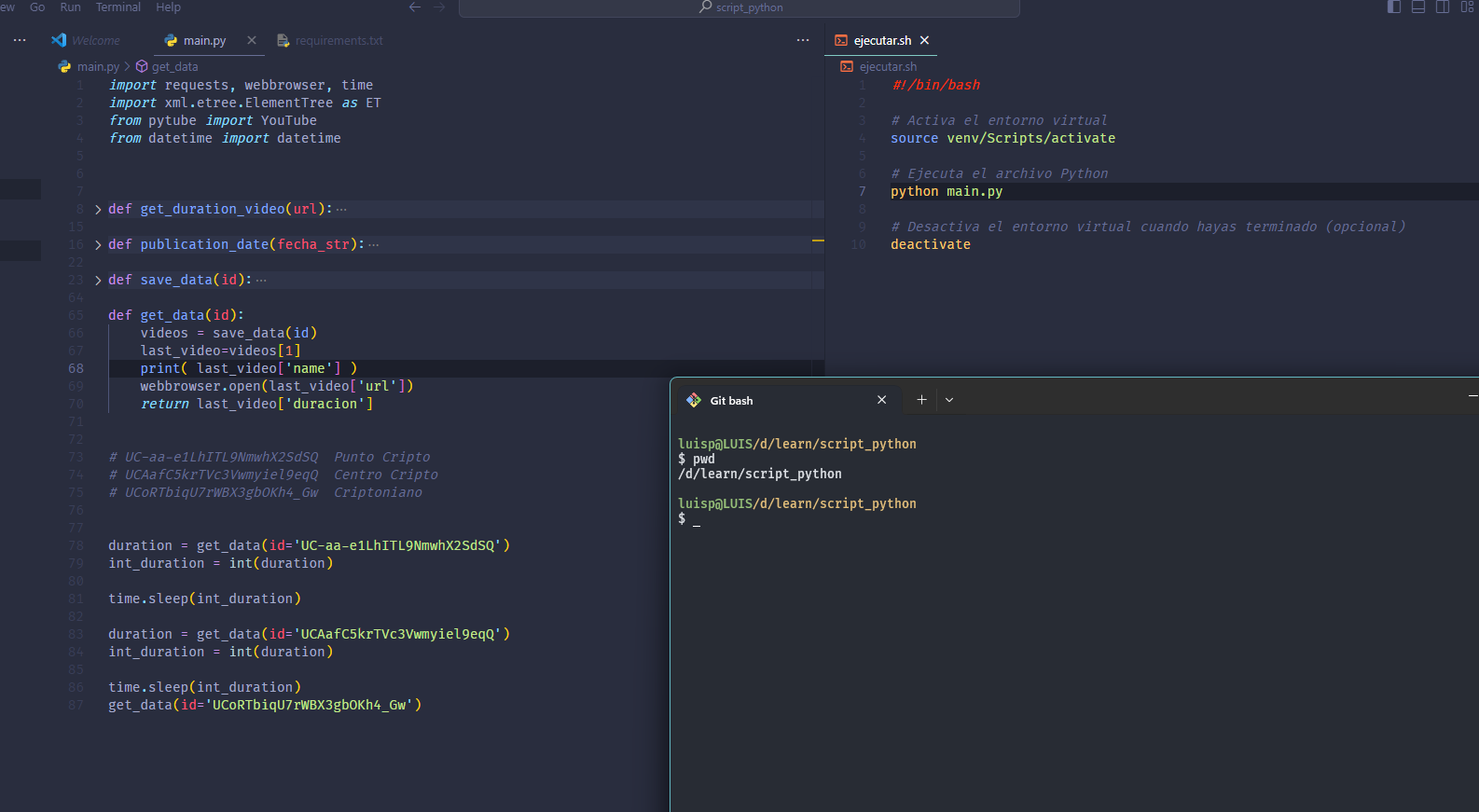
  • how to execute .sh in disc d

    10
    2
    0 Votes
    10 Posts
    2k Views
    RussR
    @Luisito-Palma, makes sense. You're welcome. Your project looks interesting.
  • Problem with the triggers in Alexa

    2
    0 Votes
    2 Posts
    665 Views
    RussR
    @fcovalls, please check/try these things: Make sure each computer has a unique Voice Name value or is your default computer. Make sure each command has a Voice field set. If you have one computer that's misbehaving, try renaming it and renaming it back. That will force Alexa to re-create the devices. Try changing your default computer from your profile page. Confirm you see the Smart Home Voice Commands page to make sure you see it there. If you don't see it there, Alexa won't create a device for it, so troubleshoot that first.
  • It is possible active(send) webhook with triggercmd. how?

    3
    0 Votes
    3 Posts
    1k Views
    S
    Are you asking for a way to fire off triggers from your phone? You can create a panel of the specific triggers then add a shortcut to panel’s url to your phone’s Home Screen Or Install ifttt on your phone and fire them off some other way like sms.
  • Customer Support? TRIGGERcmdAgent keeps stopping

    30
    1
    0 Votes
    30 Posts
    10k Views
    RussR
    @Frank-Malczewski, thanks for letting me know. Sorry that's necessary but I'm glad it's working for you. I've seen those extra tray icons before - the icon doesn't get removed when you kill the agent without using the Quit function.
  • Dissociating my TriggerCmd Forum account from Google

    2
    0 Votes
    2 Posts
    400 Views
    RussR
    @David-0 under Edit Profile I see Change Password. I think if you unlink your Gmail account you'll still be able to login with your username and that password. You should try logging in with that before unlinking just to make sure first.
  • Alexa not working with the Trigger Skill

    6
    0 Votes
    6 Posts
    1k Views
    RussR
    @David-0, good. I think that makes sense in your case.
  • I am unable to install Trigger CMD on Windows 11.

    5
    0 Votes
    5 Posts
    2k Views
    Vinícius CaxiasV
    @Russ I managed to make it work, I found the application that launches Trigger CMD by searching in the file manager. Thank you for your support.
  • Hangs on Boot

    1
    0 Votes
    1 Posts
    610 Views
    No one has replied
  • Shorter URL or redirect

    12
    0 Votes
    12 Posts
    3k Views
    S
    @Russ It's a swiss army knife on it's own. Paired with TriggerCMD it's a Bazooka.
  • Macro to open triggercmd gui

    1
    4
    1 Votes
    1 Posts
    981 Views
    No one has replied
  • Subscription Issue, money refund

    3
    0 Votes
    3 Posts
    723 Views
    A
    @Russ Thanks! Already resuscribed, wont happen again!
  • TRIGGER routine from another app linked to Alexa

    2
    0 Votes
    2 Posts
    1k Views
    RussR
    @Mauro, yes, you can start an Alexa routine whenever you trigger a command. It requires the TRIGGERcmd Smart Home alexa skill to be enabled, then you can These are the instructions: https://www.triggercmd.com/forum/topic/1844/run-an-alexa-routine-when-a-command-runs This video also shows how it works: https://youtu.be/nrqj-OwDpGE?si=xuuR4yfWZZho9Dqw&t=199
  • How open triggercmd gui with command

    7
    0 Votes
    7 Posts
    2k Views
    MauroM
    ; Defina a cor do pixel que você deseja localizar (no formato RGB hexadecimal) CorPixelDesejado := 0xd5492a ; Por exemplo, vermelho ; Use a função PixelSearch para localizar o pixel PixelSearch, EncontradoX, EncontradoY, 0, 0, A_ScreenWidth, A_ScreenHeight, %CorPixelDesejado% ; Verifique se o pixel foi encontrado If ErrorLevel = 0 { ; Movimente o mouse para as coordenadas encontradas (X, Y) MouseMove, %EncontradoX%, %EncontradoY% ; Clique no pixel Click } ; Sair do script após a execução do macro ExitApp
  • 0 Votes
    2 Posts
    1k Views
    Steve LeeS
    @HeeHang I know nothing about Make.com but TRIGGER cmd runs windows cmd commands and Windows has the parts to make it possible. Basically you probably want to add something like the following to a cmd/bat file and run that from TRIGGERcmd start "" app.exe /s timeout /t 5 taskkill /im app.exe /f start runs app.exe in a new process timeout waits a few seconds before returning taskkill /im kills task by name - assuming it is only one If you have a script rather than an exe the run: cmd /c "my.cmd" Hope that helps
  • Alexa keeps hearing "perameter" as"perimeter"

    7
    0 Votes
    7 Posts
    2k Views
    Steve LeeS
    @Russ yay! I'll give it a go