• Windows Defender triggered by installer

    2
    0 Votes
    2 Posts
    652 Views
    RussR
    Thanks @kellanist. I'll take a look. I hoped Microsoft would whitelist apps signed by my code signing certificate by now. Maybe I'm missing something. If it's new, I think it must be because I recently renewed my certificate. EDIT: I submitted the agent to Microsoft just now, so hopefully they'll whitelist it soon. Otherwise I just have to wait for its reputation to build as users install it. [image: 1766530798934-0cde63ea-3d0e-4b4a-b6e0-13c398ae26ef-image.png] This is what I saw when I submitted the agent installer: "The SmartScreen warning that you reported indicates that the application and/or certificate used to sign it do not yet have a reputation established in our system. Applications without a known reputation will show warnings when downloaded or installed. This does not prevent users from still clicking through to download or run the application. To do so, they can select "More info" -> "Run anyway" option within SmartScreen prompt window. Reputation is established by how your download is used by Windows, Edge, Internet Explorer users and the SmartScreen Service intelligence algorithms. Downloads are assigned a reputation rating based on many criteria, such as download traffic, download history, past anti-virus results and URL reputation.  This reputation may be based on the downloaded program or can also be assigned to the publisher, based on digital certificate information. Once your signing certificate has gained reputation in our system, all applications or releases signed with your certificate should have warn-free experience"

  • How do I Cancel My Subscription

    2
    0 Votes
    2 Posts
    557 Views
    RussR
    @jett, you'll need to cancel your subscription from your Paypal account.
  • 0 Votes
    7 Posts
    1k Views
    S
    @Russ because I never clicked that and had no idea what it does. It worked. Now it shows the full name of the PC and the indicator is black. I appreciate the help Russ. Have a good weekend and a happy Thanksgiving.
  • Opening in a particular Window size

    13
    0 Votes
    13 Posts
    3k Views
    RussR
    @JRSF-Home, sorry, I forgot (again) that timeout command doesn't wait if the script is running in a context that doesn't have a console, like when the TRIGGERcmd agent runs it. It just moves on immediately. This chatgpt session explains it: https://chatgpt.com/share/691cf13c-2f64-8004-8b12-78dd516285a9 You can see here that another user had the same problem. My suggestion is to use the ping command like this: ping 127.0.0.1 -n 3 Adjust that 3 number depending on how long you want to wait. Here's my improved script that uses ping to wait, and it uses CTRL-SHIFT-J to go directly to the Console tab: "C:\Program Files\Google\Chrome\Application\chrome.exe" --new-window https://www.youtube.com/watch?v=1I9qC0Zo_PM ping 127.0.0.1 -n 5 REM x y width height nircmd win setsize stitle "Allow friends to control Spotify" 200 100 800 1000 nircmd win activate stitle "Allow friends to control Spotify" REM open dev tools to the Console tab nircmd sendkeypress ctrl+shift+j ping 127.0.0.1 -n 3 REM type document.querySelector('like-button-view-model button[aria-label*="like"]').click() nircmd sendkeypress d o c u m e n t 0xBE q u e r y Shift+s e l e c t o r Shift+0x39 0xDE l i k e 0xBD b u t t o n 0xBD v i e w 0xBD m o d e l spc b u t t o n 0xDB nircmd sendkeypress a r i a 0xBD l a b e l Shift+0x38 0xBB Shift+0xDE l i k e Shift+0xDE 0xDD 0xDE Shift+0x30 0xBE c l i c k Shift+0x39 Shift+0x30 REM press enter nircmd sendkeypress 0x0D ping 127.0.0.1 -n 2 REM close dev tools nircmd sendkeypress F12 Here's a video of it working on my laptop: https://youtu.be/p-uJ8j1__zw
  • Operation on VMware virtual PCs

    2
    0 Votes
    2 Posts
    545 Views
    RussR
    @hondaru2004, here's a powershell script that will create a new computer in your TRIGGERcmd account. It assumes you installed the agent on the master PC you cloned because it uses the token.tkn file from that install for authentication. It writes the computer ID and computer name to the config files in the user's home directory. I hope this helps. # === Configuration === $urlprefix = "https://triggercmd.com" $computername = $env:COMPUTERNAME # Read token from TRIGGERcmd token file $tokenPath = Join-Path $env:USERPROFILE ".TRIGGERcmdData\token.tkn" if (Test-Path $tokenPath) { $token = Get-Content $tokenPath -Raw | ForEach-Object { $_.Trim() } Write-Host "Token loaded from: $tokenPath" -ForegroundColor Green } else { Write-Host "Error: Token file not found at $tokenPath" -ForegroundColor Red Read-Host "Press Enter to exit" exit 1 } # === Perform the POST request === Write-Host "Making API request..." -ForegroundColor Green $headers = @{ "Authorization" = "Bearer $token" "Content-Type" = "application/x-www-form-urlencoded" } $body = "name=$computername" try { $response = Invoke-RestMethod -Uri "$urlprefix/api/computer/save" -Method POST -Headers $headers -Body $body # === Display the full response === Write-Host "`nAPI Response:" -ForegroundColor Yellow $response | ConvertTo-Json -Depth 10 | Write-Host # === Extract and save the ID === $computerId = $response.data.id if ($computerId) { # Save ID to TRIGGERcmd config file $computerIdPath = Join-Path $env:USERPROFILE ".TRIGGERcmdData\computerid.cfg" $computerNamePath = Join-Path $env:USERPROFILE ".TRIGGERcmdData\computername.cfg" # Ensure the directory exists $triggerCmdDir = Split-Path $computerIdPath -Parent if (!(Test-Path $triggerCmdDir)) { New-Item -ItemType Directory -Path $triggerCmdDir -Force | Out-Null } # Save ID to file $computerId | Out-File -FilePath $computerIdPath -Encoding ASCII -NoNewline # Save computer name to file $computername | Out-File -FilePath $computerNamePath -Encoding ASCII -NoNewline Write-Host "`nExtracted ID: $computerId" -ForegroundColor Cyan Write-Host "ID saved to: $computerIdPath" -ForegroundColor Green Write-Host "Computer name saved to: $computerNamePath" -ForegroundColor Green } else { Write-Host "`nError: Could not find ID in response" -ForegroundColor Red } } catch { Write-Host "`nError making API request:" -ForegroundColor Red Write-Host $_.Exception.Message -ForegroundColor Red } Write-Host "`nRequest completed." -ForegroundColor Green Run the script with a command like this: powershell -ExecutionPolicy Bypass -File .\change_tcmd_id.ps1 Or, you could just delete the computerid.cfg file and it will prompt you for the token like when you first install the agent.
  • MacOS - A JavaScript error occurred in the main process

    8
    1
    0 Votes
    8 Posts
    2k Views
    RussR
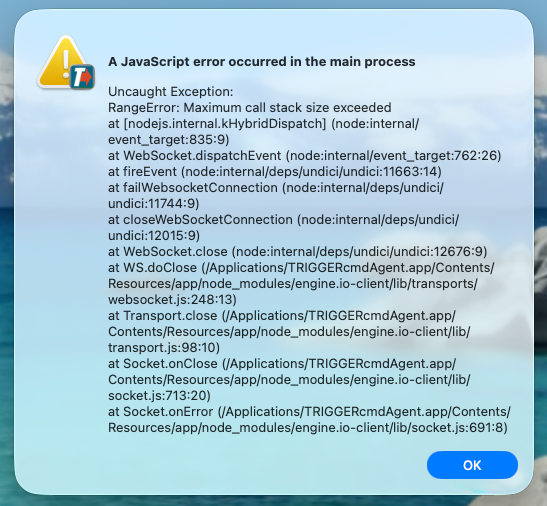
    @Simon thanks again for reporting the error. I'll see if I can reproduce it. It looks like it's in the Home Assistant integration. Sorry about the trouble. EDIT: I see from your screenshot that this.computer_name was null for some reason, so I added code to prevent a crash when that happens. I'll produce a new version soon. https://github.com/rvmey/TRIGGERcmd-Agent/commit/b54e988e7d251105bc6faa8c3fa6a5240644cbef EDIT2: Done - please upgrade to the current version (v1.0.52) to avoid that error in the future.
  • TriggerCMDAgent gives Errors when shutting down PC

    6
    0 Votes
    6 Posts
    2k Views
    RussR
    @Zaydel-Jiménez, please confirm, you're seeing the "A break point has been reached" error during Windows shutdown? If so, can you get a picture of that error like Furkan did, it might help me. Also, if it happens every time or only once in a while it would also help me to know that. I couldn't find the old 1.0.48 version but I don't think it will be any better in terms of that error than the latest version 1.0.50 because it contains the same code I thought would fix it. It's a tricky problem to fix because I can't reproduce it myself. FYI, these are the version notes: https://www.triggercmd.com/forum/topic/14/triggercmd-agent-versions
  • Can't Open Application

    2
    1
    0 Votes
    2 Posts
    869 Views
    RussR
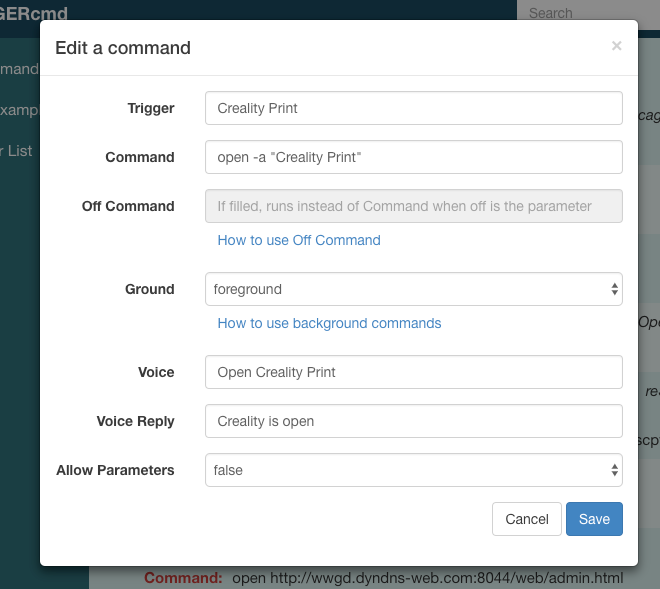
    @garym77, does that command work from a Terminal window? You should run it there first so you can see if the command gives an error. Also, you should make the voice word something like creality so you can say "Alexa, turn on creality" after you enable the Triggercmd Smart Home skill.
  • Monetizing Triggers?

    4
    0 Votes
    4 Posts
    1k Views
    RussR
    @Convaiyer, let's talk about it. I just sent you a PM.
  • app version for mac os yosemite

    3
    0 Votes
    3 Posts
    990 Views
    R
    @Russ unfortunaly no but thank you anyways. if you find and older one, ill give it a try [image: am0BhwWO_o.png]
  • Having issues with TC launching a batch

    2
    0 Votes
    2 Posts
    808 Views
    RussR
    @Strahan, I wonder if when the TC agent runs your batch file, the sql.exe file isn't in your PATH, so it doesn't run. The agent is probably running your batch file, which you've basically already proven with your loghealth.bat experiment. I like that you added another line to your laundryreset.bat file that writes something to a log file, but it's writing your log.txt file to the present working directory, which in the context of the TC agent is something like this: C:\Users\russ\AppData\Local\triggercmdagent\app-1.0.47\resources\app\src Assuming it is running your laundryreset script, you can probably fix this if you put the full path to your sql.exe file (and your log file) in the laundryreset.bat file, something like this: @echo off c:\full\path\sql.exe homecenter "delete from activeitems where action = 8192" /u service.triggercmd.homecenter /p (pwd) /h lioth.mydomain.com /l c:\logs\laundryreset.log echo From laundryreset.bat >> c:\logs\laundryreset.log dir >> c:\logs\laundryreset.log You'll want to remove the last 2 lines, especially the dir line, but I put it there because that can show you what the working directory is.
  • i want to cancel and request a refund

    4
    0 Votes
    4 Posts
    1k Views
    J
    Hi everyone, I’m new here and happy to join the forum. Looking forward to learning and sharing with you all.
  • Alexa problem

    4
    0 Votes
    4 Posts
    1k Views
    RussR
    @chrischickshow, that makes sense. I'll add something about that to the docs to warn people not to use the name of a room in their voice words..
  • TRIGGERcmd with Smarthings using Schema Cloud Connector

    smartthings
    5
    1 Votes
    5 Posts
    2k Views
    O
    @TheDreamer68!! It sounds like you're navigating the transition from the old Cloud Connected Device Integration to the new Schema Cloud Connector, which can be a bit tricky. Since the changeover is already happening, it’s best to follow the new path for creating integrations. If you’re stuck at step 14, it might be helpful to review any specific documentation or guides provided by SmartThings, especially around the Schema Cloud Connector setup.
  • TRIGGERcmd not starting at boot

    50
    1 Votes
    50 Posts
    21k Views
    Fabrizio HolsteinF
    @Russ yes, when I run manualy it start.
  • 1.0.47 not installing, no log

    4
    0 Votes
    4 Posts
    1k Views
    RussR
    @Xander, awesome. I'm glad that worked.
  • Powershell scripts no longer working

    6
    0 Votes
    6 Posts
    2k Views
    RussR
    @kellanist, great. That makes sense.
  • A JavaScript error occurred in the main process

    10
    1
    0 Votes
    10 Posts
    2k Views
    RussR
    @Tiago-Ivanov-Lavinas, great. Not sure what happened the first time, but renaming that folder is like a fresh agent install.
  • Install fails everytime, "JavaScript error in the main process.

    5
    1
    0 Votes
    5 Posts
    2k Views
    Tiago Ivanov LavinasT
    @Adam-S It worked. Thanks.
  • How to create a trigger

    3
    0 Votes
    3 Posts
    1k Views
    G
    @Russ Perfect! Thanks for your help!