TRIGGERcmd
    • Categories
    • Recent
    • Tags
    • Popular
    • Users
    • Groups
    • Search
    • Register
    • Login

    Launch a website

    Scheduled Pinned Locked Moved Windows
    10 Posts 6 Posters 11.0k Views 1 Watching
    Loading More Posts
    • Oldest to Newest
    • Newest to Oldest
    • Most Votes
    Reply
    • Reply as topic
    Log in to reply
    This topic has been deleted. Only users with topic management privileges can see it.
    • RussR Offline
      Russ
      last edited by

      {"trigger":"TRIGGERcmd site","command":"start http://www.triggercmd.com","ground":"foreground","voice":"site"},

      Russell VanderMey

      1 Reply Last reply Reply Quote 0
      • Lucas HortaleL Offline
        Lucas Hortale
        last edited by

        Can i lauch 2 or more websites in the same trigger?

        RussR 1 Reply Last reply Reply Quote 0
        • RussR Offline
          Russ @Lucas Hortale
          last edited by Russ

          @Lucas-Hortale, sure. You can run many commands if you create a script, and have your command run the script:

          Assuming you're on Windows you could make a c:\tools\websites.bat script with these contents:

          start https://www.triggercmd.com
          start https://www.google.com
          

          Then make this command: c:\tools\websites.bat

          Or, if you want to be lazy you could use a & between two commands like this:
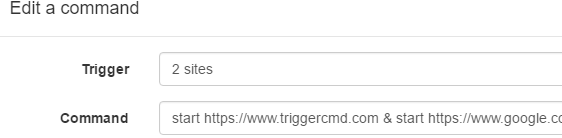
          500f4c96-469d-4f00-bc62-187002bbb1d4-image.png

          Russell VanderMey

          1 Reply Last reply Reply Quote 1
          • Julio MaradiagaJ Offline
            Julio Maradiaga
            last edited by

            Is it possible after the site is open to send a key stroke or command?

            BroleB 1 Reply Last reply Reply Quote 0
            • BroleB Offline
              Brole @Julio Maradiaga
              last edited by

              @Julio-Maradiaga check out autoIT

              1 Reply Last reply Reply Quote 0
              • Djaman BarbosaD Offline
                Djaman Barbosa
                last edited by

                Is it possible to open a webpage in a specific browser? And open the webpage in a new window?

                RussR 1 Reply Last reply Reply Quote 0
                • RussR Offline
                  Russ @Djaman Barbosa
                  last edited by Russ

                  @Djaman-Barbosa , if you want to launch Chrome or Chromium from with a new window, add --new-window like this:

                  "C:\Program Files (x86)\Google\Chrome\Application\chrome.exe" --new-window https://triggercmd.com
                  

                  This works with Edge too because it's Chromium based.

                  "C:\Program Files (x86)\Microsoft\Edge\Application\msedge.exe" --profile-directory=Default --new-window https://triggercmd.com
                  

                  I found that here:
                  https://peter.sh/experiments/chromium-command-line-switches/

                  Russell VanderMey

                  1 Reply Last reply Reply Quote 0
                  • S Offline
                    Smart Communities
                    last edited by

                    @Russ said in Launch a website:

                    https://peter.sh/experiments/chromium-command-line-switches/

                    Anyone know how to open a URL in the existing tab?

                    I have a URL running full screen. When using the start command it opens the URL but the old one is still running and I can hear it's audio.

                    RussR 1 Reply Last reply Reply Quote 0
                    • RussR Offline
                      Russ @Smart Communities
                      last edited by

                      @Smart-Communities, you could use a script that kills the browser then relaunches it with your new URL.

                      Russell VanderMey

                      S 1 Reply Last reply Reply Quote 0
                      • S Offline
                        Smart Communities @Russ
                        last edited by Smart Communities

                        @Russ That's what I ended up going with. One script & trigger to initiate and another one in the reverse. Thanks

                        1 Reply Last reply Reply Quote 0

                        Hello! It looks like you're interested in this conversation, but you don't have an account yet.

                        Getting fed up of having to scroll through the same posts each visit? When you register for an account, you'll always come back to exactly where you were before, and choose to be notified of new replies (either via email, or push notification). You'll also be able to save bookmarks and upvote posts to show your appreciation to other community members.

                        With your input, this post could be even better 💗

                        Register Login
                        • First post
                          Last post