TRIGGERcmd
    • Categories
    • Recent
    • Tags
    • Popular
    • Users
    • Groups
    • Search
    • Register
    • Login
    1. Home
    2. Recent
    Log in to post
    Load new posts
    • All Topics
    • New Topics
    • Watched Topics
    • Unreplied Topics
    • All categories
    • Tony SeabackT

      Cant Get Background Services to Work anymore

      General Discussion
      • • • Tony Seaback
      2
      0
      Votes
      2
      Posts
      852
      Views

      RussR

      @Tony-Seaback

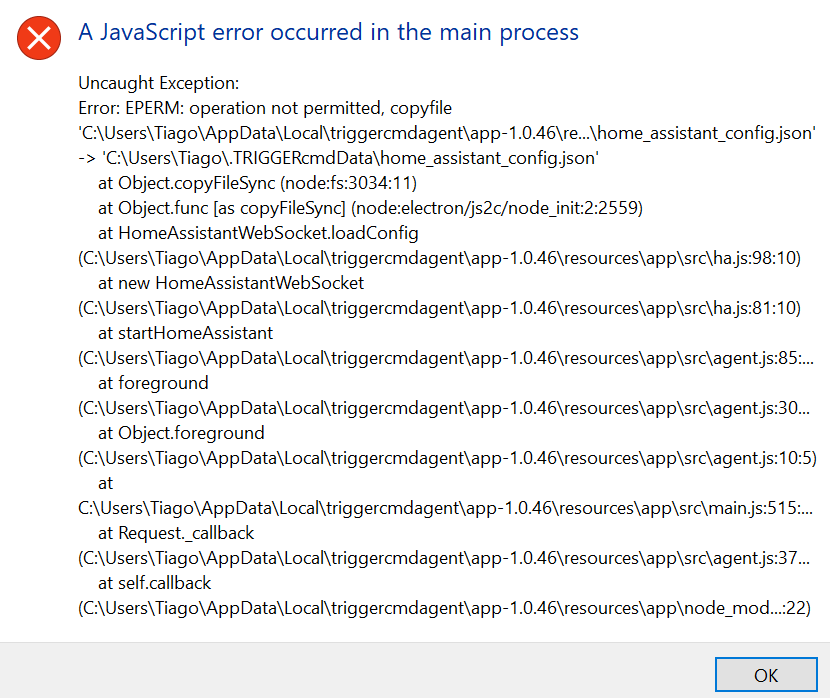
      I replied to you here, but basically I broke the background service in version 1.0.45. I just need to upgrade the node version and update the agent. I'll do that today. Stay tuned.

      https://www.triggercmd.com/forum/topic/3227/background-agent-commands-not-syncing-or-service-not-starting-please-assist-please-thank-you

      EDIT: Please upgrade to version 1.0.46. It should fix the windows background service. Sorry about the bug.

    • P

      Background service

      General Discussion
      • • • pixelatedscreen
      4
      0
      Votes
      4
      Posts
      1.5k
      Views

      RussR

      @Tony-Seaback, I replied to you here, but basically I broke the background service. I just need to upgrade the node version and update the agent. I'll do that today. Stay tuned.

      https://www.triggercmd.com/forum/topic/3227/background-agent-commands-not-syncing-or-service-not-starting-please-assist-please-thank-you

      EDIT: Please upgrade to version 1.0.46. It should fix the windows background service. Sorry about the bug.

    • Tony SeabackT

      background agent commands not syncing or service not starting please assist. PLEASE ! thank you

      General Discussion
      • • • Tony Seaback
      2
      0
      Votes
      2
      Posts
      871
      Views

      RussR

      @Tony-Seaback, I see the problem. I broke the background service in this latest version 1.0.45. I'll produce a new version today and get back to you.

      EDIT: Please upgrade to version 1.0.46. It should fix the windows background service. Sorry about the bug.

    • A

      Mouse Clicker on specific coordinate

      General Discussion
      • mouse clicker • • atroguer
      2
      0
      Votes
      2
      Posts
      1.1k
      Views

      THeVenueT

      @atroguer
      Yes if you setup a autohotkey and use the spy to get the x and y mouse coordinates u can

      In TriggerCMD gui
      “C:(path to autohotkey)” -play “C:(path to autohotkey script)”

      Use ChatGPT, to help you make the autohotkey script

      On desktop make a txt document
      Copy and paste AHK script from CHATGPT to document
      Save as
      MyScript.ahk
      File Type. ALL

    • S

      Triggercmd dont work after update.

      General Discussion
      • • • Santiago
      4
      0
      Votes
      4
      Posts
      925
      Views

      RussR

      Awesome @Santiago. Thanks for letting me know. Sorry about the trouble.

    • ?

      Can't add triggercmd to Google Home

      General Discussion
      • • • A Former User
      12
      0
      Votes
      12
      Posts
      5.5k
      Views

      RussR

      @Abel-Boby, do you see a list of voice commands on this page?

      You should have one voice command for each of your triggercmd commands that has a voice word, but only if the computer is your default computer or it has a voice word assigned to it. You can set your default computer on your profile page.

      In other words, these are the requirements for creating virtual devices in Google Home for your commands:

      Each command must have a voice word. Each computer must have a voice word, or it must be your default computer.
    • H

      CMD commands no longer work

      General Discussion
      • • • Hugoboss
      3
      0
      Votes
      3
      Posts
      713
      Views

      RussR

      @Hugoboss, sorry, I missed your original post so I'm glad you followed up.

      For the 2 examples that won't run in the triggercmd agent, you said they won't run now, but they ran fine yesterday. Did you upgrade the agent between when they ran and when they didn't?

      Do they run fine if you run them manually from a cmd prompt?

      Please try putting this one in a .bat script like this, and run the .bat script as your command instead:

      cd /d "C:\Users\username\AppData\Local\Programs\UiPath\Studio" UiRobot.exe execute --process "Discord.Join.Server"

      Please test the .bat script manually too.

      Also could you share the contents of this script, and the output when you run it manually?

      "C:\Applications\UiPath\Robot\Starta Spel\Starta Spel\Start Game.bat"
    • Matheus de SouzaM

      TriggerCmd installed as normal, but not running my commands

      General Discussion
      • • • Matheus de Souza
      2
      0
      Votes
      2
      Posts
      1.0k
      Views

      RussR

      @Matheus-de-Souza, it's showing "Command ran with error code 1" because your command is failing. Commands return error code 0 when they succeed.

      To troubleshoot, it would help to get the output of your command. You should be able to see the error if you run it manually from a cmd prompt.

      To open a cmd prompt, you can hold the Windows key and press R, then type cmd and press enter.
      9a53f208-d7ed-45ee-b14b-dec1f499230d-image.png

      If the command runs fine in the cmd prompt but it fails when you run it with the TRIGGERcmd agent, you should copy/paste your command into a .bat file and redirect the command's output to a log file, and change your triggercmd command to run the .bat file. That way you can look in the log file to see the error.

      For example, you could create a script.bat file with these contents:

      yourcommand > c:\logs\script.log 2>&1

      This part is to make stderr output go into your log, not just stdout: 2>&1

      Notice I put the log file in a c:\logs directory. You'll need to create that directory first. Windows won't let you write to a file in c:\ by default.


    • L

      Multiple users / profiles on windows 10

      General Discussion
      • • • lynwoodjweaver
      3
      0
      Votes
      3
      Posts
      871
      Views

      L

      @Russ

      THANKS! Looks like that will work for me (but I bet you knew that 🙂 )!

    • I

      Installer wont start

      General Discussion
      • • • iswasdoes
      9
      0
      Votes
      9
      Posts
      1.7k
      Views

      RussR

      @Rob-Turing, I don't know. I use Windows Defender and I wasn't able to reproduce the issue.

    • Jaqueline ChinagliaJ

      Turning PC on (without WoL)

      General Discussion
      • • • Jaqueline Chinaglia
      2
      0
      Votes
      2
      Posts
      1.3k
      Views

      XanderX

      @Greg-Larsen If you want to add hardware, a $5 smart plug (Aliexpress) would do the job of your $25 (+hub) suggestion. Set the BIOS to turn on when power is provided and you're done.

      I have my three monitors on one smart plug so when I say Good Morning to Alexa, she fires them up. I don't really need WoL so pressing the button is fine with me.

    • C

      Issue when passing URL as parameter

      General Discussion
      • • • Caio Kenup
      3
      0
      Votes
      3
      Posts
      821
      Views

      Felipe FanchiniF

      @Caio-Kenup I solved this problem including ^ just before &. So, as an example, I changed

      start www.youtube.com/watch?v=dQw4w9WgXcQ&autoplay=1

      to

      start www.youtube.com/watch?v=dQw4w9WgXcQ^&autoplay=1

      I believe that it will works to everybody that has a URL with character "&"

    • T

      Alexa stops midway when reading long sentences

      General Discussion
      • • • tigor
      6
      0
      Votes
      6
      Posts
      1.1k
      Views

      RussR

      @tigor, great. I'm glad it's working.

    • D

      Need Advice on Setting Up Custom Commands for Multiple Devices

      General Discussion
      • • • davidcook
      2
      0
      Votes
      2
      Posts
      925
      Views

      RussR

      @davidcook, let's focus on making commands sync with your Raspberry Pi first.

      Did you use these instructions when you setup your Raspberry Pi?

      If you install the background service with this command:

      /usr/share/triggercmdagent/app/src/installdaemon.sh

      ... it runs as root, and reads /root/.TRIGGERcmdData/commands.json, and it will only sync your background commands (ground = background) not foreground commands.

      If you're editing your /home/pi/.TRIGGERcmdData/commands.json that could be the problem.

      Please show me the output of this command: systemctl status triggercmdagent
      I'd like to confirm it's running.

      Also, do you see the your Raspberry Pi listed on your "Your Computers" page? If not, maybe it didn't create a computer because you're not subscribed. You can only have one computer if you're not subscribed.

    • Gustavo RiosG

      Sair do Modo suspensão

      General Discussion
      • • • Gustavo Rios
      2
      0
      Votes
      2
      Posts
      644
      Views

      RussR

      @Gustavo-Rios, you can't run any commands on a computer that's suspended because it's not connected to the Internet.

      You might be able to wake it up from a separate computer on your network though.

    • T

      Alexa keeps saying "no result" when using the conversational skill

      General Discussion
      • • • tigor
      4
      0
      Votes
      4
      Posts
      844
      Views

      RussR

      Thanks @tigor

    • J

      Alexa Not Recognizing my Trigger Word

      General Discussion
      • • • jett
      4
      0
      Votes
      4
      Posts
      871
      Views

      RussR

      @jett, no there's no lag - the changes should show up immediately. I think you're running the foreground agent, so make sure your commands are foreground commands. They'll disapear if you make them background commands and you're not running the background agent.

      Thanks for telling me about the Google Sign-in button not working on that phone. I just tried it on mine and it worked. I'll research that phone, but in the meantime, did you get it logged in using one of the other methods like a password or a pair code?

    • Adroit Tester2A

      Background Commands not running.

      General Discussion
      • • • Adroit Tester2
      3
      0
      Votes
      3
      Posts
      893
      Views

      RussR

      @Adroit-Tester2, the background agent on Windows is meant to run commands that don't do anything with the GUI, like this reboot command:

      shutdown /r /t 1

      One benefit is the TRIGGERcmdAgent Windows service runs before you login, so you could reboot the PC even if it's not logged in.

      Background commands run in the context of the TRIGGERcmdAgent Windows service that runs as Local System, which can be of benefit too because it has full access to your PC and it bypasses UAC.

      Here's a test command you use try in background mode to verify it's working:

      echo testing > c:\folder\log.txt

      I just tried that and it produced the log.txt file when I ran it in background mode.

      If you want to see the processes run, I suggest you leave them in foreground mode. You could still lock the PC after logging it on if you don't want the developers to mess with them.

    • Avik BasuA

      TriggerCMD down?

      General Discussion
      • • • Avik Basu
      12
      1
      Votes
      12
      Posts
      2.2k
      Views

      Mark HollisM

      @Russ yes it was down for about 2 hours yesterday, now work correctly 🙂

    • T

      para instalar me pide tokkern y ese tokken no lo encuentro en cuenta

      General Discussion
      • • • tommy0981
      2
      0
      Votes
      2
      Posts
      599
      Views

      RussR

      @tommy0981, the token is on the Instructions page and on your Profile page.