TRIGGERcmd
    • Categories
    • Recent
    • Tags
    • Popular
    • Users
    • Groups
    • Search
    • Register
    • Login

    bat file not triggering...
    Scheduled Pinned Locked Moved Windows
    16 Posts 3 Posters 2.4k Views
    Loading More Posts
    • Oldest to Newest
    • Newest to Oldest
    • Most Votes
    Reply
    • Reply as topic
    Log in to reply
    This topic has been deleted. Only users with topic management privileges can see it.
    • RussR Offline
      Russ @drywsef
      last edited by

      @drywsef, what happens in you open a cmd prompt, and run:

      "c:\program files\dynamount\dynamount.exe"
      

      Also, does it work if you run the command from this green play button in the GUI editor?
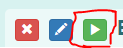
      143ce6db-e77e-451e-828f-29ec6810b2ae-image.png

      Also assuming that works, does it work from the green Trigger button on the website?

      6231be88-164e-40da-b83a-6fd0d59ce440-image.png

      If all that works, then I assume the only problem is Alexa triggering, and we can work on that after you reply.

      Russell VanderMey

      D 1 Reply Last reply Reply Quote 0
      • D Offline
        drywsef @Russ
        last edited by

        @russ running the line in command prompt works, but clicking the “play button” in TriggerCMD does not.

        tuicemenT 1 Reply Last reply Reply Quote 0
        • tuicemenT Offline
          tuicemen @drywsef
          last edited by

          @drywsef, can you post the line from your commands.json file as well as line before and after. I suspect the format maybe the issue.

          D 1 Reply Last reply Reply Quote 0
          • D Offline
            drywsef @tuicemen
            last edited by

            @tuicemen do you mean the lines from the text editor?
            Here’s what I have from that section:
            {
            "trigger": "Dynamount",
            "command": "”C:\Program Files\DynaMount\dynamount.exe”",
            "offCommand": "",
            "ground": "foreground",
            "voice": "Dynamount",
            "voiceReply": "Dynamount Starting",
            "allowParams": "false"
            }

            tuicemenT 2 Replies Last reply Reply Quote 0
            • tuicemenT Offline
              tuicemen @drywsef
              last edited by tuicemen

              @drywsef I see double quotes in your command and a space.
              I believe it should be

              "command":"C:\Program Files\DynaMount\dynamount.exe",
              
              D 1 Reply Last reply Reply Quote 0
              • D Offline
                drywsef @tuicemen
                last edited by

                @tuicemen thanks for the suggestion. Unfortunately, deleting the additional quotations and space did not work.

                tuicemenT 1 Reply Last reply Reply Quote 0
                • tuicemenT Offline
                  tuicemen @drywsef
                  last edited by

                  @drywsef Ok I'm unfamiliar with TRIGGERcmd in Windows I don't have a offCommand but thought that was only required if your allowParams was set to true.

                  If this is not the last line the the commands.json file it needs a Comma at the end of the line after the }

                  1 Reply Last reply Reply Quote 0
                  • tuicemenT Offline
                    tuicemen @drywsef
                    last edited by tuicemen

                    @drywsef it looks like you have other spaces in your call
                    I believe your line should look like this:

                    {"trigger":"Dynamount","command":"C:\Program Files\DynaMount\dynamount.exe","offCommand":"","ground":"foreground","voice":"Dynamount","voiceReply":"Dynamount Starting","allowParams":"false"}
                    
                    D 1 Reply Last reply Reply Quote 0
                    • D Offline
                      drywsef @tuicemen
                      last edited by drywsef

                      @tuicemen Thanks for writing up that line.
                      Unfortunately, it still does not work. Why would additional spaces be added if I am using the GUI editor? I have to say, this seems like a lot of troubleshooting for a very simple command. I wonder what the disconnect is.

                      tuicemenT RussR 2 Replies Last reply Reply Quote 0
                      • tuicemenT Offline
                        tuicemen @drywsef
                        last edited by

                        @drywsef I have no experience with the GUI editor you may need to look at the whole commands.json file.
                        Is this the first command you've added?

                        1 Reply Last reply Reply Quote 0
                        • RussR Offline
                          Russ @drywsef
                          last edited by

                          @drywsef, I think I see the problem. Notice the quotes around your command are crooked:
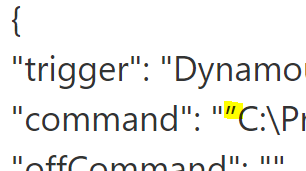
                          59669ecf-73cd-433a-a582-396b86984213-image.png

                          I think those are called "curly" quotes. Anyway, just delete those and re-type them in the GUI editor and it should work. I suspect you copied that path from Word or some tool that supports curly quotes.

                          Russell VanderMey

                          D 1 Reply Last reply Reply Quote 0
                          • D Offline
                            drywsef @Russ
                            last edited by

                            @Russ Thanks so much! That did the trick.

                            1 Reply Last reply Reply Quote 1

                            Hello! It looks like you're interested in this conversation, but you don't have an account yet.

                            Getting fed up of having to scroll through the same posts each visit? When you register for an account, you'll always come back to exactly where you were before, and choose to be notified of new replies (either via email, or push notification). You'll also be able to save bookmarks and upvote posts to show your appreciation to other community members.

                            With your input, this post could be even better 💗

                            Register Login
                            • First post
                              Last post