how do I open a shortcut file?
-
For days I'm trying to open a "shortcut" extension file, but I can't, can someone help me?
-
of course, with Alexa
-
Rather than us making a hundred wild guesses, why don't you tell us what you've already tried?
-
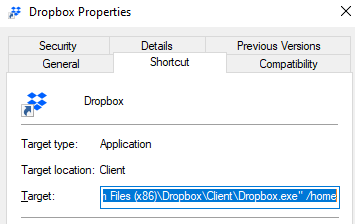
@Xander Friend, now that I saw your answer, but I finally got it. I just picked up the destination address in properties of the shortcut I created. Thanks.
-
@Igor-Penha How exactly did you get it to work. Trying to do something with a shortcut too and I am having issues.
-
@Noah-Nauman, generally you can use @Igor-Penha's solution and just copy the target from the shortcut and make that your command.
Or, if you still want to open an actual shortcut file (.lnk file), you can use the start command, like this:
start C:\shortcuts\test.lnk




Hello! It looks like you're interested in this conversation, but you don't have an account yet.
Getting fed up of having to scroll through the same posts each visit? When you register for an account, you'll always come back to exactly where you were before, and choose to be notified of new replies (either via email, or push notification). You'll also be able to save bookmarks and upvote posts to show your appreciation to other community members.
With your input, this post could be even better 💗
Register Login