Shutdown function
-
Hello Russ, sorry to bother you, but is the windows shutdown function working on Alexa? I haven't been able to use it for a few days, if everything is normal, I'm sorry I was in doubt
-
@Robertofilho, I just tested Alexa and it's working for me. Are other commands working for you?
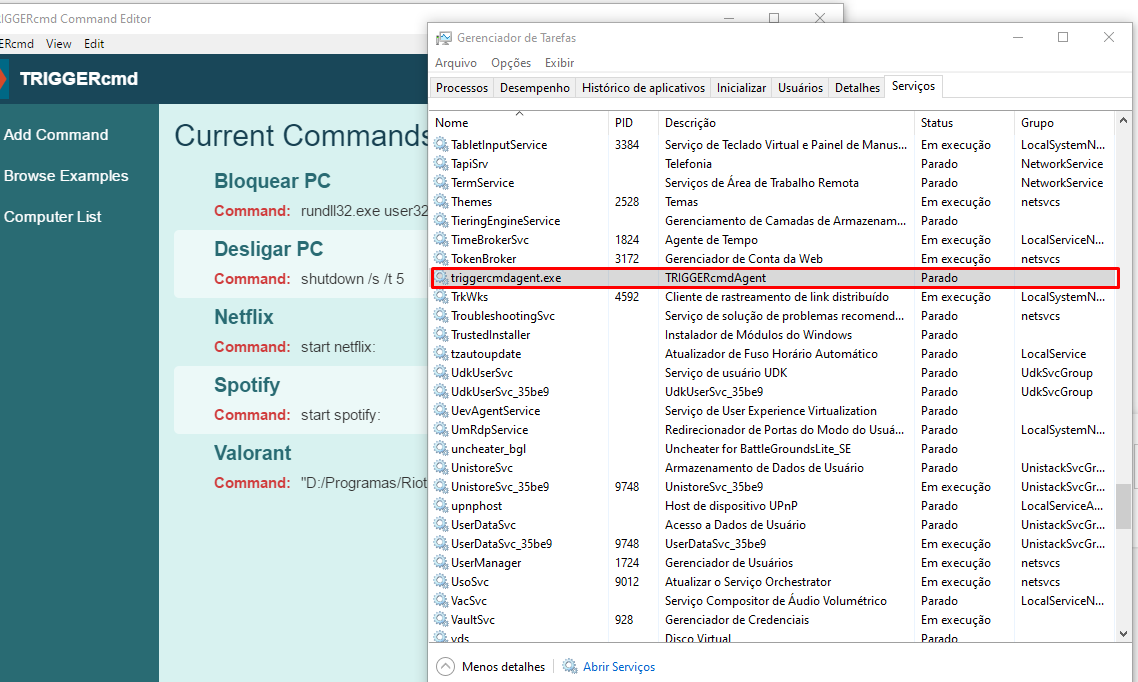
The shutdown command requires the background service to be running. On Windows you can search for services then scroll down to TRIGGERcmdAgent.

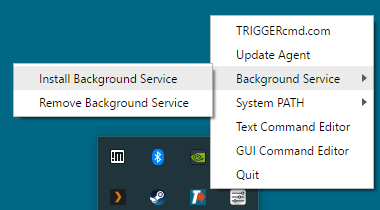
If you don't see it there, you haven't installed it yet. You can install it by right-clicking the TRIGGERcmd icon in your tray, then click Background Service, Install Background Service.
-
None of the skills are working, shutting down, blocking ... I reinstalled the program but it remains the same, I have already installed the Background Service and nothing ... the service is "stopped" is it normal Rus?
-
@Robertofilho, I think something is wrong in your TRIGGERcmd agent's configuration. Uninstalling and re-installing doesn't delete the configuration. Please try this:
- Delete or rename your .TRIGGERcmdData folder in C:\Users\(your user).
- Delete your computer from your account.
- Close and re-run the TRIGGERcmd Agent.
- It will prompt you again for the token. Copy/paste that from the Instructions page in your account.
After that, you should be able to run commands again, and if you restart the background service it should stay running and you can run background commands.


Hello! It looks like you're interested in this conversation, but you don't have an account yet.
Getting fed up of having to scroll through the same posts each visit? When you register for an account, you'll always come back to exactly where you were before, and choose to be notified of new replies (either via email, or push notification). You'll also be able to save bookmarks and upvote posts to show your appreciation to other community members.
With your input, this post could be even better 💗
Register Login