Boot on Arch
-
hi , running arch and I was able to set up my commands , but how i use to run on boot to make wakeonlan?
-
@Tiago-Mártires, I see arch linux uses systemd, so you could create a unit file with this path:
You could create a unit file with this name:: /etc/systemd/system/triggercmdagent.service
With these contents:[Unit] Description=TRIGGERcmd Agent [Service] Type=simple ExecStart=/usr/bin/env node /usr/share/triggercmdagent/app/src/daemon.js --run /root/.TRIGGERcmdData User=root Restart=always [Install] WantedBy=default.targetThen reload the systemd config with this command:
systemctl daemon-reloadThen start the background service with this command:
systemctl start triggercmdagentAnd check its status with this command:
systemctl status triggercmdagent -
Hi @Russ , thank for the answer, but did work

I run your instructions to install , i manager to setup some triggers and run it . but it doesn't happen anything ẃith your instructions to load on boot.
1 - my daemon.js is not on /usr/share/triggercmdagent/app/src/. is on /home/tiago/Modelos/TRIGGERcmd-Agent/src/daemon.js
2 - if i replace the patch fot the one where i have daemon.js when i do systemctl status triggercmdagent , is give an error :[tiago@Kodi ~]$ sudo systemctl status triggercmdagent
[sudo] senha para tiago:
● triggercmdagent.service - TRIGGERcmd Agent
Loaded: loaded (/etc/systemd/system/triggercmdagent.service; disabled; vendor preset: disabled)
Active: active (running) since Wed 2020-02-26 03:13:53 GMT; 2min 37s ago
Main PID: 6885 (node)
Tasks: 11 (limit: 38415)
Memory: 28.8M
CGroup: /system.slice/triggercmdagent.service
└─6885 node /home/tiago/Modelos/TRIGGERcmd-Agent/src/daemon.js --run /root/.TRIGGERcmdDatafev 26 03:13:54 Kodi env[6885]: ___/ For help, see: http://bit.ly/2q0QDpf
fev 26 03:13:54 Kodi env[6885]: (using sails.io.js node SDK @v1.2.1)
fev 26 03:13:54 Kodi env[6885]: Connected at: Wed Feb 26 2020 03:13:54 GMT+0000 (Hora de Greenwich)
fev 26 03:13:54 Kodi env[6885]: Initiated command removals
fev 26 03:13:54 Kodi env[6885]: Initiated command adds
fev 26 03:13:54 Kodi env[6885]: { message: 'Subscribed to 5e54ffba256e4d0019bbcef2!' }
fev 26 03:13:54 Kodi env[6885]: { message: 'Subscribed to 5e54ffba256e4d0019bbcef2!' }
fev 26 03:13:55 Kodi env[6885]: Failed while trying add a trigger.
fev 26 03:13:55 Kodi env[6885]: Failed while trying add a trigger.
fev 26 03:13:55 Kodi env[6885]: Failed while trying add a trigger.
[tiago@Kodi ~]$what is happening to fail add a trigger???
-
This post is deleted! -
@Tiago-Mártires, I think I see the problem. It's trying to write triggers to a computer with ID 5e54ffba256e4d0019bbcef2, but that computer doesn't exist anymore. I suspect you deleted it.
I suggest you try this:
- Login as root (sudo su -)
- Backup your /root/.TRIGGERcmdData/commands.json file
- Delete your /root/.TRIGGERcmdData folder
- /home/tiago/Modelos/TRIGGERcmd-Agent/src/agent.js --console
- Enter your token
- Restart your triggercmdagent daemon
- Test again
Now you'll have a new computer in your account that will match the ID in your /root/.TRIGGERcmdData/computerid.cfg file.
-
HI @Russ , sorry to tell you but didm t work....this was what i did.
1- delete all the folders /.TRIGGERcmdData in root and home.2- login as rooter and run the command , put the token to connect. so far so good , i was able to connect and trigger some commands .
3- create a desktop entry on systemd :
[Unit]
Description=TRIGGERcmd Agent*[Service]
Type=simple
ExecStart=/usr/bin/env node /home/tiago/Modelos/TRIGGERcmd-Agent/src/deamon.js --run root/.TRIGGERcmdData
User=root
Restart=always[Install]
WantedBy=default.target*I put the right patch to deamon.js because this /usr/share/triggercmdagent/app/src/daemon.js doesnt exist
then i save on /etc/systemd/system4- sudo systemctl daemon-reload
sudo systemctl start triggercmdagent
sudo systemctl status triggercmdagent
and is give an error :● triggercmdagent.service - TRIGGERcmd Agent
Loaded: loaded (/etc/systemd/system/triggercmdagent.service; enabled; vendor preset: disabled)
Active: failed (Result: exit-code) since Thu 2020-02-27 13:41:39 GMT; 4s ago
Process: 2246 ExecStart=/usr/bin/env node /home/tiago/Modelos/TRIGGERcmd-Agent/src/deamon.js --run root/.TRIGGERcmdData (code=exited, status=1/FAILURE)
Main PID: 2246 (code=exited, status=1/FAILURE)fev 27 13:41:39 kodi systemd[1]: triggercmdagent.service: Scheduled restart job, restart counter is at 5.
fev 27 13:41:39 kodi systemd[1]: Stopped TRIGGERcmd Agent.
fev 27 13:41:39 kodi systemd[1]: triggercmdagent.service: Start request repeated too quickly.
fev 27 13:41:39 kodi systemd[1]: triggercmdagent.service: Failed with result 'exit-code'.
fev 27 13:41:39 kodi systemd[1]: Failed to start TRIGGERcmd Agent.Help Please, i really like to put this working
maybe will be easy if you do a tutorial about arch from the install to the daemon , i do not know what to do anymore

What i did wrong ? now the account that will match the ID
-
@Tiago-Mártires, good idea. What specific arch Linux distro is it? I'll install it on a VM and try it myself.
Russell VanderMey
-
@Russ , I am using pure arch
you can download from : https://www.archlinux.org/download/I realy appreciate your help , but will not be easier if you create a AUR on the package manager do do it automatically?
i do not have a problem in work with the terminal and edit files , even if doesn t have Gui , you can creat a script for arch to do it automatically...is just a suggestion

will wait for news
thank you
-
@Russ , if you do not want lost to mucj time install arch , use this scrip:
Archfi Script Launch
wget archfi.sf.net/archfi
sh archfi
-
@Tiago-Mártires, thanks for the script - it helps a lot. It's quite a process to get arch installed. I'm curious, why do you use it?
-
@Russ , i use arch because i just have to install once as a rolling release , then is just maintain the system . is easy to use , just have what I want installed , and arch has a really good wiki , that's make your live easier .
is a pain in the ass have to install the system every time come out a new version....like debian or fedora or even ubuntu.
if you have a good backup like timeshift in place , and a package like downgrade if you have a bad update , you just need to roll back the system or downgrade the package... i am using arch and the only problem i had so far was when i format one of my drives in ntfs and i forgot to change the UUID on the fstab lol , system didn t boot i had to boot whit a pen drive and change the fstab to boot again. lol
I do not use a specific software like photoshop to use windows, and i do not like how Microsoft make us use what they want , is my pc , so i choose what i want on my machine, and virus is other nightmare.... you should know that
if you like linux , you should give a try
and this scrip , you will make a proper arch installation,like archwiki tells you to do, but save you to time write all the commands , and you can not miss a step lol is very easy miss a step .....
i am testing other linux bases on my http machine to use kodi , if you start on arch and like, is hard to get out it
-
@Tiago-Mártires, I got it working. Here's an article with the step-by-step instructions:
https://www.triggercmd.com/forum/topic/627/arch-linux-install
-
@Russ i don t understand what i did wrong... I will give another try later this week...
And you could trigger the command after the boot ?
-
@Tiago-Mártires, actually no, I forgot this command:
systemctl enable triggercmdagentI added that to the instructions, so now the triggercmdagent background service is enabled to startup during boot.
I changed the reboot background command to reboot (the correct command on Arch Linux), and when I triggered that command it rebooted.
FYI, it didn't work for me at first because I had a path wrong, so one thing that helped me troubleshoot is this command:
sudo journalctl -u triggercmdagentThen press SHIFT-G to jump to the bottom, and you can see any errors the background agent is producing.
Also, fyi, I noticed I got an email saying my command didn't run even though it rebooted. Apparently it started the reboot process before it got a chance to reply back to the server that it ran the command.
-
It works @Russ thank you so much , i will post a video on some groups with i am on facebook when i have this setup , and i will buy a licence later on , not because i need but to help the development
-
@Tiago-Mártires, awesome, thank you!
-
hi, i also use arch linux (manjaro in my case) and i followed all the steps exactly as presented. Triggercmd keeps running in the background but when it's triggered, it doesn't perform the action (at least not in the foreground). I can see the logs in systemctl showing that it was triggered, but the action does not happen (open a program for example).
Entered I propose a rather simple solution. I'm using a dropdown terminal (in my case guake) to run the triggercmd in the foreground, but in a way that it's hidden.
For this solution to work completely, you need to create a script that executes this command:
guake -e "node ~/TRIGGERcmd-Agent/src/agent.js --console" -r "triggercmd" &the -r flag is just to rename the guake tab.
add a
sleep 20a line before the command to ensure that it will run with some delay and avoid any possible problems.The script looks like this:
#!/bin/bash
echo "Iniciando..."
sleep 20
guake -e "node ~/TRIGGERcmd-Agent/src/agent.js --console" -r "triggercmd" &
then you can create a
triggercmd-agent.desktopfile in.config/autostart.inside the file inform this:
[Desktop Entry]
Encoding=UTF-8
Version=0.9.4
Type=Application
Name=TriggerCMD Agent
Comment=initialize triggercmd agent
Exec=sh -c "~/<path_to_script>/<script>.sh"
OnlyShowIn=XFCE;
RunHook=0
StartupNotify=true
Terminal=false
hidden=false
done that, when logging in, an instance of guake will be started that executes the command to open the triggercmd, all in a hidden way.
The main reason for this solution is that, at least for me, running triggercmd in the background doesn't work.
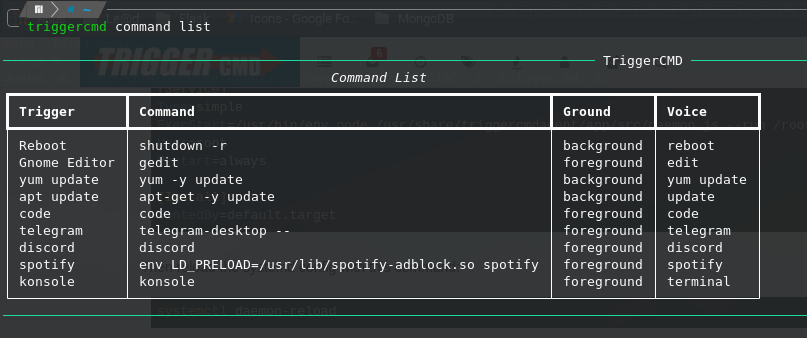
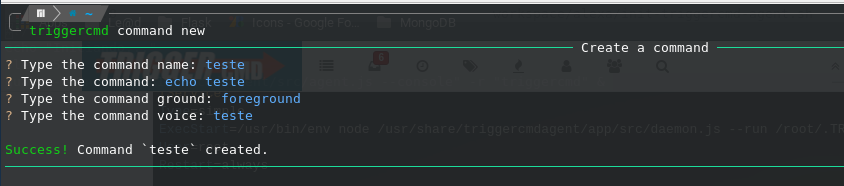
I'm also developing a CLI to create, edit, list and remove commands in a friendlier way, since in arch linux it's not yet possible to run the triggercmd graphical interface.
triggercmd command list
triggercmd command new
-
@Gustavo-Soares, your solution makes sense. Also that TUI (text user interface) is really cool. I hope you publish that.
-
@Russ thank you very much for the feedback, I will publish it, it's already on my GitHub (see here). This week I will document the solution and publish it on PyPI. Your TriggerCMD is amazing, congratulations!
-
Thank you @Gustavo-Soares



Hello! It looks like you're interested in this conversation, but you don't have an account yet.
Getting fed up of having to scroll through the same posts each visit? When you register for an account, you'll always come back to exactly where you were before, and choose to be notified of new replies (either via email, or push notification). You'll also be able to save bookmarks and upvote posts to show your appreciation to other community members.
With your input, this post could be even better 💗
Register Login