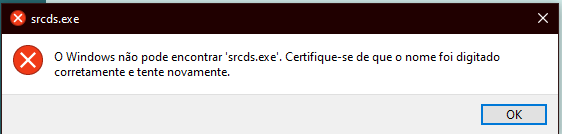
• I can't open a server of mine which is a .bat file

    2
    1
    0 Votes
    2 Posts
    399 Views
    XanderX
    @username-here Without seeing any of the actual batch file, I'd guess that you need to include the path to the .exe in the command. If "srcds.exe" isn't part of the Windows path variable, you need to specify exactly where it is to be found.
  • open a windows app Without "uap:Protocol Name"

    3
    0 Votes
    3 Posts
    443 Views
    danyrdD
    thanks a lot for your great help, I really appreciate it.
  • Como executar o pause?

    3
    2
    0 Votes
    3 Posts
    2k Views
    Ricardo PereiraR
    Funcionou, obrigado. Praticamente todos programas funcionaram, menos com o media player classic, sabe o por que?
  • Google home don't wan't use my commands

    6
    0 Votes
    6 Posts
    835 Views
    RussR
    @Rafa-B-L, awesome. Thank you!
  • Google Home: Couldn't update the setting. Check your connection.

    4
    0 Votes
    4 Posts
    414 Views
    RussR
    @Justin-Brett, thanks for that screenshot that helps a lot. I googled and found this. Can you try clearing the linked account using the steps here? https://community.hubitat.com/t/solved-connect-google-home/19912
  • How to copy commands to put it in other computer?

    2
    0 Votes
    2 Posts
    665 Views
    RussR
    @Arturo-Gracia-Maqueda, your commands are stored in the commands.json file. On Windows, that's C:\Users\(your user)\.TRIGGERcmdData\commands.json You can also use the "Text Command Editor" to edit or copy/paste the text out of that file. When you say the token doesn't work, what do you mean? Usually when you re-install the agent it will re-use your token from the previous install. That's in this file on Windows: C:\Users\(your user)\.TRIGGERcmdData\token.tkn
  • TriggerCMD site not available in Italian

    2
    0 Votes
    2 Posts
    359 Views
    RussR
    @TheConfax, thanks for reporting this problem. Now I need to figure out how to reproduce the problem. If you have any ideas, please let me know. I have a Chrome extension for switching my browser's language. When I set it to Italian the site redirects me from www.triggercmd.com to www.triggercmd.com/it, which is correct. I'll do some research. EDIT: I was able to see a problem when I used Edge and set Italian as my preferred language. I fixed it. Thank you @TheConfax!
  • don't run triggercmdagent service

    20
    2
    0 Votes
    20 Posts
    6k Views
    RussR
    @kellanist, does that script only work if you right-click and run it as administrator? If so, you could try running the TRIGGERcmd agent as administrator. By default, the TRIGGERcmd agent will not run your commands as admin, but if you run the agent as admin, then the commands it runs would run with the elevated tokens too. You could also turn off UAC, but of course that has security implications.
  • Aplicación de Alexa, no detecta dispositivos.

    4
    0 Votes
    4 Posts
    930 Views
    RussR
    @Iván-Espíndola, thank you. If you see any incorrect spanish text on the website or on the Alexa skill description, please tell me how I could correct it.
  • Best price for other countries

    4
    1 Votes
    4 Posts
    2k Views
    W
    I also support the idea given by Paulo, here in Brazil the price of the subscription is very expensive for us Brazilians. I admire your work too much, but we have to go out of our way to keep the signature.
  • CMD trigger is not actively licensed

    4
    1
    0 Votes
    4 Posts
    795 Views
    W
    It's true, I didn't remember doing that. Thanks. Pay special attention to what I mentioned in the post about the value of the subscription for Brazilians: D
  • Simple IFTTT - TriggerCMD connection

    10
    0 Votes
    10 Posts
    2k Views
    RussR
    @Ícaro-Paiv, as of today you'll also see the commands on "Other User's Computers" in the IFTTT list if you use the official TRIGGERcmd IFTTT integration.
  • Trigger CMD not working for me!

    6
    0 Votes
    6 Posts
    829 Views
    RussR
    @Victor-0, I see that @Albertino-Júnior answered how to open a specific Steam game here. You have to find the steam game ID, then you can create a command like this to run the game: "C:\Program Files (x86)\Steam\steam.exe" "steam://rungameid/1531290" You can find the steam game ID by looking it up on the Steam store, then you'll see the ID in the URL. https://store.steampowered.com/app/1531290/Nebuli/ BTW, I wrote that Nebuli game with a friend of mine. It's VR only though.
  • 0 Votes
    5 Posts
    1k Views
    H
    @Russ Good morning, thanks for the return. The script that I put on the first line, works perfectly. It just turns off the lights on my keyboard and mouse. Can you help me?
  • Where are the actual installation instructions?

    4
    0 Votes
    4 Posts
    1k Views
    RussR
    @Ron-Parker, I'm glad you figured it out, but you're right, I see I have Ubuntu Linux instructions for the .deb file install, but none for installing the .rpm on Redhat/Centos/Fedora type Linux OS's. I'll correct that soon. Thank you for pointing this out. All I found were these instructions for upgrading it. I think I should have an index page that lists each OS with links to installation instructions, similar to the trigger methods page to make them easy to find.
  • It works just perfect, but Brazilian Portuguese sentences are weird

    9
    0 Votes
    9 Posts
    2k Views
    RussR
    @Ícaro-Paiva, that's only for the non-SmartHome skill.
  • Changing e-mailaddress

    3
    0 Votes
    3 Posts
    331 Views
    B
    Thanks @Russ, I'll do that!
  • Terramaster NAS

    3
    0 Votes
    3 Posts
    1k Views
    Seth KazzimS
    @Russ Thanks! I've just got the hang of SSH so I'm happy to be building on a recently acquired skillset. I will return to update you on my progress.
  • Feature request - Name device during registration

    feature request
    3
    0 Votes
    3 Posts
    1k Views
    S
    @Russ Awesome. Thanks and loving the system. It solves so many issues for us.
  • Connect screen on tv

    2
    0 Votes
    2 Posts
    609 Views
    F
    Dunno if you still need this answer but for future reference (and in case others find this page) here are the commands for changing screen: Project flyout- %windir%\System32\DisplaySwitch.exe PC screen only- %windir%\System32\DisplaySwitch.exe /internal Duplicate- %windir%\System32\DisplaySwitch.exe /clone Extend- %windir%\System32\DisplaySwitch.exe /extend Second screen only- %windir%\System32\DisplaySwitch.exe /external