I need help to "javascript error occurred in the main process"
-
I can't install the app, I always get the javascript error, I don't have antivirus on the PC, I've reinstalled it several times but it doesn't come out, any tips on what to do?
-
This post is deleted! -
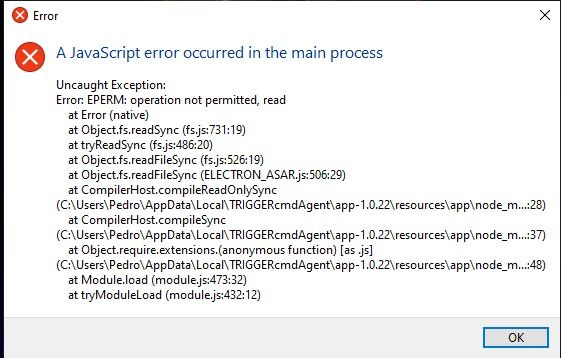 link url)
 -
@NaNo-Net, do you have 32bit Windows by chance? If so, that's probably the problem.
https://helpdeskgeek.com/windows-10/4-ways-to-tell-if-youre-using-32-bit-or-64-bit-windows/
-
@Russ no, 64 bits really :c
-
@NaNo-Net, hmm. You get that every time you just run the installer?
You could try deleting the c:\users\pedro.TRIGGERcmdData folder, but it might not exist if it didn't get that far.
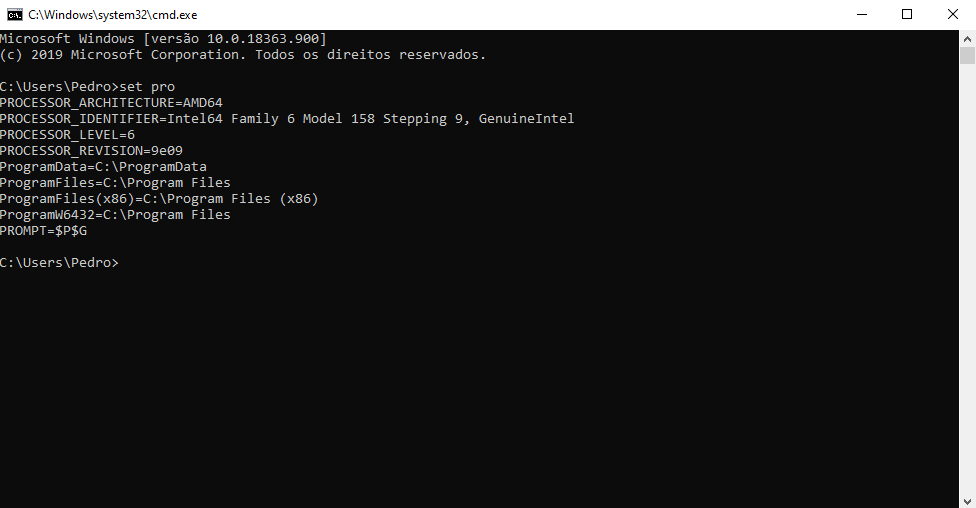
Can you send me the output of that set pro command?
-
@Russ
2020-07-08 20:09:08> Program: Starting Squirrel Updater: --createShortcut TRIGGERcmdAgent.exe --shortcut-locations=Desktop,Startup,StartMenu
2020-07-08 20:09:08> ApplyReleasesImpl: About to create shortcuts for TRIGGERcmdAgent.exe, rootAppDir C:\Users\Pedro\AppData\Local\TRIGGERcmdAgent
2020-07-08 20:09:09> ApplyReleasesImpl: Creating shortcut for TRIGGERcmdAgent.exe => C:\Users\Pedro\AppData\Roaming\Microsoft\Windows\Start Menu\Programs\TRIGGERcmd\TRIGGERcmd Agent.lnk
2020-07-08 20:09:09> ApplyReleasesImpl: About to save shortcut: C:\Users\Pedro\AppData\Roaming\Microsoft\Windows\Start Menu\Programs\TRIGGERcmd\TRIGGERcmd Agent.lnk (target C:\Users\Pedro\AppData\Local\TRIGGERcmdAgent\TRIGGERcmdAgent.exe, workingDir C:\Users\Pedro\AppData\Local\TRIGGERcmdAgent\app-1.0.22, args , toastActivatorCSLID 2cedb003-4dff-5eba-b27b-ec53af994115)
2020-07-08 20:09:09> ApplyReleasesImpl: Creating shortcut for TRIGGERcmdAgent.exe => C:\Users\Pedro\Desktop\TRIGGERcmd Agent.lnk
2020-07-08 20:09:09> ApplyReleasesImpl: About to save shortcut: C:\Users\Pedro\Desktop\TRIGGERcmd Agent.lnk (target C:\Users\Pedro\AppData\Local\TRIGGERcmdAgent\TRIGGERcmdAgent.exe, workingDir C:\Users\Pedro\AppData\Local\TRIGGERcmdAgent\app-1.0.22, args , toastActivatorCSLID 2cedb003-4dff-5eba-b27b-ec53af994115)
2020-07-08 20:09:09> ApplyReleasesImpl: Creating shortcut for TRIGGERcmdAgent.exe => C:\Users\Pedro\AppData\Roaming\Microsoft\Windows\Start Menu\Programs\Startup\TRIGGERcmd Agent.lnk
2020-07-08 20:09:09> ApplyReleasesImpl: About to save shortcut: C:\Users\Pedro\AppData\Roaming\Microsoft\Windows\Start Menu\Programs\Startup\TRIGGERcmd Agent.lnk (target C:\Users\Pedro\AppData\Local\TRIGGERcmdAgent\TRIGGERcmdAgent.exe, workingDir C:\Users\Pedro\AppData\Local\TRIGGERcmdAgent\app-1.0.22, args , toastActivatorCSLID 2cedb003-4dff-5eba-b27b-ec53af994115)
2020-07-08 20:09:09> ApplyReleasesImpl: Examining Pin: File Explorer.lnk
2020-07-08 20:09:09> ApplyReleasesImpl: Examining Pin: Navegador Opera GX.lnk
2020-07-08 20:09:09> ApplyReleasesImpl: Examining Pin: PSCS6.lnk
2020-07-08 20:09:09> ApplyReleasesImpl: Examining Pin: WO Mic Client.lnkis that any use?
-
@NaNo-Net, no, unfortunately that doesn't give me the information I need.
Please run a cmd prompt, and run this set pro command, and send me the output, like this:
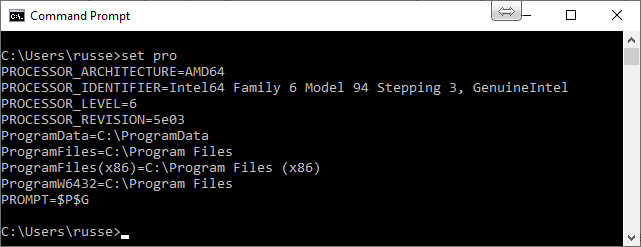
-


Hello! It looks like you're interested in this conversation, but you don't have an account yet.
Getting fed up of having to scroll through the same posts each visit? When you register for an account, you'll always come back to exactly where you were before, and choose to be notified of new replies (either via email, or push notification). You'll also be able to save bookmarks and upvote posts to show your appreciation to other community members.
With your input, this post could be even better 💗
Register Login