TRIGGERcmd
    • Categories
    • Recent
    • Tags
    • Popular
    • Users
    • Groups
    • Search
    • Register
    • Login

    Start netflix app

    Scheduled Pinned Locked Moved Windows
    24 Posts 14 Posters 12.3k Views 2 Watching
    Loading More Posts
    • Oldest to Newest
    • Newest to Oldest
    • Most Votes
    Reply
    • Reply as topic
    Log in to reply
    This topic has been deleted. Only users with topic management privileges can see it.
    • RussR Offline
      Russ @Renan Paes
      last edited by Russ

      @Renan-Paes, this worked for me:

      taskkill /f /im primevideo.exe
      

      Russell VanderMey

      1 Reply Last reply Reply Quote 1
      • N Offline
        Nico @Russ
        last edited by

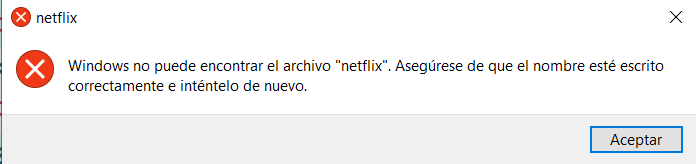
        @Russ a mi tampoco me funciona, lo he hecho tal cual dijeron.
        ca54848c-d059-4ad6-a40f-cbd1779793be-image.png

        RussR 1 Reply Last reply Reply Quote -1
        • RussR Offline
          Russ @Nico
          last edited by

          @Nico, are you able to manually run Netflix? It looks like it's not installed. You can install it from the Windows app store.

          Russell VanderMey

          Rodolfo LincangoR 1 Reply Last reply Reply Quote 0
          • Igor PenhaI Offline
            Igor Penha
            last edited by

            @MAX-MAGALHAES said in Start netflix app:

            :

            o que é esse voiceReply man ?

            1 Reply Last reply Reply Quote 0
            • Rex BonesR Offline
              Rex Bones
              last edited by

              This post is deleted!
              1 Reply Last reply Reply Quote 0
              • Rex BonesR Offline
                Rex Bones @Russ
                last edited by

                @Russ is it possible to have the Amazon Prime app (on Windows) launch and begin playing a specific title?

                RussR 1 Reply Last reply Reply Quote 0
                • RussR Offline
                  Russ @Rex Bones
                  last edited by Russ

                  @Rex-Bones, I made this AutoIt script and compiled it to a Windows .exe file. It takes a parameter for what you want to search for and play in Amazon Prime Video (installed from the Windows App store). I also made this video to demo it.

                  ShellExecute ( "primevideo:" )
                  
                  Sleep(2000)  ; wait 2 seconds for Prime Video to start
                  
                  WinActivate ( "Amazon Prime Video" )
                  $pos = WinGetPos("Amazon Prime Video")
                  
                  $x = 120
                  $y = 150
                  MouseClick("left", $pos[0] + $x, $pos[1] + $y)  ; click the Search box
                  
                  Send("^a") ; Select all text, in case something was typed in the Search box already.
                  
                  ;;; For testing:   Send("the boys season 1{ENTER}")
                  
                  Send($CmdLine[1] & "{ENTER}")   ; type the first parameter of the .exe, and press enter
                  
                  Sleep(2000)  ; wait 2 seconds
                  
                  $x = 550
                  $y = 250
                  MouseClick("left", $pos[0] + $x, $pos[1] + $y)  ; click the show icon
                  
                  Sleep(1500) ; wait 1.5 seconds
                  
                  $x = 450
                  $y = 515
                  MouseClick("left", $pos[0] + $x, $pos[1] + $y)   ; click Watch now
                  

                  Russell VanderMey

                  Quasar 07Q 1 Reply Last reply Reply Quote 0
                  • Quasar 07Q Offline
                    Quasar 07 @Russ
                    last edited by

                    @Russ How can I do the same, but instead from the windows app, from the Chrome browser and my prime video account.
                    Thanks

                    1 Reply Last reply Reply Quote 0
                    • Quasar 07Q Offline
                      Quasar 07
                      last edited by Quasar 07

                      @Quasar-07 said in Start netflix app:

                      @Russ How can I do the same, but instead from the windows app, from the Chrome browser and my prime video account.
                      Thanks
                      I have already learned it by myself, thank you very much even so for the program.
                      A question? I registered with the same email as the PayPal account, how can I change it, if possible? Thanks again.

                      RussR 1 Reply Last reply Reply Quote 0
                      • Anthony GustavoA Offline
                        Anthony Gustavo
                        last edited by

                        @Russfor netflix how can i do the same to start it suits for example

                        RussR 1 Reply Last reply Reply Quote 0
                        • RussR Offline
                          Russ @Quasar 07
                          last edited by

                          @Quasar-07, I'm glad you figured out the first question. About changing your account's email address - you can't. The email address you opened the account with is tied to that account. You'd have to subscribe the other account, and then cancel the first one. You'd want to do that near your anniversary date to save some money.

                          Russell VanderMey

                          1 Reply Last reply Reply Quote 0
                          • RussR Offline
                            Russ @Anthony Gustavo
                            last edited by Russ

                            @Anthony-Gustavo, here's a similar script for Netflix:

                            ShellExecute ( "netflix:" )
                            
                            Sleep(2000)  ; wait 2 seconds for Prime Video to start
                            
                            WinActivate ( "Netflix" )
                            $pos = WinGetPos("Netflix")
                            
                            $x = 1797
                            $y = 63
                            MouseClick("left", $pos[0] + $x, $pos[1] + $y)  ; click the Search box
                            
                            ;suits
                            Send("^a") ; Select all text, in case something was typed in the Search box already.
                            
                            Sleep(2000)  ; wait 2 seconds
                            
                            ;;; For testing:     ;; Send("suits{ENTER}")
                            
                            Send($CmdLine[1] & "{ENTER}")   ; type the first parameter of the .exe, and press enter
                            
                            Sleep(2000)  ; wait 2 seconds
                            
                            $x = 194
                            $y = 248
                            MouseClick("left", $pos[0] + $x, $pos[1] + $y)  ; click the show icon
                            
                            Sleep(1500) ; wait 1 seconds
                            
                            $x = 961
                            $y = 220
                            MouseClick("left", $pos[0] + $x, $pos[1] + $y)   ; click Watch now
                            

                            Here's a link to the two compiled .exe files:
                            Prime
                            Netflix

                            Russell VanderMey

                            1 Reply Last reply Reply Quote 0
                            • Anthony GustavoA Offline
                              Anthony Gustavo
                              last edited by Anthony Gustavo

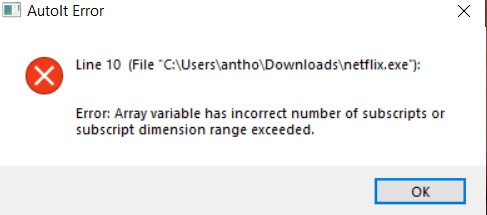
                              @Russ For me is happening this error

                              ShellExecute ( "netflix:" )

                              Sleep(2000) ; wait 2 seconds for Prime Video to start

                              WinActivate ( "Netflix" )
                              $pos = WinGetPos("Netflix")

                              $x = 1764
                              $y = 72
                              MouseClick("left", $pos[0] + $x, $pos[1] + $y) ; click the Search box

                              ;suits
                              Send("^a") ; Select all text, in case something was typed in the Search box already.

                              Sleep(2000) ; wait 2 seconds

                              ;;; For testing: ;; Send("suits{ENTER}")

                              Send($CmdLine[1] & "{ENTER}") ; type the first parameter of the .exe, and press enter

                              Sleep(2000) ; wait 2 seconds

                              $x = 231
                              $y = 289
                              MouseClick("left", $pos[0] + $x, $pos[1] + $y) ; click the show icon

                              Sleep(1500) ; wait 1 seconds

                              $x = 962
                              $y = 268
                              MouseClick("left", $pos[0] + $x, $pos[1] + $y) ; click Watch now

                              I changed my coordinates, can you create an .exe for me or tell me which program you use? And also how do I configure the command in Triggercmd?
                              c3a30e35-24be-45d7-b20a-1403f36867c2-image.png

                              RussR 1 Reply Last reply Reply Quote 0
                              • RussR Offline
                                Russ @Anthony Gustavo
                                last edited by Russ

                                @Anthony-Gustavo, it's getting that error because this line is expecting a parameter:

                                Send($CmdLine[1] & "{ENTER}") 
                                

                                You can compile that script to an .exe with AutoIT.

                                The command in the TRIGGERcmd GUI editor would either be:

                                C:\Users(your user)\netflix.exe suits

                                ... if you want your command to always search for suits, or:

                                  C:\\Users\\(your user)\\netflix.exe
                                

                                If you want to pass suits or something else as a parameter. For that, don't forget to flip Allow parameters to true.

                                Russell VanderMey

                                1 Reply Last reply Reply Quote 0
                                • Rodolfo LincangoR Offline
                                  Rodolfo Lincango @Russ
                                  last edited by

                                  @Russ , es mi mismo caso, si esta instalado pero me sale el anuncio, me podrias ayudar por favor.

                                  1 Reply Last reply Reply Quote 0

                                  Hello! It looks like you're interested in this conversation, but you don't have an account yet.

                                  Getting fed up of having to scroll through the same posts each visit? When you register for an account, you'll always come back to exactly where you were before, and choose to be notified of new replies (either via email, or push notification). You'll also be able to save bookmarks and upvote posts to show your appreciation to other community members.

                                  With your input, this post could be even better 💗

                                  Register Login
                                  • First post
                                    Last post