Have original Alexa (not Alexa+) or MCP receive the result of a command
-
The "Voice/MCP Reply" field works with MCP (AI) and the original conversational Alexa skills called TRIGGERcmd, TC, and Trigger Command (not TRIGGERcmd Smart Home). Conversational Alexa skills don't work with Alexa+.
If your command has {{result}} in the Voice Reply field, then the voice assistant or AI assistant using MCP will wait a few seconds for a "result" of the command to be logged in the Runs list for that command, and will include that result in what it says back to you.
So for example, you could have Alexa run a command on your Raspberry Pi that would take the temperature, and Alexa could tell you that temperature.
As a test, I put this in my Voice Reply field of my "Results Test" command:
Running {{trigger}} on {{computer}} with result {{result}}I put this in the Command field:
%USERPROFILE%\.TRIGGERcmdData\sendresult.bat "My command result"NOTE: Use ~/.TRIGGERcmdData/sendresult.sh instead for Linux/Mac/Raspberry Pi.
I said this:
Alexa, ask trigger CMD to run results testAlexa said this:
Running results test on DS with result My command resultYou only have about 4-5 seconds to send a result via that SendResult script. If you take too long, it will say "no result" in the {{result}} placeholder.
ChatGPT example:
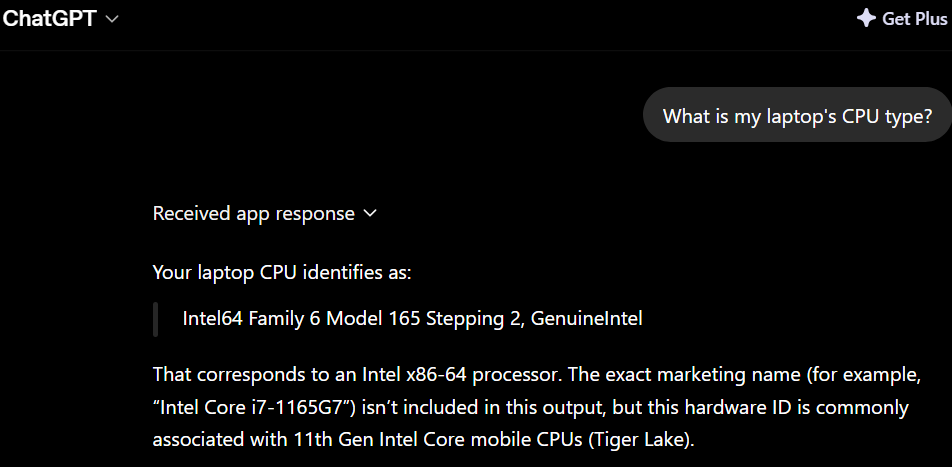
This is the command for the ChatGPT example::
%USERPROFILE%\.TRIGGERcmdData\sendresult.bat "%PROCESSOR_IDENTIFIER%"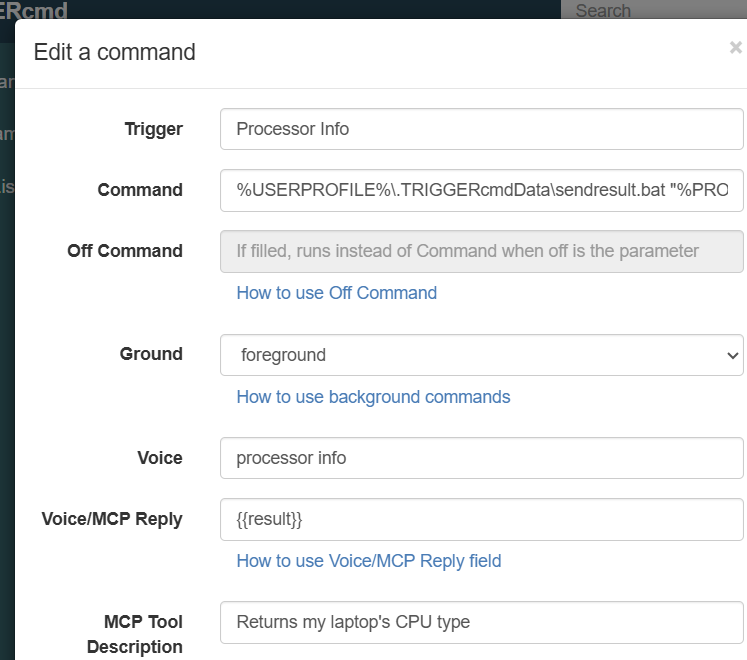
-
 R Russ pinned this topic on
-
R Russ referenced this topic on
Hello! It looks like you're interested in this conversation, but you don't have an account yet.
Getting fed up of having to scroll through the same posts each visit? When you register for an account, you'll always come back to exactly where you were before, and choose to be notified of new replies (either via email, or push notification). You'll also be able to save bookmarks and upvote posts to show your appreciation to other community members.
With your input, this post could be even better 💗
Register Login