Smart reply for voice with parameters
-
@colegl, thanks for the reminder. I did it just now, and it's awesome!
@mysticnynja, thanks for the suggestion.
Now you can use these placeholders in your Voice Reply field:
- {{trigger}}
- {{computer}}
- {{params}}
- {{result}}
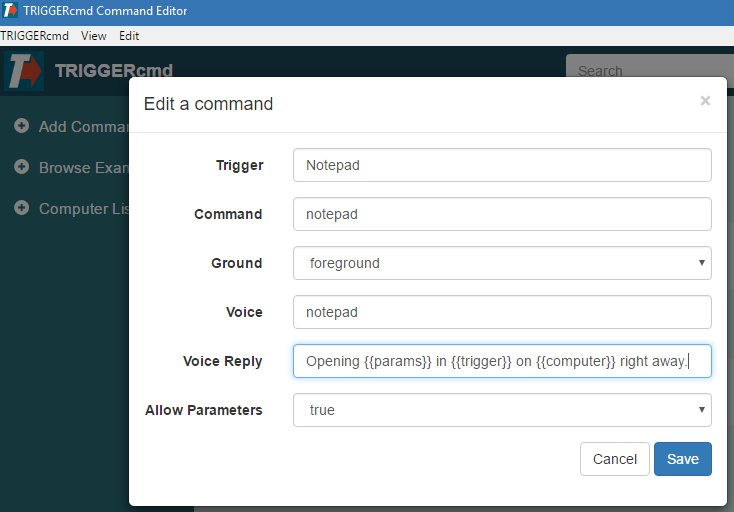
-
I just saw this!! Awesome I'll try it out today and let you know!
-
Can I ask a follow up question?
I'd like to have editable voice response too, and I'm running triggercmd on pi, I assume it would be a case of updating the installation and editing the json file (I have no ui on my pi).
I'd actually like to be able to disable any feedback at all, currently it says "Getting triggercmd" and then "blah blah blah on pi"
-
@sim-wonkdonk, you could minimize the response by putting a space in that voice reply field.
-
I'm using a raspberry pi, so I have to edit the commands via the commands.json
{"trigger":"STANDBY","command":"/opt/TIVO/ircode-script.sh STANDBY","ground":"background","voice":"STANDBY","allowParams": "false"},
Putting a space in the "voice" parameter stops the command work, as thats the trigger word for the command, not the response the command gives.
I guess there's no work around?
-
@sim-wonkdonk, the voice field is different from the voiceReply field. Your example is missing the voiceReply field.
Here's an example with that field:
{ "trigger": "test command", "command": "d: & cd \\appdev\\test & node t.js", "ground": "background", "voice": "test", "voiceReply": " ", "allowParams": "false" } -
@russ related to this - is it possible to include the script output in the voice reply ? For example - current lab temperature is {{result}} celcius.
Just started using triggercmd and it’s fantastic - great service mate, we’ll worth the $ !
-
@phil-tanguay, I do plan on implementing that ability soon, now that I've added the SendResult script to the .TRIGGERcmdData folder to send a result of a command back to the server.
Currently the result just gets logged in the Runs log for the command.
It's on my todo list.
-
@russ Awesome ! Looking forward to it but no rush

My brain is bubbling with ideas - triggercmd has opened a whole new avenue for cool automations.
-
@colegl and @phil-tanguay, I implemented this today for Google Assistant. I'm working on Alexa now.
I put this in my Voice Reply field of my Notepad command (I should have just created a new command):
Running {{trigger}} on {{computer}} with params {{params}} with result {{result}}I put this in the Command field:
%USERPROFILE%\.TRIGGERcmdData\sendresult "My command result"I said this:
Ask trigger command to run notepad with parameter russGoogle Assistant said this:
Running notepad on DS with params russ with result My command resultI'm pretty happy with how it turned out.
I only gave about 4-5 seconds to send a result via that SendResult.bat script. If you take too long, it will say "no result" in the {{result}} placeholder.
EDIT: Now you can do this with Alexa too.
-
F Furkan Cevik referenced this topic on
-
 R Russ referenced this topic on
Hello! It looks like you're interested in this conversation, but you don't have an account yet.
Getting fed up of having to scroll through the same posts each visit? When you register for an account, you'll always come back to exactly where you were before, and choose to be notified of new replies (either via email, or push notification). You'll also be able to save bookmarks and upvote posts to show your appreciation to other community members.
With your input, this post could be even better 💗
Register Login