Trigger a command with a Shortcut via Siri
-
You can run commands on your computers with Siri using a Shortcut. Here's how:
-
Download the Shortcuts app on your iOS device.
-
Open this link or scan this QR code from your iOS device:

-
Fill in the computer, trigger, and token fields. The params field is optional.
-
In the shortcut's settings, tap "Add to Siri" and record your personal phrase.
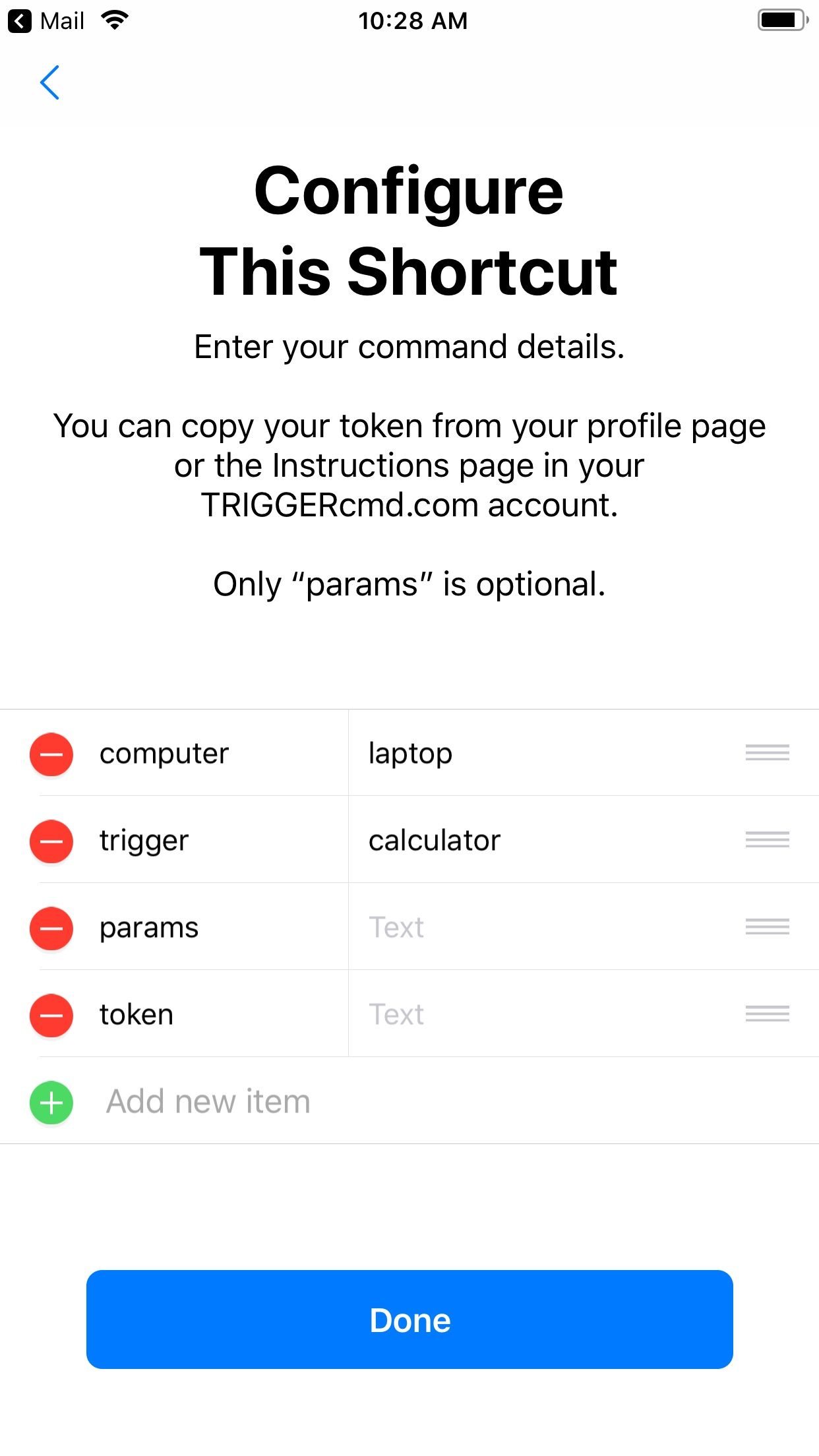
Here's a Youtube video showing how it works:
https://youtu.be/YBOiWBokal8 -
-
 R Russ referenced this topic on
-
R Russ pinned this topic on
-
hi -- how can this be used to display or say the result?
here's a command that works on alexa:
osascript -e 'tell application "Music" to set result to "This song is " & name of current track & " by " & artist of current track & " on the " & year of current track & " album " & album of current track' | sed 's/^/"/;s/$/"/' | xargs -I{} ~/.TRIGGERcmdData/sendresult.sh {}when created with the QR code, the last step is "Get contents of TEXT". result: nothing. I added "Show result <contents of URL>" (defaults to that parameter). result: "no authorization header was found".
-
@gajahduduk said in Trigger a command with a Shortcut via Siri:
osascript -e 'tell application "Music" to set result to "This song is " & name of current track & " by " & artist of current track & " on the " & year of current track & " album " & album of current track' | sed 's/^/"/;s/$/"/' | xargs -I{} ~/.TRIGGERcmdData/sendresult.sh {}
Can you help me get started? I tried your command it doesn't seem to work. Is there something I need to do in the Music app first?
russ@macbook-air ~ % osascript -e 'tell application "Music" to set result to "This song is " & name of current track & " by " & artist of current track & " on the " & year of current track & " album " & album of current track' 60:64: execution error: Can’t make name of «class pTrk» of application "Music" into type Unicode text. (-1700) -
@Russ i think your Music app's player state is stopped. play a track, or play one and pause it, and it should work. (mine is never stopped :).
to test the basic functionality leave out the last pipe part (" | xargs" …), and run the rest in Terminal.
osascript -e 'tell application "Music" to set result to "This song is " & name of current track & " by " & artist of current track & " on the " & year of current track & " album " & album of current track' | sed 's/^/"/;s/$/"/'as noted, this works for the "original" Alexa. Since I've been having problems with Alexa Plus and TriggerCMD, I was trying the Shortcuts route.
-
@gajahduduk, the sendresult.sh script is not executable by default, so you could probably solve it by running this:
chmod +x ~/.TRIGGERcmdData/sendresult.shOr make your command:
osascript -e 'tell application "Music" to set result to "This song is " & name of current track & " by " & artist of current track & " on the " & year of current track & " album " & album of current track' | sed 's/^/"/;s/$/"/' | xargs -I{} bash ~/.TRIGGERcmdData/sendresult.sh {}If you run a command like this:
curl 'https://TRIGGERcmd.com/api/run/trigger?computer=maclaptop&trigger=result&token=(your token)'... and your command has {{result}} in the Voice Reply field, you'll get a response like this:
{"message":"Trigger sent. Result was: YOURRESULT"}So your Shortcut will need to parse that message using "Get Dictionary Value".
This post has some detail about it.
EDIT: I changed that response to the following to make it easier to get the command's result.
{"message":"Trigger sent. Result was: YOURRESULT", "result":"YOURRESULT"} -
@Russ brilliant! yes, I had made sendresult.sh executable previously. but the response change made parsing the result easier as you say. other stumbling blocks fixed:
- the trigger value in the shortcut configuration needed a "%20" instead of a space, as the command name had a space!
- the value for "computer" has to be the actual computer name in TriggerCMD, not laptop or maclaptop etc. (DUH).
- then what I needed in the first steps of the shortcut was this:
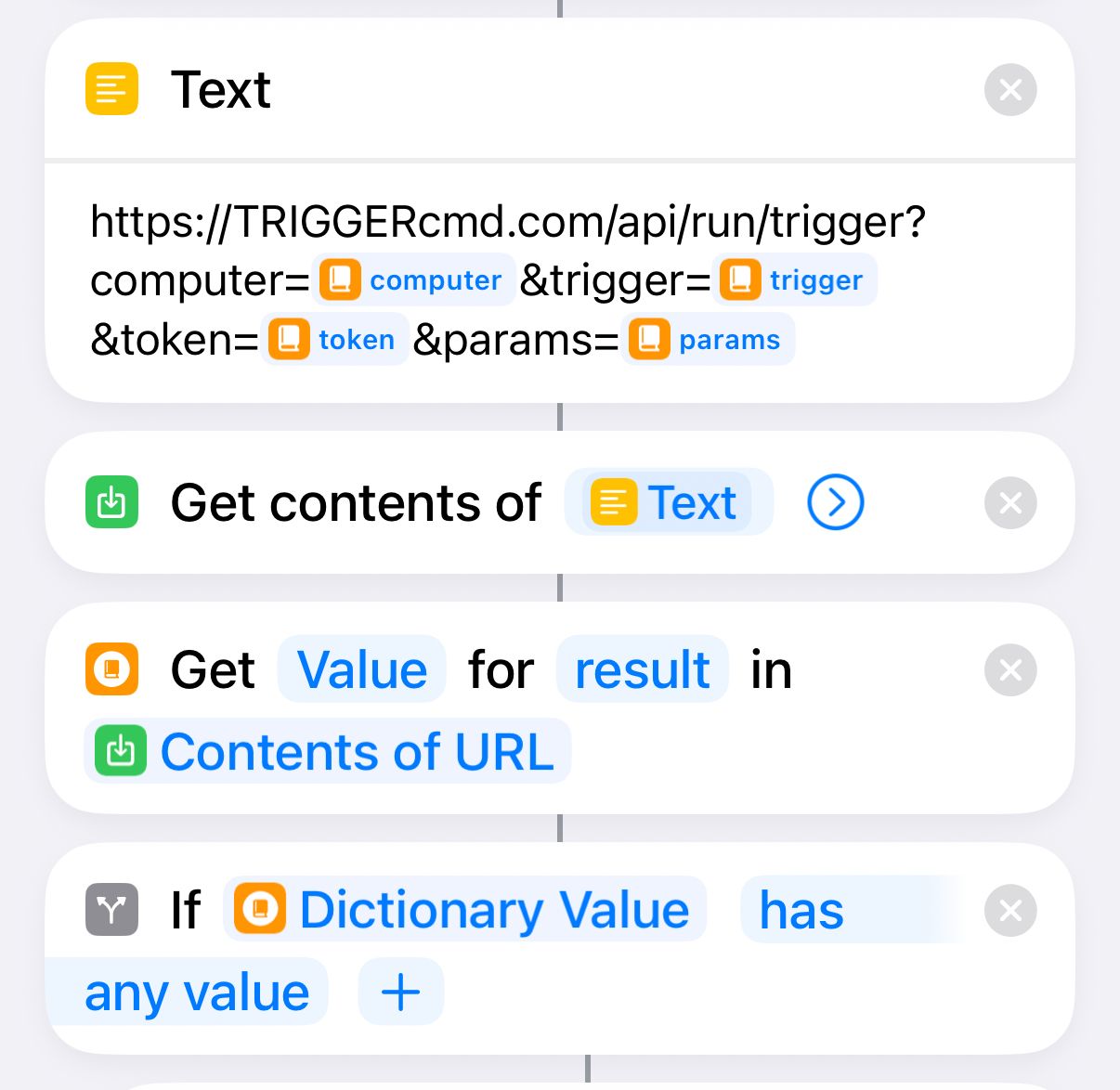
… etc. (you need to work with the variable "dictionary value" in this case.)
-
Nice @gajahduduk. I'm glad you got it working. Thanks for sharing your use-case.
Hello! It looks like you're interested in this conversation, but you don't have an account yet.
Getting fed up of having to scroll through the same posts each visit? When you register for an account, you'll always come back to exactly where you were before, and choose to be notified of new replies (either via email, or push notification). You'll also be able to save bookmarks and upvote posts to show your appreciation to other community members.
With your input, this post could be even better 💗
Register Login