Control your Roku
-
This command will make your Roku remote ring:
curl -XPOST http://(roku IP address):8060/keypress/FindRemoteHere are some other useful Roku commands:
curl -v -XPOST http://(roku IP address):8060/keypress/up
curl -v -XPOST http://(roku IP address):8060/keypress/down
curl -v -XPOST http://(roku IP address):8060/keypress/left
curl -v -XPOST http://(roku IP address):8060/keypress/right
curl -v -XPOST http://(roku IP address):8060/keypress/selectYou can also play a specific Youtube video like this:
curl -v -XPOST "http://(roku IP address):8060/launch/837?contentId=cxOuqIZ1J4k"Launch Netflix:
curl -d '' http://(roku IP address):8060/launch/12List apps with their app ID's (Netflix's app ID is 12):
curl http://(roku IP address):8060/query/appsSee these pages for more:
https://github.com/tispratik/docs-1/blob/master/develop/guides/remote-api-ecp.md
https://developer.roku.com/docs/developer-program/debugging/external-control-api.mdI used this to create a panel to control my Roku. I created a Windows batch file with a single line like this:
curl -d '' "http://%1:8060/keypress/%2"I created a single command like this:
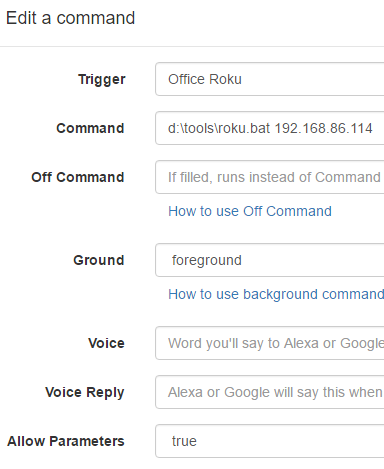
Then I made a panel with multiple "buttons" with these parameters:
Play,Rev,Fwd
Select,Left,Right,Down,Up
Back,Home
Info,Search,Enter,InstantReplay,PowerOff,PowerOnIf your roku supports it you could add these:
VolumeDown,VolumeUp,VolumeMute
InputHDMI1,InputHDMI2,InputHDMI3,InputHDMI4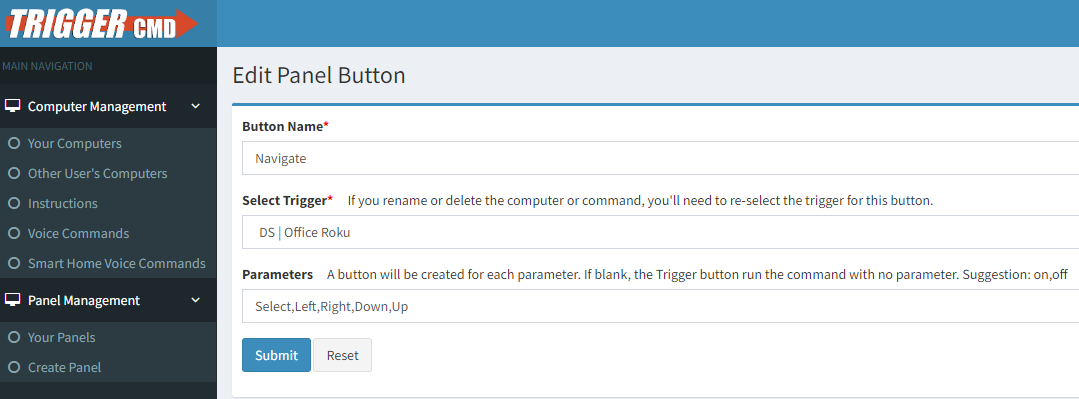
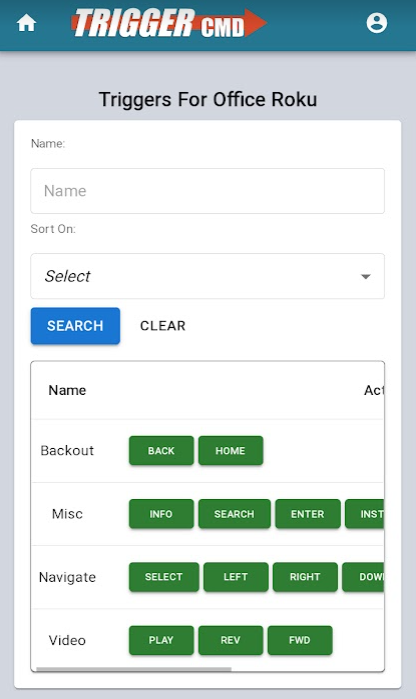
I scanned my panel's QR code to bring it up on my phone, and this is what it looks like:
-
 R Russ referenced this topic on
Hello! It looks like you're interested in this conversation, but you don't have an account yet.
Getting fed up of having to scroll through the same posts each visit? When you register for an account, you'll always come back to exactly where you were before, and choose to be notified of new replies (either via email, or push notification). You'll also be able to save bookmarks and upvote posts to show your appreciation to other community members.
With your input, this post could be even better 💗
Register Login