Questions
-
Good, I have two questions for you,
1- How can I run a script as an administrator from trigger cmd? What happens is that when I run it as an administrator myself I do not give me errors and when I do it with trigger cmd an application does not close because an access error deneged2- Therefore, I would like to know how I can run a script with trigger cmd but that looks on the screen the CMD window to see what is the error in the following script's developing, since I currently realize that I do not know that I do not know It develops one or two steps of it, I am new to all this and it helps me a lot to read the error codes to look for them on Google.
By the way, use Windows.
Thank you.
-
@Tony-Jiménez, here's one way to run elevated commands to run "As administrator" via TRIGGERcmd:
Open Task Scheduler and create a task called "AdminScript" like this:
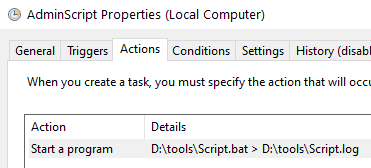
This is what the Action settings look like:
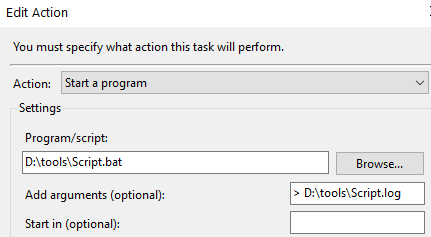
On the General Tab, click this "Run with highest privileges" checkbox. That basically tells it to run "As administrator", aka elevated.

Make your TRIGGERcmd command run this:
SCHTASKS.EXE /RUN /TN "AdminScript"This is my test script:
@echo off
net session > NUL 2>&1
IF ERRORLEVEL 1 GOTO not_elevated
echo This script ran WITH elevated privilages.
goto end
:not_elevated
echo This script ran WITHOUT elevated privilages.
:end
start notepad
These are the contents of d:\tools\script.log:
This script ran WITH elevated privilages.I see that notepad ran "As administrator" because it has Elevated = Yes in Task Manager. I had to add the Elevated column to see that.

-
 R Russ referenced this topic on
-
R Russ referenced this topic on
-
@Russ I'm trying to get this to work on an old (out of date) Win10 micro-PC that's x86.
{"trigger":"Users","command":"schtasks.exe /run /tn users","ground":"background","voice":"users"},
Here's the command in the JSON file. If I run the schtasks from a command prompt, it works. If I try to trigger this, it doesn't. Am I missing some syntax?
(The goal is to run a batch file at c:\ which deletes a file in Program Files and replaces it with a backup.)
EDIT: Just needed to change it to Foreground

 ️
️


Hello! It looks like you're interested in this conversation, but you don't have an account yet.
Getting fed up of having to scroll through the same posts each visit? When you register for an account, you'll always come back to exactly where you were before, and choose to be notified of new replies (either via email, or push notification). You'll also be able to save bookmarks and upvote posts to show your appreciation to other community members.
With your input, this post could be even better 💗
Register Login