Pass parameters with Zapier
-
Dear TriggerCMD
I am looking to use TriggerCMD to pass parameters to a vbscript file for execution.
I see from the video that each parameter is used by specifying %1.A few more questions:
1, I have used the parameter field in Zapier and called notepad only to see that notepad was not aware that it needed to open the file, so it appears that the parameter is not being passed?
2, How are parameters separated when specifying more than one? (is it just a space like on the cmd line?)
3, Are there only nine parameters that can be passed like with batch files?
4, Is there an upper limit on the number of characters sent?
Thanks for the great functionality
Jonathan -
@jgodney, I'll answer each question by number:
-
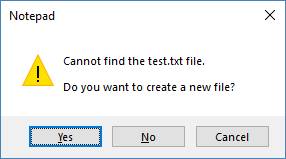
Did you enable parameters on the command you ran from Zapier? Also did notepad open, or did it give you a prompt like this?
-
Yes - multiple parameters are separated by a space.
-
No - you can send an unlimited number of parameters, separated by spaces. Actually batch files can accept more than 9 too.
-
From here I see, "On computers running Microsoft Windows XP or later, the maximum length of the string that you can use at the command prompt is 8191 characters"
-

Hello! It looks like you're interested in this conversation, but you don't have an account yet.
Getting fed up of having to scroll through the same posts each visit? When you register for an account, you'll always come back to exactly where you were before, and choose to be notified of new replies (either via email, or push notification). You'll also be able to save bookmarks and upvote posts to show your appreciation to other community members.
With your input, this post could be even better 💗
Register Login