TRIGGERcmd
    • Categories
    • Recent
    • Tags
    • Popular
    • Users
    • Groups
    • Search
    • Register
    • Login

    Question

    Scheduled Pinned Locked Moved General Discussion
    14 Posts 2 Posters 3.0k Views 1 Watching
    Loading More Posts
    • Oldest to Newest
    • Newest to Oldest
    • Most Votes
    Reply
    • Reply as topic
    Log in to reply
    This topic has been deleted. Only users with topic management privileges can see it.
    • S Offline
      Smart Communities
      last edited by Smart Communities

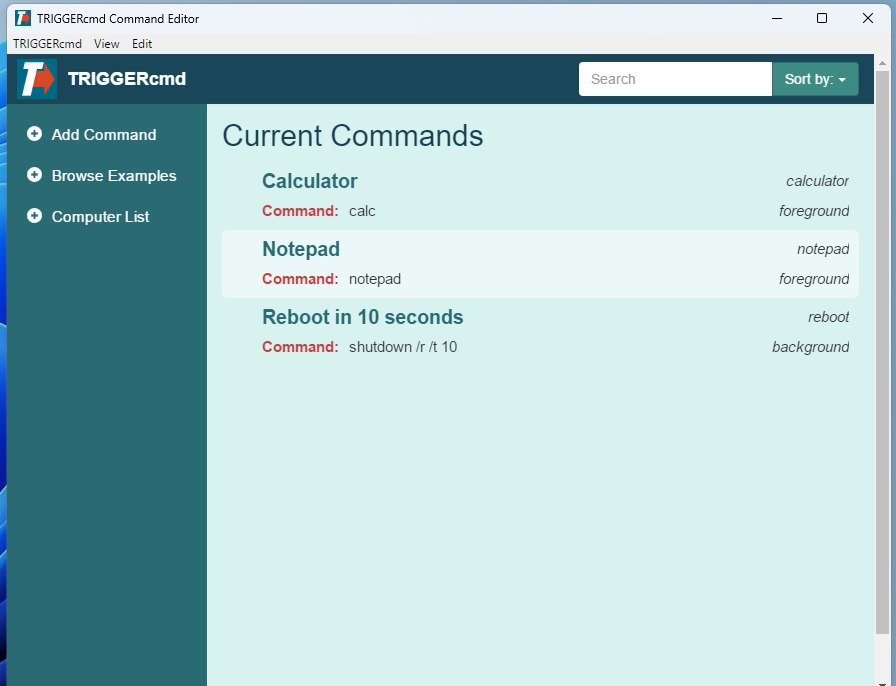
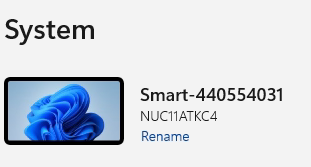
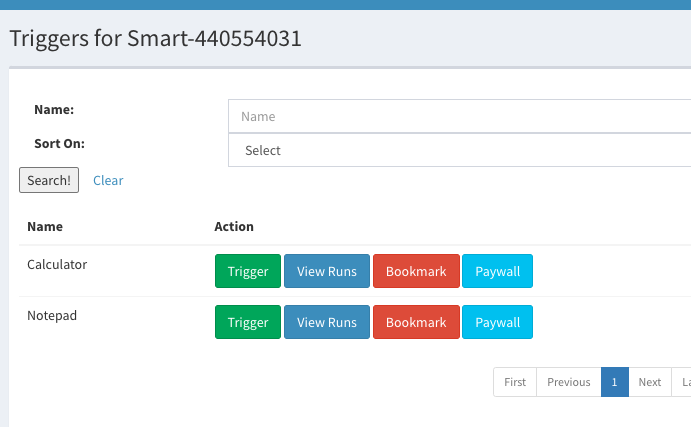
      I got you a couple of screenshots. Hope this helps.

      Agent running

      anydesk00003.png
      @Russ
      Default task still on pc
      anydesk00002.png

      pc name
      anydesk00001.png

      Triggercmd account
      Screenshot 2023-01-28 at 4.26.37 PM.png

      1 Reply Last reply Reply Quote 0
      • S Offline
        Smart Communities @Russ
        last edited by Smart Communities

        This post is deleted!
        1 Reply Last reply Reply Quote 0
        • S Offline
          Smart Communities @Russ
          last edited by

          @Russ any idea where I’m messing up?

          RussR 1 Reply Last reply Reply Quote 0
          • RussR Offline
            Russ @Smart Communities
            last edited by Russ

            @Smart-Communities, I don't think you're doing anything wrong, but I don't know yet what went wrong.

            Can you try two things?

            1. Rename the background command and see if it shows up.

            If it doesn't, try:

            1. Uninstall and reinstall the background agent and see if it shows up.

            Russell VanderMey

            S 1 Reply Last reply Reply Quote 0
            • S Offline
              Smart Communities @Russ
              last edited by

              @Russ neither of those worked but here's what did.

              I ran "update agent" which stated Background service must be reinstalled once update is complete. Upon reinstalling background service after the update I was able to see the background command.

              My triggercmdagentsetup is on a thumbdrive. Is that bound to a specific version of triggercmd?

              RussR 1 Reply Last reply Reply Quote 0
              • RussR Offline
                Russ @Smart Communities
                last edited by

                @Smart-Communities, that's correct. It doesn't download the latest version when you run the pre-downloaded agent installer on your thumb drive, it will install that specific version when you run it.

                So I'm guessing either the uninstall / re-install fixed it, or maybe there was a bug in the version you had on your thumb drive.

                Anyway I'm glad it's working now. Sorry for the trouble.

                Russell VanderMey

                S 1 Reply Last reply Reply Quote 0
                • S Offline
                  Smart Communities @Russ
                  last edited by

                  @Russ downloaded newest and same issue. To be clear, the background agent is automatically installed when TriggerCMD is installed. That correct?

                  RussR 1 Reply Last reply Reply Quote 0
                  • RussR Offline
                    Russ @Smart Communities
                    last edited by

                    @Smart-Communities, no that is not correct.

                    You install the background service by right-clicking the TRIGGERcmd tray icon and clicking Background Service - Install Background Service.
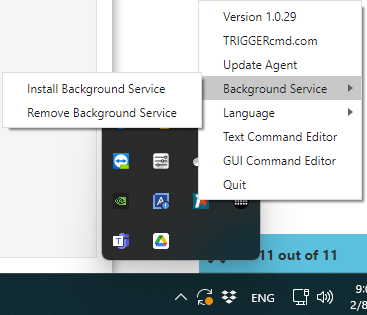
                    e4e685b7-6711-4c93-81c2-7fa303d41ee4-image.png

                    Russell VanderMey

                    S 1 Reply Last reply Reply Quote 0
                    • S Offline
                      Smart Communities @Russ
                      last edited by

                      @Russ Apologies Russ. Not sure why I thought that. Maybe because it was a default command when installing. Anyway sorry to waste your time.

                      RussR 1 Reply Last reply Reply Quote 0
                      • RussR Offline
                        Russ @Smart Communities
                        last edited by

                        No problem at all @Smart-Communities. I'm glad you asked.

                        Russell VanderMey

                        1 Reply Last reply Reply Quote 0

                        Hello! It looks like you're interested in this conversation, but you don't have an account yet.

                        Getting fed up of having to scroll through the same posts each visit? When you register for an account, you'll always come back to exactly where you were before, and choose to be notified of new replies (either via email, or push notification). You'll also be able to save bookmarks and upvote posts to show your appreciation to other community members.

                        With your input, this post could be even better 💗

                        Register Login
                        • First post
                          Last post