Custom Invocation Name for triggercmd
-
@smart-leap, here are some options:
- Use the "TRIGGER Command" skill and say "Alexa ask TRIGGER command to run X"
- Use a Google Assistant shortcut and say whatever you want, like my "Hey Google, open sesame" example for opening my garage.
- Use SmartThings with an Alexa "routine" and say whatever you want, like "Hey Alexa, open sesame."
- Use SmartThings and say, "turn on X" (where X is your virtual switch for your command).
- Use IFTTT and say, "trigger X"
My favorite method is a Google Assistant shortcut, but if you don't have a Google Home device, that might not be an option for you.
-
Thanks for the quick reply Russ. Hope you are doing good. I want to run an .exe in my laptop using triggercmd with the help of alexa, and i achieved that. To run .exe i have to say "Alexa, ask triggercmd to run .exe name." and its running for me on my laptop. now my use case is , i want to say "Alexa, ask acme to run .exe name". can i achieve this ? and yes .. how can i do that ? help needed. thanks in advance
-
@smart-leap, sorry no - you can't achieve that. If you say, "Alexa, ask smartleap ...." Alexa will try to find a skill called smartleap and there isn't one.
-
@russ Thank you Russ for your information. Is there any way ? where I can write a custom skill on the top over the Triggercmd to change the invocation name. Let me know, if you know any possibility of doing it. Thanks in advance and have a nice day :).
-
@smart-leap, I didn't think of it at first, but I suppose you could create your own Alexa skill that calls one of the TRIGGERcmd API endpoints to trigger your commands.
It wouldn't be a simple project, but it's doable. I'd suggest starting with one of Amazon's example skills that uses Lambda, then add some logic that would call the TRIGGERcmd API.
https://developer.amazon.com/alexa-skills-kit/alexa-skill-quick-start-tutorial
-
@russ I thought of the same Russ. Where can I get TRIGGERcmd API endpoints ? Do TRIGGERcmd have any docs regarding this.
-
@russ I tried to connect to the url "https://www.triggercmd.com/api/run/triggerSave/" by passing the token as i have a paid account. Its giving me an error ("err": "Your user has been blocked!"). Do we need any access privileges to consume API ? If yes, how can i do and to whom i need to reach out.
-
@smart-leap,
You don't need anything enabled - the API's should work even with a free account.Would you please copy/paste the code or your curl command here? I might be able to see what's wrong.
Don't include your token in what you paste. Replace it with something like [token].
I assume you're looking at this page for how to call the API:
https://www.triggercmd.com/forum/topic/72/parameters-are-now-supported-via-ifttt-tasker-and-curl-api-sHere's the curl command I just used to test the API:
curl -X POST https://www.triggercmd.com/api/run/triggerSave -H "authorization: Bearer [token]" -H "content-type: application/json" -d "{\"computer\":\"RVHP\",\"trigger\":\"calculator\"}"Notice the extra backslashes ('s) in the json. That's necessary on Windows to "escape" the quotes, but they're not necessary in your Alexa skill's Lambda code.
If you get this working, please post your code. I bet others would be interested.
-
@russ thanks for the quick response. I havent wrote any code, actually i am trying to test this service using postman. In response i got the error that i have mentioned above.
-
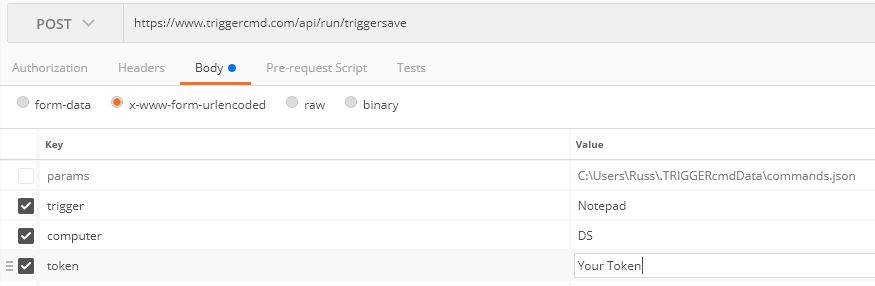
@smart-leap, here's a Postman example:

Hello! It looks like you're interested in this conversation, but you don't have an account yet.
Getting fed up of having to scroll through the same posts each visit? When you register for an account, you'll always come back to exactly where you were before, and choose to be notified of new replies (either via email, or push notification). You'll also be able to save bookmarks and upvote posts to show your appreciation to other community members.
With your input, this post could be even better 💗
Register Login