Share your best command
-
I have a Mac and have already created several commands. I love TriggerCMD but I am running out of ideas what else I can do with it.
Wouldn't it be great if you share your best ideas and commands in this thread?
Excited to see what your best commands are.
Cheers... -
@Mike, I came up with a good one for a mac. I should have thought of this sooner. I think it's useful.
People sometimes lose all of their commands because their hard drive died or something. This way you can restore them to a new computer (or hard drive).
Backup your TRIGGERcmd commands to iCloud Drive
Put this text in a script called bkuptcmd.sh in your home directory (or wherever you want):
CMP_ID=$(cat ~/.TRIGGERcmdData/computerid.cfg)
BKUP_PATH="$HOME/Library/Mobile Documents/com~apple~CloudDocs/tcmdBackups/$CMP_ID"
echo $BKUP_PATH
mkdir -p "$BKUP_PATH"
cp ~/.TRIGGERcmdData/commands.json "$BKUP_PATH"
Make it executable with a command like this:
chmod +x bkuptcmd.shCreate a TRIGGERcmd command and set the command field to this:
~/bkuptcmd.shRun your command remotely.
Witness your commands.json file in iCloud Drive:
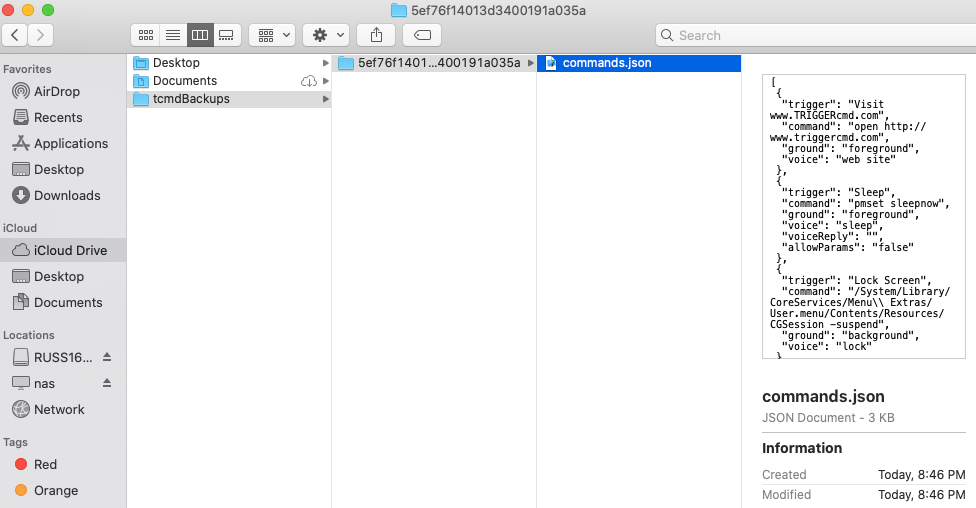
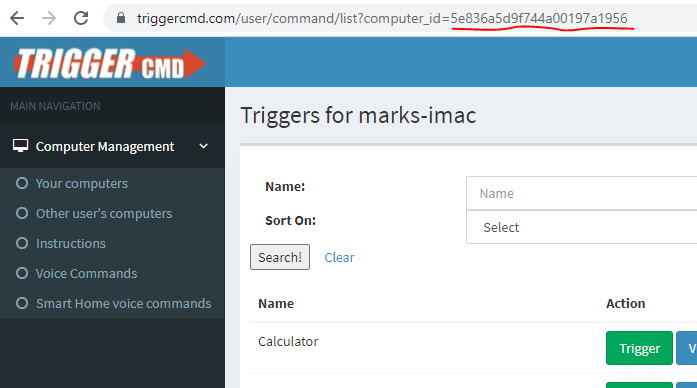
The folder name is your computer's TRIGGERcmd computer id. You can match that to your computer record by clicking the View Triggers button for the computer. The computer id will be in the URL.
-
@Russ This is amazing and so useful. I will be getting the new Mac in a couple of weeks and I was wondering already how I get my commands backed up! Perfect timing.


Hello! It looks like you're interested in this conversation, but you don't have an account yet.
Getting fed up of having to scroll through the same posts each visit? When you register for an account, you'll always come back to exactly where you were before, and choose to be notified of new replies (either via email, or push notification). You'll also be able to save bookmarks and upvote posts to show your appreciation to other community members.
With your input, this post could be even better 💗
Register Login