Triggercmd Agent won't work
-
Hi, I resently installed the Trigger program, but after the instalation a Windows message popped out and instantly closed by itslef. I click de direct acces Agent but it doesn't starts. I've tried unistalling and reinstalling but the problem contiues. I tried with theSolutions from Windows and it says that the program is uncompatible... My computer runs Windows 10 x64bits.
-
@Pablo-Rodriguez, I just want to confirm you've checked for the TRIGGERcmd icon in the tray in the lower right after you click the up arrow?
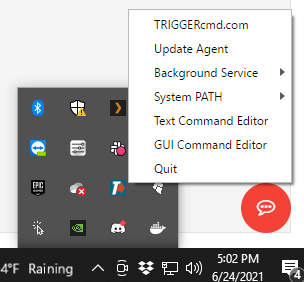
If you see a screen that says it's incompatible, please send me a screenshot.
Thanks for the info about Windows 10 x64 - that's important.


Hello! It looks like you're interested in this conversation, but you don't have an account yet.
Getting fed up of having to scroll through the same posts each visit? When you register for an account, you'll always come back to exactly where you were before, and choose to be notified of new replies (either via email, or push notification). You'll also be able to save bookmarks and upvote posts to show your appreciation to other community members.
With your input, this post could be even better 💗
Register Login