TRIGGERcmd
    • Categories
    • Recent
    • Tags
    • Popular
    • Users
    • Groups
    • Search
    • Register
    • Login

    What's the difference between background and foreground commands?
    Scheduled Pinned Locked Moved Instructions
    23 Posts 8 Posters 46.7k Views 1 Watching
    Loading More Posts
    • Oldest to Newest
    • Newest to Oldest
    • Most Votes
    Reply
    • Reply as topic
    Log in to reply
    This topic has been deleted. Only users with topic management privileges can see it.
    • RussR Offline
      Russ @Kingnabis
      last edited by Russ

      @Kingnabis, you're saying you can not run notepad, correct?

      I recommend that you try using the TRIGGERcmd Smart Home Alexa skill. It recognizes your voice commands better because it has a list of what you might say ahead of time, so Alexa only has to match up what you say with something in that list.

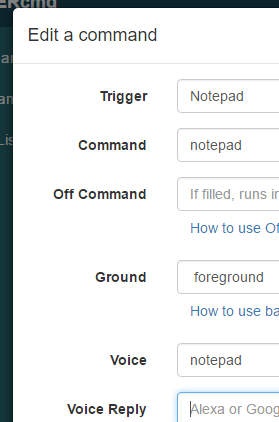
      Is your notepad command setup like this?
      5b23d63b-a007-4934-ad72-e78e3ace7184-image.png

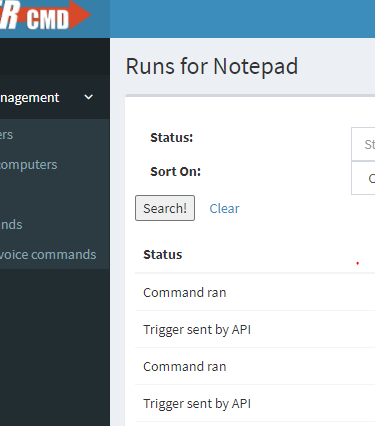
      When you click the View Runs button,
      a2da75b0-2587-48e7-af9f-b2ad6400c439-image.png

      do you get a Command ran entry in your list?
      21bdba44-6753-4fbd-b107-97c14f196d0c-image.png

      Russell VanderMey

      1 Reply Last reply Reply Quote 1
      • K Offline
        Kingnabis
        last edited by

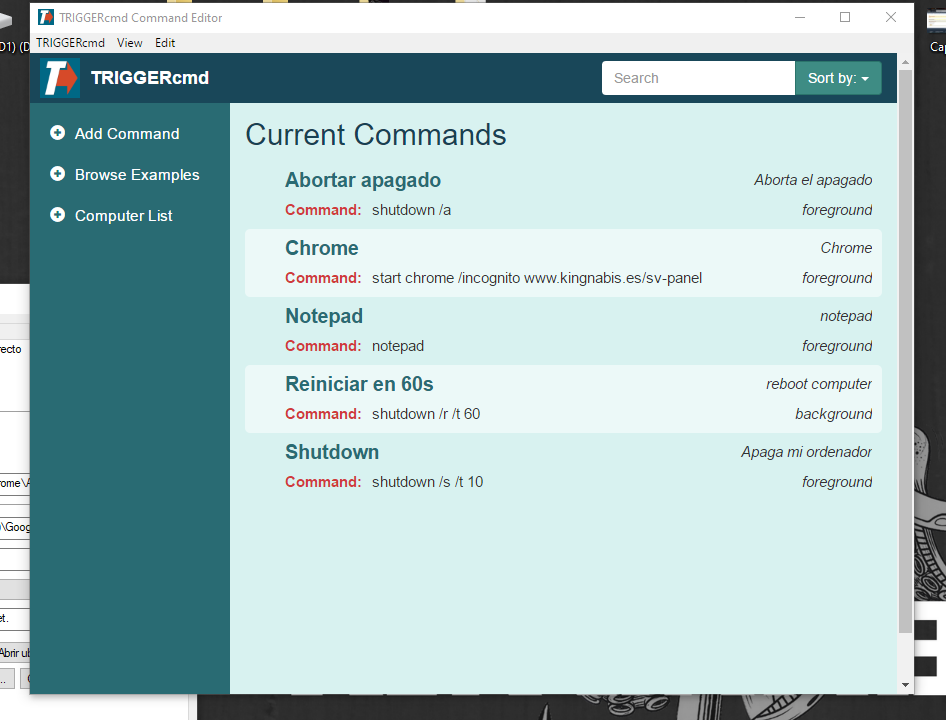
        Yes, mine was like yours but i was jumping the COMAND part. I need to add START previously to notepad... I udapted like this and it works. I have to write it on cmd, if works there works from the skill. asdge.PNG
        1 Reply Last reply Reply Quote 0
        • K Offline
          Kingnabis
          last edited by

          ahoraci.PNG

          1 Reply Last reply Reply Quote 0
          • adriangcamachoA Offline
            adriangcamacho
            last edited by adriangcamacho

            Hi, any solution to run background commands in mac os?

            RussR 1 Reply Last reply Reply Quote 0
            • RussR Offline
              Russ @adriangcamacho
              last edited by

              @Adrián-González-Camacho, not yet. I didn't think many Mac users would want to use it. Do you want this feature so you can run commands while you're not logged on? Just curious what your use-case is.

              Russell VanderMey

              adriangcamachoA 1 Reply Last reply Reply Quote 0
              • adriangcamachoA Offline
                adriangcamacho @Russ
                last edited by

                @Russ I want to use my mac as a server and launch home automation commands

                RussR 1 Reply Last reply Reply Quote 1
                • RussR Offline
                  Russ @adriangcamacho
                  last edited by

                  @adriangcamacho, I see. I assume you don't want to leave it logged in?

                  I'll have to research again how to create services that startup at boot time on a Mac.

                  Russell VanderMey

                  adriangcamachoA 1 Reply Last reply Reply Quote 1
                  • adriangcamachoA Offline
                    adriangcamacho @Russ
                    last edited by

                    @Russ Yep, thank you a lot for your time.
                    If you need some help i think i could help you i'm backend developer.

                    1 Reply Last reply Reply Quote 0
                    • TuneyLunesT Offline
                      TuneyLunes
                      last edited by

                      I'd also like to use my mac as an automation server and it would be easier to not have to be logged in permanently. Thanks @Russ !

                      RussR 1 Reply Last reply Reply Quote 0
                      • RussR Offline
                        Russ @TuneyLunes
                        last edited by

                        @TuneyLunes, I haven't built this into the Mac agent yet, so for now you can use this method to setup the background agent on a Mac.

                        Russell VanderMey

                        1 Reply Last reply Reply Quote 0
                        • Alê 滝口A Offline
                          Alê 滝口 @Russ
                          last edited by

                          @Russ Could you give me an example of a command to run a script?

                          RussR 1 Reply Last reply Reply Quote 0
                          • RussR Offline
                            Russ @Alê 滝口
                            last edited by

                            @Alê-滝口, if the computer is running Mac or Linux, the command could be:

                            ~/yourscript.sh
                            

                            That assumes you've created a script in your home directory called yourscript.sh.

                            If the computer is running Windows, the command could be:

                            c:\scripts\yourscript.bat
                            

                            That assumes you created a c:\scripts folder, and put yourscript.bat in it.

                            Russell VanderMey

                            Alê 滝口A 1 Reply Last reply Reply Quote 0
                            • Alê 滝口A Offline
                              Alê 滝口 @Russ
                              last edited by

                              @Russ thank you !!!

                              1 Reply Last reply Reply Quote 0

                              Hello! It looks like you're interested in this conversation, but you don't have an account yet.

                              Getting fed up of having to scroll through the same posts each visit? When you register for an account, you'll always come back to exactly where you were before, and choose to be notified of new replies (either via email, or push notification). You'll also be able to save bookmarks and upvote posts to show your appreciation to other community members.

                              With your input, this post could be even better 💗

                              Register Login
                              • First post
                                Last post