Computer does not run commands
-
Hi, there. I'm having some problems with TriggerCMD working in spanish. First of all, I've just installed it and checked that there is the deffault reboot command in computer Command Editor, but there is not in web. I've read that installing Background Service should do the work, but I clicked that option and authorised it several times achieving the same result, nothing. Actually, I am not sure if it is installed.
The second problem is the following. I checked that the commands in foreground work calling them from both the web and the Command Editor option. But the computer does not run them when asking Alexa. I've tried the deffault commands and the routine way (just thinking that the request sequence might be the wrong one). Alexa confirmed that Smart Home TriggerCMD was activated and identifies the devices (calculator and notepad are detected and active during these tests). When it say the request, Alexa's response is like it actually sends the command, but as I said the computer does nothing. I also tried to start everything again, meaning that I tried to reinstall it in my computer, reactivating the skill, delecting my computer from Computer list, turning off Avast... I do not know what else could I try.
Thanks for your help. -
@Diego-Alonso-Aldave-V, thank you for your patience - I see you've tried a lot of things.
First, about your problem with the background service, you have two options - just change the Reboot command to foreground. That will work fine as long as you always leave your computer logged in. If you want to be able to run that command while you're logged off, you need to install the background service. If you want to figure that out, please start by checking whether the TRIGGERcmdAgent service is listed when you run services.msc. It should look like this:
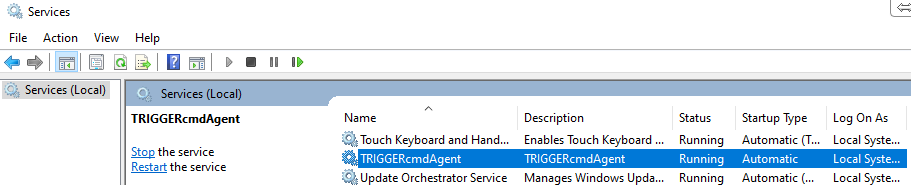
Second, about the Alexa TRIGGERcmd Smart Home skill.
Are you saying, "Alexa, enciende calculator" ?
Does your Runs list for your Calculator command show these entries?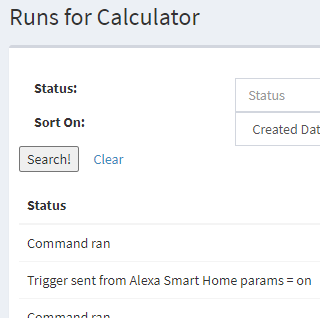
-
I really want to be able to run background commands. I checked that TRIGGERcmdAgent is listed. Today, it suddenly showed both the reboot command and another one for shutdown I made yesterday. But, after changing the trigger for shutdown, the reboot one vanished from web and from device in Amazon Alexa app. About 15 min later, it was detected again and appeared doubled in web.
In the case of the skill, I tried saying that for both calculator and notepad. Also changed the name of calculator in case Alexa (configured in spanish) was not understanding it. In the Runs list for any of my commands I just found these two: "Command ran" and "Trigger sent from website". -
@Diego-Alonso-Aldave-V,
About Alexa Smart Home:
You should be able to see changes within a few seconds at https://alexa.amazon.com under Smart Home Devices when you rename a command or change the voice field. In fact a change to one of those fields solves certain problems because it causes your Alexa device to be deleted and re-created.Please also try using the Alexa app on the phone. That way we can be confident your Alexa app is logged in as the same Amazon account you're testing with. You should be able to swipe down on the ALL DEVICES screen to update your devices list about 5 seconds after making changes to your commands.
About background commands:
The foreground agent (tray icon) adds and removes foreground commands, and the background agent (Windows service) adds and removes background commands.One thing you can do to troubleshoot your background commands is restart the TRIGGERcmdAgent service. It's possible it failed for some reason, and restarting it might fix that.
-
ASH: Yes, I check that the changes are done in this. I have tried changing things but that did not work. I also tried using the Alexa app. Same situation. I must say that the updates appear at least about 1 min later. For some reason, sometimes they take more time.
BGC: I restarted it but still does not work...
-
@Diego-Alonso-Aldave-V, please try these two things:
Remove the · from your computer name. I saw in the log that the system is having a problem finding your computer, and I think that's why.
Va·lar-2
Delete or rename your reboot command because I see you have two of them. Maybe one got added while it was set as a background command and the background service was working.
-
@Russ Sorry for the waiting. I've tried this and it finally works well. Thank you so much.
-
@Diego-Alonso-Aldave-V, awesome. Thanks for letting me know it's working.


Hello! It looks like you're interested in this conversation, but you don't have an account yet.
Getting fed up of having to scroll through the same posts each visit? When you register for an account, you'll always come back to exactly where you were before, and choose to be notified of new replies (either via email, or push notification). You'll also be able to save bookmarks and upvote posts to show your appreciation to other community members.
With your input, this post could be even better 💗
Register Login