Pass variable (parameters) to powershell?
-
I'm trying to pass a variable (a link) to a powershell script, but when I enable parameters, the script doesn't run. It runs if I call the script without parameters. And how is the variable captured in powershell? Thanks.
-
@ef3h37b6, I did a test and it worked for me.
I used this powershell script, saved as d:\tools\urltest.ps1, and made a TRIGGERcmd command with powershell d:\tools\urltest.ps1 as the Command field and with Allow Parameters set to true.
param (
    [string]$URL
)
start $URL
I used the triggercmd.com website's orange Parameters button to send it a URL as a parameter, like this:
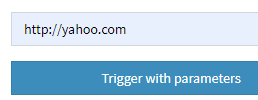
It opened yahoo.com in my default browser, as it should.
Please tell me more about what you've tried that's not working.
-
Awesome, got it working. Thank you.

Hello! It looks like you're interested in this conversation, but you don't have an account yet.
Getting fed up of having to scroll through the same posts each visit? When you register for an account, you'll always come back to exactly where you were before, and choose to be notified of new replies (either via email, or push notification). You'll also be able to save bookmarks and upvote posts to show your appreciation to other community members.
With your input, this post could be even better 💗
Register Login