• "alexa or google will say this AFTER it runs"

    2
    0 Votes
    2 Posts
    493 Views
    RussR
    @itsmeblake , yes, but you have to use one of the original skills, not the smart home one. This post explains how: https://www.triggercmd.com/forum/topic/332/smart-reply-for-voice-with-parameters/5 Basically, you put {result} in the Voice Reply field of your command, and use the sendresult script to send the text you want spoken in place of that {result} placeholder.
  • 1 Votes
    1 Posts
    485 Views
    No one has replied
  • Is possible set 2 or 3 alexa words in the same command?

    6
    0 Votes
    6 Posts
    1k Views
    RussR
    @Mark-Hollis, do you want to run your command with multiple parameters? Like this? notepad one two If so, do you want to provide those two parameters with your voice? If so, yes, you can provide them via an Alexa routine, but you'll want to use the TRIGGERcmd or TRIGGER command skill instead of the TRIGGERcmd Smart Home skill, and follow this procedure instead: Open the Alexa app on your phone: Tap More in the lower right Tap Routines Tap the + in the upper right Tap "Enter routine name" and give it a name Tap "When this happens" then "Voice" and enter the phrase you want to say, then tap Next Tap "Add action" then "Custom" then type: "Ask TRIGGERcmd to run notepad with parameter one two"

  • Windows 11 - Multiple issues

    5
    0 Votes
    5 Posts
    2k Views
    kellanistK
    @Russ Wil do! I haven't seen the issue with the UI since the latest Win 11 update. May have been an issue with an earlier build.
  • Is it possible to wake a laptop from sleep?

    6
    0 Votes
    6 Posts
    4k Views
    RussR
    @Bráulio-Betônico, no problem. Thanks for the question. I'm glad you asked.
  • 0 Votes
    6 Posts
    1k Views
    RussR
    @JeryGale, if you're subscribed you can have multiple computers. You could create an Alexa routine to run a command on multiple PC's at once. You can assign any phrase to our Alexa routine - for example "computers off". Alexa routines can have multiple actions. If you have the Smart Home Alexa skill enabled, your commands will show up under "Smart Home" when you add your actions. So you could say, "Alexa, computers off" and have it run your shutdown command on all of your PC's. Turning the computers on would require you to setup a Wake-On-Lan script. I have a command that can turn my PC on that runs on my Raspberry Pi because it's always on.
  • Triggercmd stopped working.

    5
    0 Votes
    5 Posts
    1k Views
    Neto GerbiN
    @Russ Worked...thank you very much!!! Awesome!
  • Boot on Arch

    Moved
    27
    0 Votes
    27 Posts
    10k Views
    Gustavo SoaresG
    @Russ, very good. I think applying a decode('utf-8') should solve this problem. I really hadn't tried using special characters yet.
  • Trigger CMD for MacBook Pro doesn't work

    2
    1
    0 Votes
    2 Posts
    450 Views
    RussR
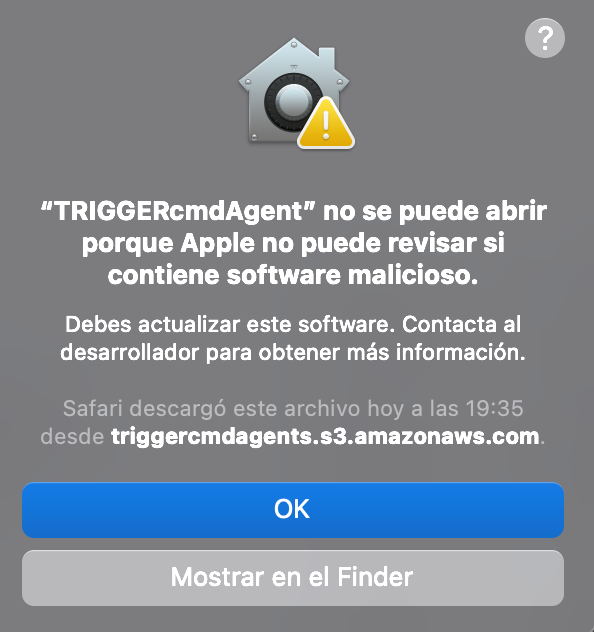
    @eocode, you just have to click OK. It's not malicious software, it's just not in Apple's database.
  • Varias cuentas

    1
    0 Votes
    1 Posts
    400 Views
    No one has replied
  • Issue with running batch file

    4
    1
    0 Votes
    4 Posts
    951 Views
    RussR
    @esaltat, awesome.
  • Share your best command

    3
    0 Votes
    3 Posts
    1k Views
    MikeM
    @Russ This is amazing and so useful. I will be getting the new Mac in a couple of weeks and I was wondering already how I get my commands backed up! Perfect timing.
  • Enabling Voice Reply on TriggerCMD Smart Home

    4
    0 Votes
    4 Posts
    1k Views
    RussR
    @esaltat, unfortunately that's a problem I can't solve because Amazon doesn't give developers the ability to change the audible feedback for Smart Home skills. Thanks for sharing your use case. That's pretty cool.
  • Subscription Issue

    3
    0 Votes
    3 Posts
    721 Views
    E
    Thanks!, I resubscribed.
  • I subscribed but still can't add more machines / commands

    9
    0 Votes
    9 Posts
    2k Views
    W
    @Russ I'll get it together over the weekend, but essentially the RPITX project provided most of the answers for me https://github.com/F5OEO/rpitx it's a bit of a cludge as it uses a short wire on a Pi GPIO pin to TX, but it works just fine. I've also got a HackRF One, which was really useful for capturing and decoding the signal from the gate remote, but with a cheap RTL-SDR dongle you can do that with RPITX as well. I've even seen people getting stuff like rolljamming working with the Pi - which has been in the news in the UK as the basis of replay attacks used by car thieves. Radio was a whole new world to me and I have to say that after a few intense weeks of getting various projects built, I still feel like I know next to nothing :-). Main thing I learned - the right type of antenna for the application is crucial. Anyway, I'll waffle on about it in the forum but please don't hesitate to get in touch if I can help. Ade
  • Reconnect

    2
    1
    0 Votes
    2 Posts
    419 Views
    RussR
    @Alejandro-Lopez, you can use the same TRIGGERcmd account, but if you don't have the commands.json file from your c:\Users\(username)\.TRIGGERcmdData folder, you'll need to recreate your commands because that's where they were stored. For security reasons, they're not stored in the cloud. You'll need to delete your old computer from your account because unless you're subscribed you can only have 1 computer.
  • Integromat connect keeps breaking

    9
    0 Votes
    9 Posts
    2k Views
    Irfan KhanI
    @Russ looks like its been stable! thank you!
  • NO PUEDO INSTALAR EL PROGRAMA, ES EN WINDOWS 32BITS.

    2
    0 Votes
    2 Posts
    409 Views
    RussR
    @HENRY-BADU, 32bit Windows isn't supported, but people have made it work with these instructions: https://www.triggercmd.com/forum/topic/99/no-gui-triggercmd-agent-that-works-on-32bit-windows
  • Error while connecting to Samsung SmartThings

    6
    1 Votes
    6 Posts
    2k Views
    RussR
    @rkstormer, thanks for your patience. I'm glad we got it figured out. FYI, this typo was the problem with the SmartApp code. This commit fixes it, so you can upgrade to the latest version of the code now and it should work fine. https://github.com/rvmey/SmartThingsPublic/commit/354a7bd74ae911197433c476f0c59c1dba5de91a#diff-cf70bb620d755db3e5a6ede5fd18e43d1b639309fa4e7b63c3e2e9222b2b3992
  • pair code

    2
    0 Votes
    2 Posts
    659 Views
    RussR
    @Steve-Gardinier, are you trying to pair the tcmd command line utility? That's the only use for the pair code so far. You use the token on the Instructions page to login the agent on your computer, or the Android TRIGGERcmd Widgets app.