• Unable to log into dashboard

    9
    0 Votes
    9 Posts
    2k Views
    RussR
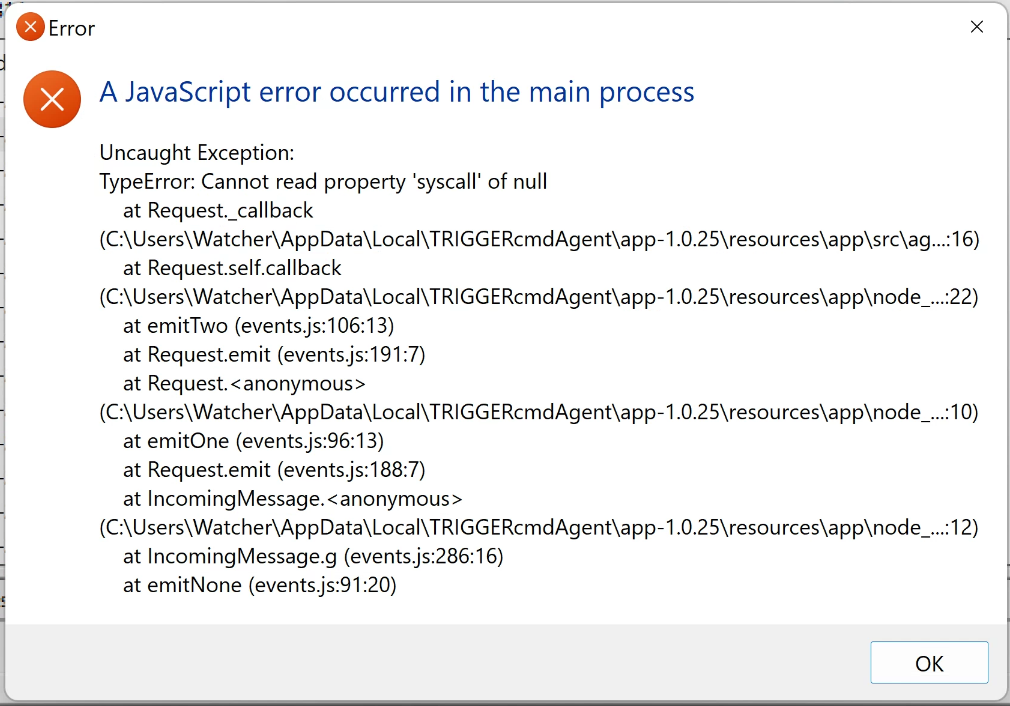
    @barry-hamilton, @Ricale-Kincheski, @k8nr, @marcelo-muller, @Moacir-Vilela-Sêga, thank you for reporting the problem. I do see I had a problem in the logs. I'm looking into it now.
  • Please help

    help
    3
    0 Votes
    3 Posts
    1k Views
    Martín Ruiz BelloM
    @russ goodness! I rest easy knowing that there is no need to log in or issue any commands. Thank you!!!
  • Command for run gulp task is not working

    2
    0 Votes
    2 Posts
    347 Views
    RussR
    @renan-hugo, please try this: Run which gulp to get the path to the gulp command. Like this: russ@russmac % which gulp /Users/russ/.nvm/versions/node/v8.17.0/bin/gulp Then make your shell script something like this: #!/usr/bin/env bash cd /Applications/XAMPP/xamppfiles/htdocs/cative/wp-content/themes/cative/gulp/ /Users/russ/.nvm/versions/node/v8.17.0/bin/gulp assistir > /tmp/output.txt 2>&1 For some reason you need to specify the full path to the executables you install via npm i -g. That's been my experience on Mac anyways. If that doesn't work, please try running the gulp script like this: node /Users/russ/.nvm/versions/node/v8.17.0/bin/gulp Or even like this: /Users/russ/.nvm/versions/node/v8.17.0/bin/node /Users/russ/.nvm/versions/node/v8.17.0/bin/gulp To do that last one, you'll need the full path to your node executable which you can find with this command: which node
  • Command Doesn't Work If PC Hasn't Been Used Recently (Not In Sleep)

    4
    0 Votes
    4 Posts
    2k Views
    RussR
    @alexander-cleary, I'm trying to reproduce the problem myself. I setup my Windows laptop the same way - to not go to sleep when I close the lid (while plugged in to AC power). Hopefully I can reproduce the problem you see. I'll know in about an hour. So far I know it's working because I see the "Command ran" entries in the runs list. Also if you haven't already done it, could you see whether leaving the lid open makes a difference? EDIT: I waited more than an hour and the TRIGGERcmd agent on my laptop is still responding. [image: 1653234937517-f7c92b55-e3a6-4787-9219-9e280cb52f4a-image.png] My laptop is Windows 10. Is yours Windows 11 by chance?
  • ahcmd.exe problem

    28
    0 Votes
    28 Posts
    13k Views
    RussR
    @newstuffoldstuff, I see. If you want to avoid reducing your User Access Control setting, you could try installing the background service and running it as a background command. It will run as Local System.
  • NO APARECE POP UP PARA PONER TOKEN

    2
    0 Votes
    2 Posts
    455 Views
    RussR
    @paola-castillo, I used Google Translate to translate what you wrote as: "Hello, I downloaded and installed the program, but the pop up where the token is put never appeared, and I have not been able to link my computer, how else can I do this process to be able to link my computer?" Assuming you're running Windows, you could run this command to run the agent in text mode in a cmd window with this command: node %LOCALAPPDATA%\TRIGGERcmdAgent\app-1.0.25\resources\app\src\agent.js --console You'll need to install Node JS first.
  • Can not connect to Zapier

    4
    0 Votes
    4 Posts
    637 Views
    RussR
    @Favored-live-Tech , please try again, it should work now. For some reason Zapier changed how they send parameters for their oauth flow. I was able to make a corresponding change on my end to accomodate it.
  • Stacking commands

    3
    0 Votes
    3 Posts
    1k Views
    RussR
    @dinco, like @Xander said, WOL needs a second device/computer on your network to turn on your PC. The script you run on that second device could in theory turn on your PC, then loop until the PC until it's up, then use the tcmd command to remotely run a command on the PC. The trick is what to put in the loop to detect whether the Trigger CMD agent started. This is one idea this: Wait 10 seconds Use tcmd to run a script on the PC that runs a command on the original PC that just creates a flag file. If the flag file is detected, delete it and exit the loop. You'd want uncheck this in your profile page if you do that though. Otherwise you'll get an email saying the command didn't run because the agent isn't started. [image: 1650591601094-88b5c88a-d267-492f-86cc-025908202a6b-image.png]
  • How to get working with BitFocus Companion

    2
    0 Votes
    2 Posts
    4k Views
    RussR
    @favored-live-tech, here's one simple way to add a button to trigger one of your commands: First add Generic HTTP Requests under Connections. [image: 1650501127781-facc1bb3-57ff-4c08-a058-6b88aa905954-image.png] Click the Bookmark button next to the command you want to run. [image: 1650501275396-37c274fd-cb5a-4fd9-9af1-de758106a69c-image.png] Copy the bookmark URL for that command. It looks like this: https://www.triggercmd.com/trigger/bookmark?token=blahblah.. Create a "Regular button" with http: GET as the "Press action" Paste the bookmark URL into the URL field (lower-right in this screenshot). [image: 1650501049253-bdfaf20f-cb9f-4623-9e64-cd2eac1f76ab-image.png] Instead of the bookmark URL you could also use a URL like this: https://www.triggercmd.com/api/run/triggerSave?computer=(your computer name)&trigger=calculator&token=(token) Where token is a token from the Instructions page. Also replace calculator with your command's name. If there's a lot of demand, I'd be willing to make an official TRIGGERcmd connection module for it.
  • Echo dot 4 Don't Found Commands

    3
    0 Votes
    3 Posts
    606 Views
    RussR
    @emristv, good. I'm glad you figured it out. I answered here too.
  • Trigger Command Outage?

    3
    0 Votes
    3 Posts
    748 Views
    A
    @russ Wonderful, thank you!
  • Installation has failed

    8
    2
    0 Votes
    8 Posts
    2k Views
    RussR
    @igor-gallette , did you try temporarily disabling antivirus?
  • This topic is deleted!

    1
    0 Votes
    1 Posts
    7 Views
    No one has replied
  • Two softwares - two programs - one trigger

    3
    1
    0 Votes
    3 Posts
    780 Views
    RussR
    @oz-perrenoud, here's another idea for you. Put "start " at the beginning, like this: start C:\Windows\System32\notepad.exe && C:\Windows\System32\calc.exe The "start" command exits right after it spawns Notepad so it runs the next command, calc.exe immediately. I tried it and it worked for me.
  • Raspberry Pi network install beta

    raspberry pi
    1
    0 Votes
    1 Posts
    640 Views
    No one has replied
  • Logging

    7
    0 Votes
    7 Posts
    2k Views
    RussR
    @legtod2, if you want to use the TRIGGERcmd Smart Home Alexa skill to turn on and turn off galculator, I'd recommend using the offCommand field like this: {"trigger":"Open Calculator","command":"/home/pi/open_galc.sh","offCommand": "/home/pi/close_galc.sh","ground":"foreground","voice":"calculator","allowParams": "true"}, Notice I set "allowParams": "true" which is necessary to use offCommand, but because you're using offCommand, your /home/pi/open_galc.sh command won't receive the on parameter. Alternatively you could use one shell script that expects the on or off parameter like I did here.
  • Echo show cards

    7
    0 Votes
    7 Posts
    1k Views
    RussR
    @legtod2, I remember your fruitbox jukebox project. It's a cool idea. I might end up dedicating one of my own Pi's to that use-case. You're apparently using the TRIGGERcmd or TRIGGER command skill. Both of those skills allow you to specify text that Alexa will say and display after the command runs. [image: 1645381608767-8edfe45d-df88-4397-a3d3-af9a4650f026-image.png] You can set that text for the command in the GUI editor: [image: 1645381717228-37419987-f5b0-4523-8ea3-044ce681b730-image.png] In my commands.json it looks like this: "voiceReply": "Also try, \"Alexa, next song.\"", BTW, for "Alexa, next song" to work, you'd need to create an Alexa Routine to run the next song command when you say that.
  • Alternatives to tinytask?

    2
    0 Votes
    2 Posts
    3k Views
    RussR
    @raquel, I've tried AutoHotKey before. There's also MacroMaker, Macro Express, but I haven't tried them.
  • Dynamic Replies from Alexa via TRIGGERcmd?

    sendresult
    11
    0 Votes
    11 Posts
    4k Views
    Furkan CevikF
    @russ Thanks Russ!
  • TRIGGERcmds not refreshing in Google Home

    15
    0 Votes
    15 Posts
    3k Views
    RussR
    @david-jones, awesome. I'm so sorry for the trouble. Please email me a copy of that commands.json file so I can prevent that problem in the future.