• Alternatives to tinytask?

    2
    0 Votes
    2 Posts
    3k Views
    RussR
    @raquel, I've tried AutoHotKey before. There's also MacroMaker, Macro Express, but I haven't tried them.
  • Dynamic Replies from Alexa via TRIGGERcmd?

    sendresult
    11
    0 Votes
    11 Posts
    4k Views
    Furkan CevikF
    @russ Thanks Russ!
  • TRIGGERcmds not refreshing in Google Home

    15
    0 Votes
    15 Posts
    3k Views
    RussR
    @david-jones, awesome. I'm so sorry for the trouble. Please email me a copy of that commands.json file so I can prevent that problem in the future.
  • "What can I say on ..?"

    3
    0 Votes
    3 Posts
    1k Views
    David JonesD
    @david-jones Have posted the app now as part of a GiHub repository I'm building for TRIGGERcmd on PC and RPi: djaus2/TRIGGERcmdRPi Look for WhatCanISay app.
  • This topic is deleted!

    1
    0 Votes
    1 Posts
    2 Views
    No one has replied
  • New in TriggerCMD, how to send a keystroke?

    1
    1
    0 Votes
    1 Posts
    343 Views
    No one has replied
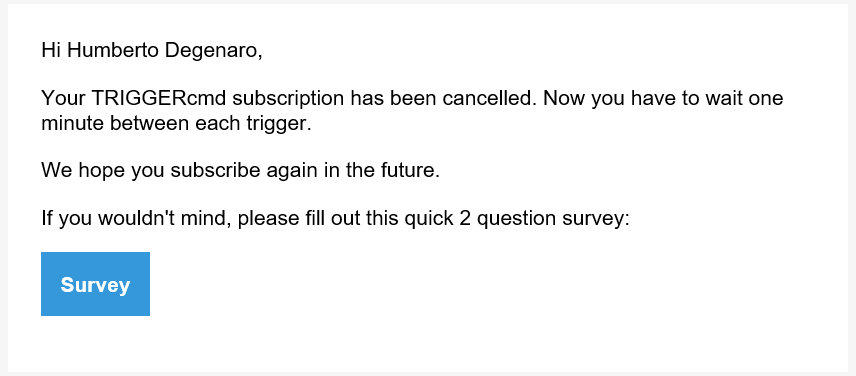
  • Subscription canceled twice!

    4
    2
    0 Votes
    4 Posts
    1k Views
    RussR
    @hdegenaro, good. Also thank you for subscribing.
  • 0 Votes
    2 Posts
    806 Views
    RussR
    @david-jones, if you enable the TRIGGERcmd Google Action it should work. You've only enabled the TRIGGERcmd Smart Home Google Action so far. I like the Smart Home action better personally because it creates on/off smart home switches for each of your commands, so Google Assistant just has to match your words to one of them when you say turn on X or turn off X. It has a much better chance of matching your words to your commands because it has a list of them ahead of time.
  • 0 Votes
    13 Posts
    4k Views
    RussR
    @tuicemen, This is actually wrong ^. "deviceType":"light" is not a thing. If adding that made it work, it's because when you change a command, TRIGGERcmd deletes and re-creates the Alexa smart home device. That needed to happen for the Alexa device associated with your command to have the new brightness feature. Sorry I didn't tell you that sooner. Any newly created commands will have the new brightness and color features. Old commands just need to be changed so they get re-created. Or you can delete and re-discover them at https://alexa.amazon.com. Also btw, only Alexa supports brightness and color so far. I'll look into Google Assistant soon. EDIT 3/21/22: The "TRIGGERcmd Smart Home" action on Google Assistant supports color and brightness now too.
  • Questions on TCMD tool and usage?

    12
    0 Votes
    12 Posts
    3k Views
    tuicemenT
    @russ Ya it is so simple to use. I like the list option for showing trigger names. My memory isn't what it use to be and my spelling never was the greatest!
  • Cast equivalent on RPi for T2S?

    4
    0 Votes
    4 Posts
    999 Views
    RussR
    @david-jones, have you considered this tool? https://github.com/vishen/go-chromecast It's a Go utility so they have binaries for all different OS's, including arm7 (Rpi).
  • Shutdown Arch Linux

    1
    0 Votes
    1 Posts
    546 Views
    No one has replied
  • API call to list your commands on each computer

    3
    1 Votes
    3 Posts
    2k Views
    RussR
    @esaltat, in Linux you could use a command like this: curl 'https://triggercmd.com/api/run/list?&sortOn=createdAt,DESC&command_id=(your command id)&token=(your token)' You'll see your command id in your browser URL when you click the View Runs button for that command: [image: 1642963027146-258f7d6a-98cf-41a1-a032-8893ff3724c0-image.png] Or install jq and use this command will show two fields you're interested in: curl 'https://triggercmd.com/api/run/list?&sortOn=createdAt,DESC&command_id=(your command id)&token=(your token)' | jq -r '.records[] | .createdAt + " " + .status' 2022-01-23T18:38:03.008Z Command ran 2022-01-23T18:38:02.844Z Trigger sent from website 2022-01-22T19:34:41.879Z Command ran 2022-01-22T19:34:40.150Z Trigger sent from Google Assistant Smart Home params = on 2022-01-15T16:38:46.310Z Command ran 2022-01-15T16:38:46.067Z Trigger sent from Google Assistant Smart Home params = on 2022-01-15T16:38:39.210Z Command ran 2022-01-15T16:38:38.205Z Trigger sent from Alexa Smart Home params = on 2022-01-15T16:18:52.395Z Command ran 2022-01-15T16:18:52.274Z Trigger sent from Alexa
  • Trigger Android to launch app from windows

    1
    0 Votes
    1 Posts
    409 Views
    No one has replied
  • 0 Votes
    1 Posts
    761 Views
    No one has replied
  • Alexa -->TriggerCmd-->Pi-->Fruitbox Jukebox integration

    5
    0 Votes
    5 Posts
    3k Views
    L
    @russ Very cool suggestion. Send the equivalent to pressing a local keyboard keypress.
  • como iniciar automaticamente triggercmd con windows 10?

    2
    0 Votes
    2 Posts
    560 Views
    RussR
    @david-albino, the agent should start automatically when you login. For some use-cases you might want to run the background agent which starts up even before you login because it runs as a Windows service. It only runs background commands and they run in the background so you don't see them running. That's why use-cases are limited. To install background agent, you right-click the TRIGGERcmd agent icon in your tray, then click Background Service, then Install Background Service. [image: 1642459241712-ee774c45-895e-4294-81f5-9846a4b741ec-image.png] If you want the normal foreground agent to start during boot without having to login, you could also configure your Windows to automatically login.

  • Billing issue

    3
    0 Votes
    3 Posts
    508 Views
    B
    @russ Ah! No worries then. Are you able to still complete a refund as I don't intend on using the service anymore? Many thanks
  • Windows 11 on Raspberry Pi?

    raspberry pi
    5
    0 Votes
    5 Posts
    1k Views
    tuicemenT
    @russ I've been researching this some what. As my current PC doesn't support Windows 11 (or so it says). There are still some things that need work arounds but hopefully they get worked out for when your 8 gig Pi arrives.
  • Interface possibilities

    feature request
    3
    0 Votes
    3 Posts
    1k Views
    tuicemenT
    @russ said in Interface possibilities: FYI, the agent does backup your commands.json file to commands.json.backup every time you change it, and it auto-restores the backup if you make a mistake in json formatting. Awesome, I did see the commands.json.backup file but didn't realize it auto restored. I don't like to use the cloud for backups, however I do for some things as well as a back up on disks.