TRIGGERcmd
    • Categories
    • Recent
    • Tags
    • Popular
    • Users
    • Groups
    • Search
    • Register
    • Login
    1. Home
    2. General Discussion
    Log in to post
    Load new posts
    • Recently Replied
    • Recently Created
    • Most Posts
    • Most Votes
    • Most Views
    • Oz PerrenoudO

      Two softwares - two programs - one trigger

      • • Oz Perrenoud
      3
      0
      Votes
      3
      Posts
      463
      Views

      RussR

      @oz-perrenoud, here's another idea for you. Put "start " at the beginning, like this:

      start C:\Windows\System32\notepad.exe && C:\Windows\System32\calc.exe

      The "start" command exits right after it spawns Notepad so it runs the next command, calc.exe immediately.

      I tried it and it worked for me.

    • RussR

      Raspberry Pi network install beta

      raspberry pi • • Russ
      1
      0
      Votes
      1
      Posts
      432
      Views

      No one has replied

    • L

      Logging

      • • legtod2
      7
      0
      Votes
      7
      Posts
      888
      Views

      RussR

      @legtod2, if you want to use the TRIGGERcmd Smart Home Alexa skill to turn on and turn off galculator, I'd recommend using the offCommand field like this:

      {"trigger":"Open Calculator","command":"/home/pi/open_galc.sh","offCommand": "/home/pi/close_galc.sh","ground":"foreground","voice":"calculator","allowParams": "true"},

      Notice I set "allowParams": "true" which is necessary to use offCommand, but because you're using offCommand, your /home/pi/open_galc.sh command won't receive the on parameter.

      Alternatively you could use one shell script that expects the on or off parameter like I did here.
    • L

      Echo show cards

      • • legtod2
      7
      0
      Votes
      7
      Posts
      644
      Views

      RussR

      @legtod2, I remember your fruitbox jukebox project. It's a cool idea. I might end up dedicating one of my own Pi's to that use-case.

      You're apparently using the TRIGGERcmd or TRIGGER command skill. Both of those skills allow you to specify text that Alexa will say and display after the command runs.
      8edfe45d-df88-4397-a3d3-af9a4650f026-image.png

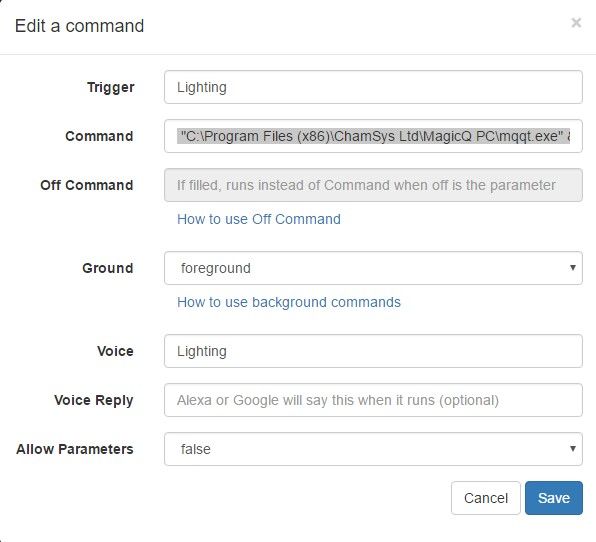
      You can set that text for the command in the GUI editor:
      37419987-f5b0-4523-8ea3-044ce681b730-image.png

      In my commands.json it looks like this:

      "voiceReply": "Also try, \"Alexa, next song.\"",

      BTW, for "Alexa, next song" to work, you'd need to create an Alexa Routine to run the next song command when you say that.

    • R

      Alternatives to tinytask?

      • • raquel
      2
      0
      Votes
      2
      Posts
      929
      Views

      RussR

      @raquel, I've tried AutoHotKey before. There's also MacroMaker, Macro Express, but I haven't tried them.

    • Furkan CevikF

      Dynamic Replies from Alexa via TRIGGERcmd?

      sendresult • • Furkan Cevik
      11
      0
      Votes
      11
      Posts
      2.4k
      Views

      Furkan CevikF

      @russ Thanks Russ!

    • David JonesD

      TRIGGERcmds not refreshing in Google Home

      • • David Jones
      15
      0
      Votes
      15
      Posts
      2.1k
      Views

      RussR

      @david-jones, awesome. I'm so sorry for the trouble. Please email me a copy of that commands.json file so I can prevent that problem in the future.

    • David JonesD

      "What can I say on ..?"

      • • David Jones
      3
      0
      Votes
      3
      Posts
      623
      Views

      David JonesD

      @david-jones Have posted the app now as part of a GiHub repository I'm building for TRIGGERcmd on PC and RPi: djaus2/TRIGGERcmdRPi Look for WhatCanISay app.

    • Germano HenningG

      This topic is deleted!

      • • Germano Henning
      1
      0
      Votes
      1
      Posts
      2
      Views

      No one has replied

    • Johnny 0J

      New in TriggerCMD, how to send a keystroke?

      • • Johnny 0
      1
      0
      Votes
      1
      Posts
      158
      Views

      No one has replied

    • H

      Subscription canceled twice!

      • • hdegenaro
      4
      0
      Votes
      4
      Posts
      545
      Views

      RussR

      @hdegenaro, good. Also thank you for subscribing.

    • David JonesD

      Google nest says:"TRIGGERcmd not registered on Google Home" when it is.

      • • David Jones
      2
      0
      Votes
      2
      Posts
      567
      Views

      RussR

      @david-jones, if you enable the TRIGGERcmd Google Action it should work.

      You've only enabled the TRIGGERcmd Smart Home Google Action so far.

      I like the Smart Home action better personally because it creates on/off smart home switches for each of your commands, so Google Assistant just has to match your words to one of them when you say turn on X or turn off X. It has a much better chance of matching your words to your commands because it has a list of them ahead of time.

    • tuicemenT

      Feature request: Add ability to Dim with Alexa & Google

      feature request google assistan alexa • • tuicemen
      13
      0
      Votes
      13
      Posts
      2.2k
      Views

      RussR

      @tuicemen,

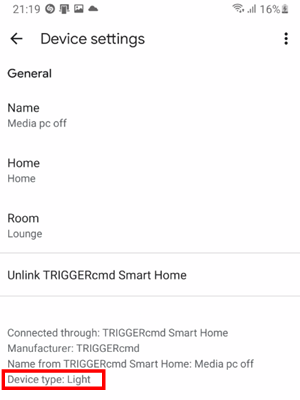
      This is actually wrong ^. "deviceType":"light" is not a thing.

      If adding that made it work, it's because when you change a command, TRIGGERcmd deletes and re-creates the Alexa smart home device. That needed to happen for the Alexa device associated with your command to have the new brightness feature.

      Sorry I didn't tell you that sooner. Any newly created commands will have the new brightness and color features. Old commands just need to be changed so they get re-created. Or you can delete and re-discover them at https://alexa.amazon.com.

      Also btw, only Alexa supports brightness and color so far. I'll look into Google Assistant soon.

      EDIT 3/21/22: The "TRIGGERcmd Smart Home" action on Google Assistant supports color and brightness now too.

    • tuicemenT

      Questions on TCMD tool and usage?

      • • tuicemen
      12
      0
      Votes
      12
      Posts
      1.3k
      Views

      tuicemenT

      @russ Ya it is so simple to use. I like the list option for showing trigger names. My memory isn't what it use to be and my spelling never was the greatest!

    • David JonesD

      Cast equivalent on RPi for T2S?

      • • David Jones
      4
      0
      Votes
      4
      Posts
      523
      Views

      RussR

      @david-jones, have you considered this tool?

      https://github.com/vishen/go-chromecast

      It's a Go utility so they have binaries for all different OS's, including arm7 (Rpi).

    • Maicon FidélixM

      Shutdown Arch Linux

      • • Maicon Fidélix
      1
      0
      Votes
      1
      Posts
      207
      Views

      No one has replied

    • RussR

      API call to list your commands on each computer

      • • Russ
      3
      1
      Votes
      3
      Posts
      1.8k
      Views

      RussR

      @esaltat, in Linux you could use a command like this:

      curl 'https://triggercmd.com/api/run/list?&sortOn=createdAt,DESC&command_id=(your command id)&token=(your token)'

      You'll see your command id in your browser URL when you click the View Runs button for that command:
      258f7d6a-98cf-41a1-a032-8893ff3724c0-image.png

      Or install jq and use this command will show two fields you're interested in:

      curl 'https://triggercmd.com/api/run/list?&sortOn=createdAt,DESC&command_id=(your command id)&token=(your token)' | jq -r '.records[] | .createdAt + " " + .status' 2022-01-23T18:38:03.008Z Command ran 2022-01-23T18:38:02.844Z Trigger sent from website 2022-01-22T19:34:41.879Z Command ran 2022-01-22T19:34:40.150Z Trigger sent from Google Assistant Smart Home params = on 2022-01-15T16:38:46.310Z Command ran 2022-01-15T16:38:46.067Z Trigger sent from Google Assistant Smart Home params = on 2022-01-15T16:38:39.210Z Command ran 2022-01-15T16:38:38.205Z Trigger sent from Alexa Smart Home params = on 2022-01-15T16:18:52.395Z Command ran 2022-01-15T16:18:52.274Z Trigger sent from Alexa
    • I

      Trigger Android to launch app from windows

      • • itsmeblake
      1
      0
      Votes
      1
      Posts
      171
      Views

      No one has replied

    • RussR

      Public panel with QR code to switch my lights via Alexa routines

      alexa • • Russ
      1
      0
      Votes
      1
      Posts
      466
      Views

      No one has replied

    • L

      Alexa -->TriggerCmd-->Pi-->Fruitbox Jukebox integration

      • • legtod2
      5
      0
      Votes
      5
      Posts
      855
      Views

      L

      @russ Very cool suggestion. Send the equivalent to pressing a local keyboard keypress.