You can use this strip, or any similar 5V addressable LED strip.
To prepare the Raspberry Pi with the OS, the TRIGGERcmd agent, and connection to your wifi, I recommend the setup.bat script that makes that process a snap.
I used a $10 Raspberry Pi Zero W, but any Pi should work.
Run these commands to install pre-reqs:
sudo su -
apt install python3-pip
pip3 install rpi_ws281x
Contents of green.py:
import sys
from rpi_ws281x import *

if len(sys.argv) > 1:
    if sys.argv[1] == "white":
        color = Color(255,255,255)
        print("white")
    elif sys.argv[1] == "green":
        print("green")
        color = Color(0,255,0)
    elif sys.argv[1] == "red":
        color = Color(255,0,0)
        print("red")
    elif sys.argv[1] == "blue":
        color = Color(0,0,255)
        print("blue")
    elif sys.argv[1] == "off":
        color = Color(0,0,0)
        print("off")
    else:
        color = Color(255,255,255) # white
        print("white")
else:
    color = Color(255,255,255) # white

# LED strip configuration:
LED_COUNT      = 300      # Number of LED pixels.
LED_PIN        = 18      # GPIO pin connected to the pixels (18 uses PWM!).
#LED_PIN        = 10      # GPIO pin connected to the pixels (10 uses SPI /dev/spidev0.0).
LED_FREQ_HZ    = 800000  # LED signal frequency in hertz (usually 800khz)
LED_DMA        = 10      # DMA channel to use for generating signal (try 10)
LED_BRIGHTNESS = 255     # Set to 0 for darkest and 255 for brightest
LED_INVERT     = False   # True to invert the signal (when using NPN transistor level shift)
LED_CHANNEL    = 0       # set to '1' for GPIOs 13, 19, 41, 45 or 53

strip = Adafruit_NeoPixel(LED_COUNT, LED_PIN, LED_FREQ_HZ,LED_DMA,LED_INVERT,LED_BRIGHTNESS,LED_CHANNEL)
strip.begin()

for x in range(0,LED_COUNT):
    strip.setPixelColor(x,color)

strip.show()
0,255,0 is green, 255,0,0 is red, and 0,0,255 is blue.
commands.json entries:
    {"trigger":"Lights","command":"python3 \/root\/leds.py","ground":"background","voice":"lights","allowParams": "true"},
    {"trigger":"White","command":"python3 \/root\/leds.py white","ground":"background","voice":"white","allowParams": "false"},
    {"trigger":"Green","command":"python3 \/root\/leds.py green","ground":"background","voice":"green","allowParams": "false"},
    {"trigger":"Blue","command":"python3 \/root\/leds.py blue","ground":"background","voice":"blue","allowParams": "false"},
    {"trigger":"Red","command":"python3 \/root\/leds.py red","ground":"background","voice":"red","allowParams": "false"},
    {"trigger":"Off","command":"python3 \/root\/leds.py off","ground":"background","voice":"off","allowParams": "false"}
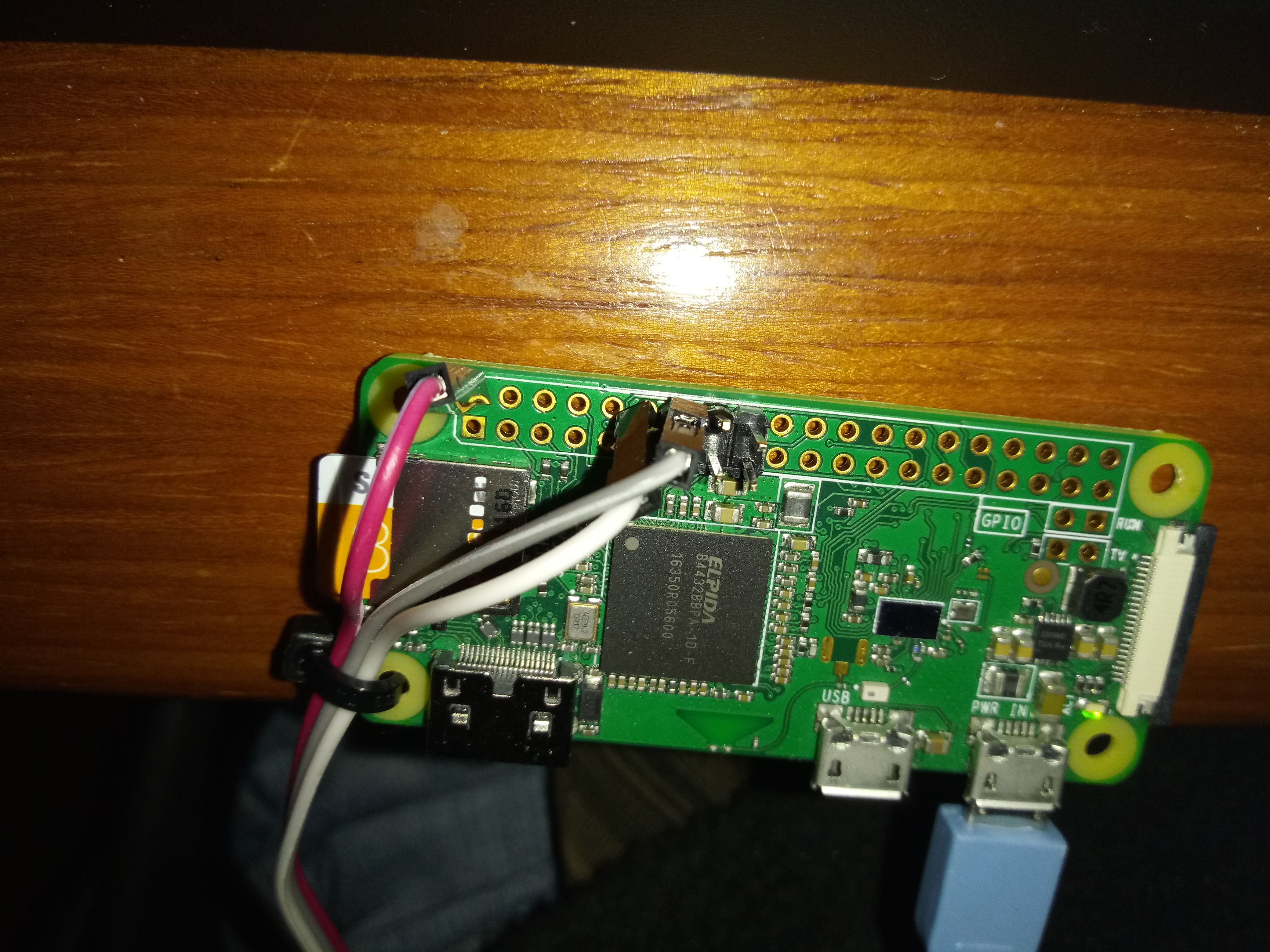
This picture shows how to wire it. Red is 5V, Grey is ground, and White is signal (middle wire on the LED strip).