<title>
<![CDATA[ How do I mute Realtek speakers on my Windows computer? ]]>
</title>
<description>
<![CDATA[ <p dir="auto">What is the command to mute Realtek speakers on my Windows computer?</p>
]]>
</description>
<link>https://www.triggercmd.com/forum/topic/2878/how-do-i-mute-realtek-speakers-on-my-windows-computer</link>
<generator>RSS for Node</generator>
<lastBuildDate>Thu, 14 Aug 2025 15:06:38 GMT</lastBuildDate>
<atom:link href="https://www.triggercmd.com/forum/topic/2878.rss" rel="self" type="application/rss+xml"/>
<pubDate>Thu, 27 Jun 2024 23:27:59 GMT</pubDate>
<ttl>60</ttl>
<item>
<title>
<![CDATA[ Reply to How do I mute Realtek speakers on my Windows computer? on Wed, 11 Sep 2024 13:36:20 GMT ]]>
</title>
<description>
<![CDATA[ <p dir="auto">Go into Sound settings, find your Realtek device, and disable it there if you don’t want it to play anything at all.</p>
]]>
</description>
<link>https://www.triggercmd.com/forum/post/8187</link>
<guid isPermaLink="true">https://www.triggercmd.com/forum/post/8187</guid>
<dc:creator>
...</dc:creator>
<pubDate>Wed, 11 Sep 2024 13:36:20 GMT</pubDate>
</item>
<item>
<title>
<![CDATA[ Reply to How do I mute Realtek speakers on my Windows computer? on Mon, 05 Aug 2024 01:56:40 GMT ]]>
</title>
<description>
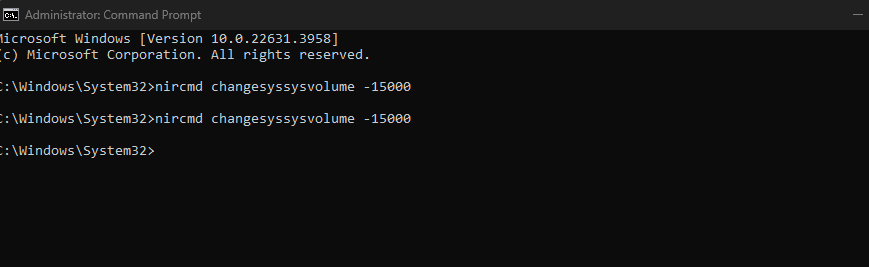
<![CDATA[ <p dir="auto"><a class="mention plugin-mentions-user plugin-mentions-a" href="https://www.triggercmd.com/forum/uid/22279">@D0llyy</a>, I see the problem. Your command is wrong. It should be this:</p>
<pre><code>nircmd changesysvolume -15000
</code></pre>
<p dir="auto">Your command has a double sys in change<strong>syssys</strong>volume.</p>
]]>
</description>
<link>https://www.triggercmd.com/forum/post/8112</link>
<guid isPermaLink="true">https://www.triggercmd.com/forum/post/8112</guid>
<dc:creator>
...</dc:creator>
<pubDate>Mon, 05 Aug 2024 01:56:40 GMT</pubDate>
</item>
<item>
<title>
<![CDATA[ Reply to How do I mute Realtek speakers on my Windows computer? on Mon, 05 Aug 2024 01:42:10 GMT ]]>
</title>
<description>
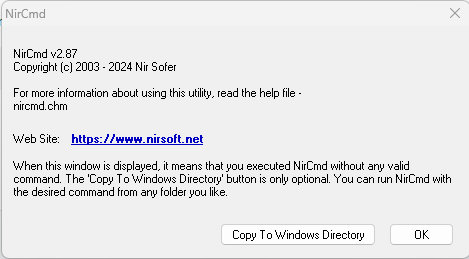
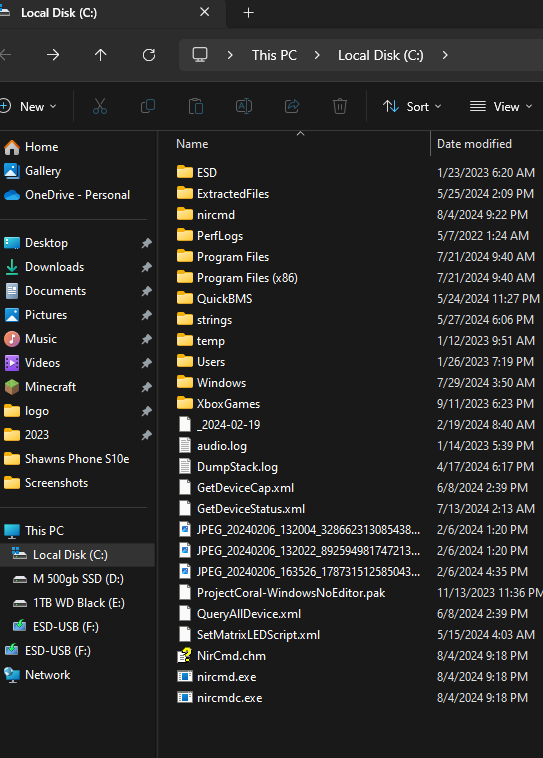
<![CDATA[ <p dir="auto"><a class="mention plugin-mentions-user plugin-mentions-a" href="https://www.triggercmd.com/forum/uid/1">@Russ</a> I copied the nircmdc.exe, nircmd.exe, and NirCmd.chm to the Local Disk (C:) Then I lunched the Command Prompt when I typed the >nircmd in the command this message pops:<br />
<img src="/forum/assets/uploads/files/1722821983063-screenshot-2024-08-04-213919.png" alt="Screenshot 2024-08-04 213919.png" class=" img-fluid img-markdown" /></p>
<p dir="auto">and then when I tested the command using >nircmd changesyssysvolume -15000 it didn't work and that message kept showing and I keep clicking okay</p>
<p dir="auto"><img src="/forum/assets/uploads/files/1722822088491-screenshot-2024-08-04-214116.png" alt="Screenshot 2024-08-04 214116.png" class=" img-fluid img-markdown" /><br />
<img src="/forum/assets/uploads/files/1722822124589-screenshot-2024-08-04-214153.png" alt="Screenshot 2024-08-04 214153.png" class=" img-fluid img-markdown" /></p>
]]>
</description>
<link>https://www.triggercmd.com/forum/post/8111</link>
<guid isPermaLink="true">https://www.triggercmd.com/forum/post/8111</guid>
<dc:creator>
...</dc:creator>
<pubDate>Mon, 05 Aug 2024 01:42:10 GMT</pubDate>
</item>
<item>
<title>
<![CDATA[ Reply to How do I mute Realtek speakers on my Windows computer? on Mon, 05 Aug 2024 01:16:11 GMT ]]>
</title>
<description>
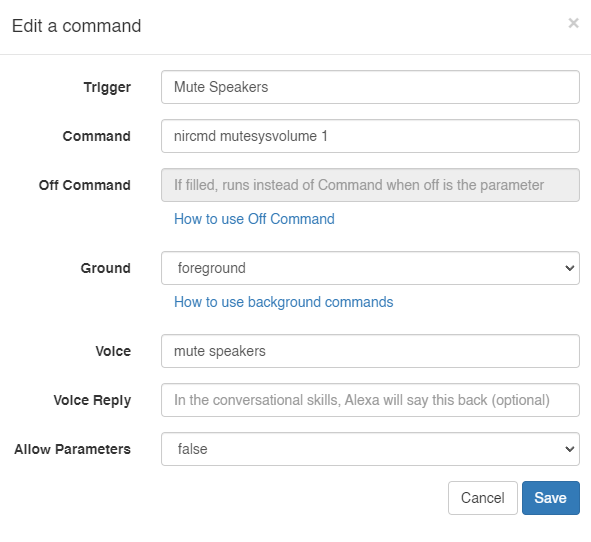
<![CDATA[ <p dir="auto"><a class="mention plugin-mentions-user plugin-mentions-a" href="https://www.triggercmd.com/forum/uid/22279">@D0llyy</a> I tried it and it didn't work. Here is a screenshot.</p>
<p dir="auto"><img src="/forum/assets/uploads/files/1722820560610-screenshot-2024-08-04-211529.png" alt="Screenshot 2024-08-04 211529.png" class=" img-fluid img-markdown" /></p>
]]>
</description>
<link>https://www.triggercmd.com/forum/post/8110</link>
<guid isPermaLink="true">https://www.triggercmd.com/forum/post/8110</guid>
<dc:creator>
...</dc:creator>
<pubDate>Mon, 05 Aug 2024 01:16:11 GMT</pubDate>
</item>
<item>
<title>
<![CDATA[ Reply to How do I mute Realtek speakers on my Windows computer? on Fri, 28 Jun 2024 20:48:19 GMT ]]>
</title>
<description>
<![CDATA[ <p dir="auto"><a class="mention plugin-mentions-user plugin-mentions-a" href="https://www.triggercmd.com/forum/uid/22279">@D0llyy</a>, if you want to mute your speakers on a Windows box, you could use nircmd like this:</p>
<pre><code>nircmd mutesysvolume 1
</code></pre>
<p dir="auto"><a href="https://nircmd.nirsoft.net/mutesysvolume.html" rel="nofollow ugc">https://nircmd.nirsoft.net/mutesysvolume.html</a></p>
]]>
</description>
<link>https://www.triggercmd.com/forum/post/7911</link>
<guid isPermaLink="true">https://www.triggercmd.com/forum/post/7911</guid>
<dc:creator>
...</dc:creator>
<pubDate>Fri, 28 Jun 2024 20:48:19 GMT</pubDate>
</item>