<?xml version="1.0" encoding="UTF-8"?><rss xmlns:dc="http://purl.org/dc/elements/1.1/" xmlns:content="http://purl.org/rss/1.0/modules/content/" xmlns:atom="http://www.w3.org/2005/Atom" version="2.0"><channel><title><![CDATA[Say room temperature and humidity]]></title><description><![CDATA[<p dir="auto">This was inspired by <a class="mention plugin-mentions-user plugin-mentions-a" href="https://www.triggercmd.com/forum/uid/2856">@hm123</a> thread <a href="https://www.triggercmd.com/forum/topic/609/google-assistant-say-the-raspberry-pi-temperature">google-assistant-say-the-raspberry-pi-temperature</a></p>
<p dir="auto">Things you will need for this<br />
You will need a DHT22 or DHT11 temperature/humidity sensor</p>
<p dir="auto">I used this tutorial  <a href="https://www.thegeekpub.com/236867/using-the-dht11-temperature-sensor-with-the-raspberry-pi/" rel="nofollow ugc">https://www.thegeekpub.com/236867/using-the-dht11-temperature-sensor-with-the-raspberry-pi/</a> to help.</p>
<p dir="auto">I used the pi in my office so this is the trigger:</p>
<pre><code>{"trigger":"office con","command":"python3 /home/pi/scripts/DHT.py 4 22","ground":"background","voice":"Office conditions","voiceReply":"Current office conditions are {{result}} percent","allowParams": "false"},
 
</code></pre>
<p dir="auto">The python script allows for a DHT11 or DHT22 and to use different GPIO pins thus the 4(pin) and 22(the DHT) in the command.</p>
<pre><code>#Libraries
import Adafruit_DHT as dht
import sys
import os
#Set DATA pin
Pin = sys.argv[1]
DHT = int(sys.argv[2])
if DHT == 11:
   #Read Temp and Hum from DHT11
  h,t = dht.read_retry(dht.DHT11 , Pin)
 #Print Temperature and Humidity on Shell window
  print('Temperature print={0:0.1f}  Humidity={1:0.1f}'.format(t,h))
  result = ('Temperature={0:0.1f}Humidity={1:0.1f}'.format(t,h))
  os.system('~/.TRIGGERcmdData/sendresult.sh ' + 'Temp={0:0.1f}  Humidity={1:0.1f}'.format(t,h))

if DHT == 22:
   #Read Temp and Humidity from DHT22
   h,t = dht.read_retry(dht.DHT22 , Pin)
   #Print Temperature and Humidity on Shell window
   print('Temp={0:0.1f}  Humidity={1:0.1f}'.format(t,h))
   result = ('Temperature={0:0.1f}Humidity={1:0.1f}'.format(t,h))
   os.system('~/.TRIGGERcmdData/sendresult.sh ' + result)

quit
</code></pre>
<p dir="auto">if you have the DHT hooked up correctly and you execute the script from the shell you should see a return something like this:<br />
Temp=20.1  Humidity=32.1<br />
sh: 1: /home/pi/.TRIGGERcmdData/sendresult.sh: not found<br />
pi@raspberrypi:~/scripts $</p>
]]></description><link>https://www.triggercmd.com/forum/topic/1962/say-room-temperature-and-humidity</link><generator>RSS for Node</generator><lastBuildDate>Wed, 15 Jul 2026 04:38:52 GMT</lastBuildDate><atom:link href="https://www.triggercmd.com/forum/topic/1962.rss" rel="self" type="application/rss+xml"/><pubDate>Tue, 11 Jan 2022 21:50:19 GMT</pubDate><ttl>60</ttl><item><title><![CDATA[Reply to Say room temperature and humidity on Thu, 13 Jan 2022 17:16:24 GMT]]></title><description><![CDATA[<p dir="auto">If your like me and find the decimal point in the return a bit confusing you can change the line</p>
<pre><code> os.system('~/.TRIGGERcmdData/sendresult.sh ' + 'Temp={0:0.1f}  Humidity={1:0.1f}'.format(t,h))
</code></pre>
<p dir="auto">to</p>
<pre><code>os.system('~/.TRIGGERcmdData/sendresult.sh ' + 'Temp={0:0.0f}  Humidity={1:0.0f}'.format(t,h))
</code></pre>
<p dir="auto">if you wish the return to send a Fahrenheit value instead of Celsius you can add the line</p>
<pre><code>t = (t* 1.8) + 32
</code></pre>
<p dir="auto">just after the  line</p>
<pre><code>#Print Temperature and Humidity on Shell window
</code></pre>
]]></description><link>https://www.triggercmd.com/forum/post/5241</link><guid isPermaLink="true">https://www.triggercmd.com/forum/post/5241</guid><dc:creator><![CDATA[tuicemen]]></dc:creator><pubDate>Thu, 13 Jan 2022 17:16:24 GMT</pubDate></item><item><title><![CDATA[Reply to Say room temperature and humidity on Thu, 13 Jan 2022 13:05:38 GMT]]></title><description><![CDATA[<p dir="auto"><a class="mention plugin-mentions-user plugin-mentions-a" href="https://www.triggercmd.com/forum/uid/13362">@tuicemen</a> I tested this again this morning and got the reply running on fire tv<img src="https://www.triggercmd.com/forum/assets/plugins/nodebb-plugin-emoji/emoji/android/1f616.png?v=6sa9akdcpc2" class="not-responsive emoji emoji-android emoji--confounded" style="height:23px;width:auto;vertical-align:middle" title=":confounded:" alt="😖" /><br />
This is what I was getting while trying to setup prior to it working. I've since switched to using Trigger command which worked reliably for me before setting up the routine. Time will tell if it continues to work flawlessly.</p>
]]></description><link>https://www.triggercmd.com/forum/post/5239</link><guid isPermaLink="true">https://www.triggercmd.com/forum/post/5239</guid><dc:creator><![CDATA[tuicemen]]></dc:creator><pubDate>Thu, 13 Jan 2022 13:05:38 GMT</pubDate></item><item><title><![CDATA[Reply to Say room temperature and humidity on Thu, 13 Jan 2022 01:52:26 GMT]]></title><description><![CDATA[<p dir="auto"><a class="mention plugin-mentions-user plugin-mentions-a" href="https://www.triggercmd.com/forum/uid/1">@russ</a>, Thanks.  It took me A few times to get it to work I was using TRIGGERcmd as one word needed the spaces ( C M D).</p>
]]></description><link>https://www.triggercmd.com/forum/post/5235</link><guid isPermaLink="true">https://www.triggercmd.com/forum/post/5235</guid><dc:creator><![CDATA[tuicemen]]></dc:creator><pubDate>Thu, 13 Jan 2022 01:52:26 GMT</pubDate></item><item><title><![CDATA[Reply to Say room temperature and humidity on Wed, 12 Jan 2022 23:26:24 GMT]]></title><description><![CDATA[<p dir="auto"><a class="mention plugin-mentions-user plugin-mentions-a" href="https://www.triggercmd.com/forum/uid/13362">@tuicemen</a>, I just tried it.  It worked nicely.</p>
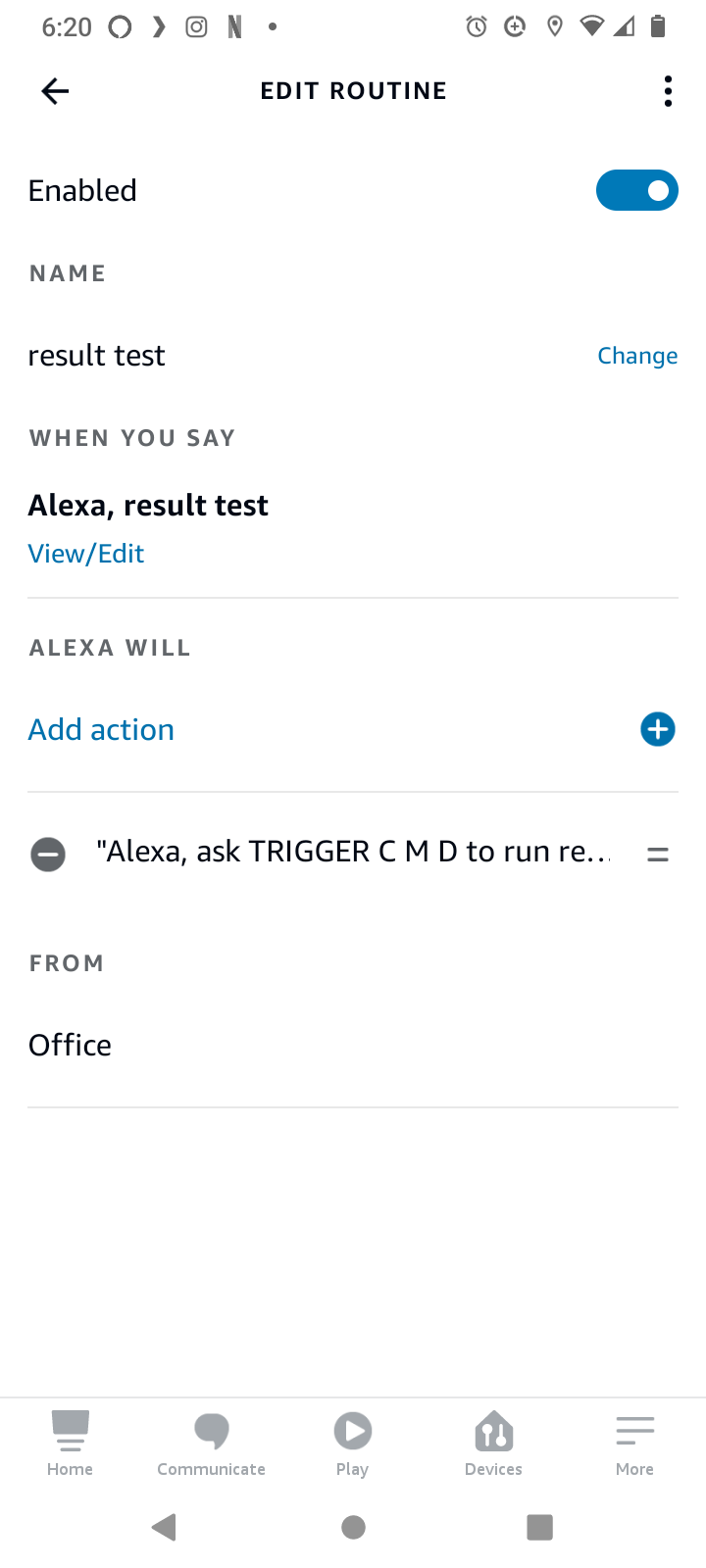
<p dir="auto">Here's my Alexa Routine config:</p>
<p dir="auto"><img src="/forum/assets/uploads/files/1642029726077-result_test.png" alt="result_test.png" class=" img-fluid img-markdown" /></p>
<p dir="auto">I'm using the TRIGGERcmd skill which works the same as the Trigger Command skill.</p>
<p dir="auto">I used a "Custom" action with this text:  <strong>ask TRIGGER C M D to run result</strong></p>
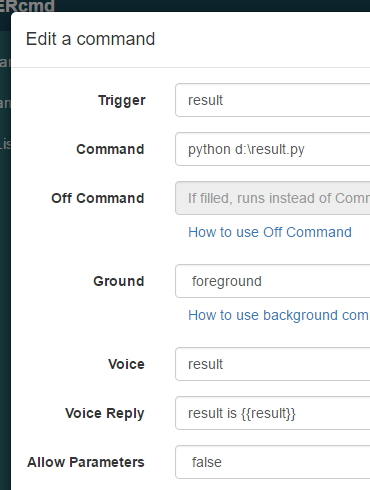
<p dir="auto">My command config looks like this:<br />
<img src="/forum/assets/uploads/files/1642029873502-1f8b8041-27a9-405d-bdc3-91e26ca90b48-image.png" alt="1f8b8041-27a9-405d-bdc3-91e26ca90b48-image.png" class=" img-fluid img-markdown" /></p>
<p dir="auto">My super basic python script looks like this:</p>
<pre><code>import os
result = 'Nineteen'
sts = os.system(os.environ['USERPROFILE'] + "\\.TRIGGERcmdData\\SendResult.bat "+str(result))
</code></pre>
]]></description><link>https://www.triggercmd.com/forum/post/5234</link><guid isPermaLink="true">https://www.triggercmd.com/forum/post/5234</guid><dc:creator><![CDATA[Russ]]></dc:creator><pubDate>Wed, 12 Jan 2022 23:26:24 GMT</pubDate></item><item><title><![CDATA[Reply to Say room temperature and humidity on Wed, 12 Jan 2022 13:44:25 GMT]]></title><description><![CDATA[<p dir="auto"><a class="mention plugin-mentions-user plugin-mentions-a" href="https://www.triggercmd.com/forum/uid/1">@russ</a>  Thanks I did play with routines a little this morning but may have given up to soon.<br />
I'll play a bit more to see if I can get that to work.</p>
]]></description><link>https://www.triggercmd.com/forum/post/5217</link><guid isPermaLink="true">https://www.triggercmd.com/forum/post/5217</guid><dc:creator><![CDATA[tuicemen]]></dc:creator><pubDate>Wed, 12 Jan 2022 13:44:25 GMT</pubDate></item><item><title><![CDATA[Reply to Say room temperature and humidity on Wed, 12 Jan 2022 13:35:01 GMT]]></title><description><![CDATA[<p dir="auto"><a class="mention plugin-mentions-user plugin-mentions-a" href="https://www.triggercmd.com/forum/uid/13362">@tuicemen</a> , come to think of it, I think you would get the reply if you use the "custom" action in a routine with the Trigger Command skill.</p>
]]></description><link>https://www.triggercmd.com/forum/post/5216</link><guid isPermaLink="true">https://www.triggercmd.com/forum/post/5216</guid><dc:creator><![CDATA[Russ]]></dc:creator><pubDate>Wed, 12 Jan 2022 13:35:01 GMT</pubDate></item><item><title><![CDATA[Reply to Say room temperature and humidity on Wed, 12 Jan 2022 12:34:24 GMT]]></title><description><![CDATA[<p dir="auto"><a class="mention plugin-mentions-user plugin-mentions-a" href="https://www.triggercmd.com/forum/uid/1">@russ</a>, Thanks. I actually have several Ideas  for {{result}} placeholder to send back the result of a command using the sendresult script.</p>
<p dir="auto">I remember some users on the <a href="https:forums.x10.com">x10 forums</a> saying they wished Alexa could say different things when a command was asked. The routines work fine for simple replies but not if you need a specific value.</p>
]]></description><link>https://www.triggercmd.com/forum/post/5213</link><guid isPermaLink="true">https://www.triggercmd.com/forum/post/5213</guid><dc:creator><![CDATA[tuicemen]]></dc:creator><pubDate>Wed, 12 Jan 2022 12:34:24 GMT</pubDate></item><item><title><![CDATA[Reply to Say room temperature and humidity on Wed, 12 Jan 2022 02:26:25 GMT]]></title><description><![CDATA[<p dir="auto"><a class="mention plugin-mentions-user plugin-mentions-a" href="https://www.triggercmd.com/forum/uid/13362">@tuicemen</a>, nice work!  I don't see many examples that use the {{result}} placeholder to send back the result of a command using the sendresult script.  It's good to see someone's using it.</p>
]]></description><link>https://www.triggercmd.com/forum/post/5206</link><guid isPermaLink="true">https://www.triggercmd.com/forum/post/5206</guid><dc:creator><![CDATA[Russ]]></dc:creator><pubDate>Wed, 12 Jan 2022 02:26:25 GMT</pubDate></item></channel></rss>