<title>
<![CDATA[ Remote Mega Download ]]>
</title>
<description>
<![CDATA[ <p dir="auto">So I am trying to get some remote downloads working with megacmd so I can just paste a mega link (like this <a href="https://mega.nz/folder/bGAmWLBI#iRuLe8LRlvSrUyzCw7iiGA/file/DHRGjTzD" rel="nofollow ugc">https://mega.nz/folder/bGAmWLBI#iRuLe8LRlvSrUyzCw7iiGA/file/DHRGjTzD</a>) into the parameters field and have it start downloading the files from that link.</p>
<p dir="auto">this batch file below runs find when I run it as an admin. But I cant even get it to run when I am using triggercmd let alone change that link for a parameter field to input different links. How Can i get this to work the way I want to?<br />
set PATH=C:\Users\Noah\AppData\Local\MEGAcmd<br />
mega-get <a href="https://mega.nz/folder/bGAmWLBI#iRuLe8LRlvSrUyzCw7iiGA/file/DHRGjTzD" rel="nofollow ugc">https://mega.nz/folder/bGAmWLBI#iRuLe8LRlvSrUyzCw7iiGA/file/DHRGjTzD</a> B:\Downloads\files</p>
<p dir="auto">So I got this batch file to work when I run it as admin. But i have no idea how I can get this working with triggercmd. I just dont want to have to remote in just to start a mega download.</p>
<p dir="auto">@echo off<br />
echo Paste Mega Link Below<br />
set /p input=<br />
if %input% == 1 goto ech<br />
:ech<br />
set PATH=C:\Users\User\AppData\Local\MEGAcmd<br />
mega-get %input% B:\Downloads\files</p>
]]>
</description>
<link>https://www.triggercmd.com/forum/topic/1409/remote-mega-download</link>
<generator>RSS for Node</generator>
<lastBuildDate>Thu, 14 Aug 2025 10:22:50 GMT</lastBuildDate>
<atom:link href="https://www.triggercmd.com/forum/topic/1409.rss" rel="self" type="application/rss+xml"/>
<pubDate>Sat, 29 May 2021 16:08:00 GMT</pubDate>
<ttl>60</ttl>
<item>
<title>
<![CDATA[ Reply to Remote Mega Download on Mon, 23 Sep 2024 23:58:11 GMT ]]>
</title>
<description>
<![CDATA[ <p dir="auto"><a class="mention plugin-mentions-user plugin-mentions-a" href="https://www.triggercmd.com/forum/uid/1">@Russ</a> could you walk me through how to do this in simple terms and lots of clear step by step instructions? I've never used these softwares before so you can imagine how confusing this is for me to understand without having any experience doing anything remotely similar to this.</p>
]]>
</description>
<link>https://www.triggercmd.com/forum/post/8210</link>
<guid isPermaLink="true">https://www.triggercmd.com/forum/post/8210</guid>
<dc:creator>
<![CDATA[ Overryde113 ]]>
</dc:creator>
<pubDate>Mon, 23 Sep 2024 23:58:11 GMT</pubDate>
</item>
<item>
<title>
<![CDATA[ Reply to Remote Mega Download on Mon, 23 Sep 2024 23:49:36 GMT ]]>
</title>
<description>
<![CDATA[ <p dir="auto">Would Anyone be able to help me do this? I've never used any of these softwares before and I've never done anything like this before so I'm pretty lost. I need to download a 300gb+ Mega folder but I can't afford Mega Pro and I can't find another way to do this.</p>
]]>
</description>
<link>https://www.triggercmd.com/forum/post/8209</link>
<guid isPermaLink="true">https://www.triggercmd.com/forum/post/8209</guid>
<dc:creator>
<![CDATA[ Overryde113 ]]>
</dc:creator>
<pubDate>Mon, 23 Sep 2024 23:49:36 GMT</pubDate>
</item>
<item>
<title>
<![CDATA[ Reply to Remote Mega Download on Tue, 08 Jun 2021 21:26:14 GMT ]]>
</title>
<description>
<![CDATA[ <p dir="auto"><a class="mention plugin-mentions-user plugin-mentions-a" href="https://www.triggercmd.com/forum/uid/1">@Russ</a> well i am having a hard time thinking of a way to even set up a way to send the parameter from home assistant</p>
]]>
</description>
<link>https://www.triggercmd.com/forum/post/4149</link>
<guid isPermaLink="true">https://www.triggercmd.com/forum/post/4149</guid>
<dc:creator>
<![CDATA[ Noah Nauman ]]>
</dc:creator>
<pubDate>Tue, 08 Jun 2021 21:26:14 GMT</pubDate>
</item>
<item>
<title>
<![CDATA[ Reply to Remote Mega Download on Sat, 05 Jun 2021 02:31:34 GMT ]]>
</title>
<description>
<![CDATA[ <p dir="auto"><a class="mention plugin-mentions-user plugin-mentions-a" href="https://www.triggercmd.com/forum/uid/4952">@Noah-Nauman</a>, sure, are you having Home Assistant call the TRIGGERcmd API? Can you send me a screenshot to give me some context?</p>
<p dir="auto">I don't have much experience with HA. I've only tried it out.</p>
]]>
</description>
<link>https://www.triggercmd.com/forum/post/4129</link>
<guid isPermaLink="true">https://www.triggercmd.com/forum/post/4129</guid>
<dc:creator>
...</dc:creator>
<pubDate>Sat, 05 Jun 2021 02:31:34 GMT</pubDate>
</item>
<item>
<title>
<![CDATA[ Reply to Remote Mega Download on Fri, 04 Jun 2021 21:30:00 GMT ]]>
</title>
<description>
<![CDATA[ <p dir="auto"><a class="mention plugin-mentions-user plugin-mentions-a" href="https://www.triggercmd.com/forum/uid/1">@Russ</a> I have a question for you. this script is still working great but I was wondering if there was a way to get this to work with Home Assistant where I can paste the link into a card to start the downloads. Do you think it is possible? I have had a hard time trying to figure this out</p>
]]>
</description>
<link>https://www.triggercmd.com/forum/post/4127</link>
<guid isPermaLink="true">https://www.triggercmd.com/forum/post/4127</guid>
<dc:creator>
<![CDATA[ Noah Nauman ]]>
</dc:creator>
<pubDate>Fri, 04 Jun 2021 21:30:00 GMT</pubDate>
</item>
<item>
<title>
<![CDATA[ Reply to Remote Mega Download on Tue, 01 Jun 2021 01:10:40 GMT ]]>
</title>
<description>
<![CDATA[ <p dir="auto"><a class="mention plugin-mentions-user plugin-mentions-a" href="https://www.triggercmd.com/forum/uid/4952">@Noah-Nauman</a>, awesome. You're welcome.</p>
]]>
</description>
<link>https://www.triggercmd.com/forum/post/4122</link>
<guid isPermaLink="true">https://www.triggercmd.com/forum/post/4122</guid>
<dc:creator>
...</dc:creator>
<pubDate>Tue, 01 Jun 2021 01:10:40 GMT</pubDate>
</item>
<item>
<title>
<![CDATA[ Reply to Remote Mega Download on Mon, 31 May 2021 01:05:10 GMT ]]>
</title>
<description>
<![CDATA[ <p dir="auto"><a class="mention plugin-mentions-user plugin-mentions-a" href="https://www.triggercmd.com/forum/uid/1">@Russ</a> Got it working. Thank you so much for the help.</p>
]]>
</description>
<link>https://www.triggercmd.com/forum/post/4119</link>
<guid isPermaLink="true">https://www.triggercmd.com/forum/post/4119</guid>
<dc:creator>
<![CDATA[ Noah Nauman ]]>
</dc:creator>
<pubDate>Mon, 31 May 2021 01:05:10 GMT</pubDate>
</item>
<item>
<title>
<![CDATA[ Reply to Remote Mega Download on Sun, 30 May 2021 11:40:57 GMT ]]>
</title>
<description>
<![CDATA[ <p dir="auto"><a class="mention plugin-mentions-user plugin-mentions-a" href="https://www.triggercmd.com/forum/uid/1">@Russ</a> you're the best. I'll try this later tonight</p>
]]>
</description>
<link>https://www.triggercmd.com/forum/post/4118</link>
<guid isPermaLink="true">https://www.triggercmd.com/forum/post/4118</guid>
<dc:creator>
<![CDATA[ Noah Nauman ]]>
</dc:creator>
<pubDate>Sun, 30 May 2021 11:40:57 GMT</pubDate>
</item>
<item>
<title>
<![CDATA[ Reply to Remote Mega Download on Sat, 29 May 2021 21:58:29 GMT ]]>
</title>
<description>
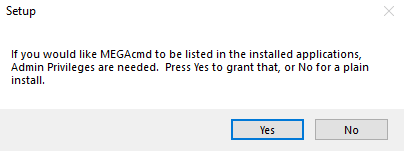
<![CDATA[ <p dir="auto"><a class="mention plugin-mentions-user plugin-mentions-a" href="https://www.triggercmd.com/forum/uid/4952">@Noah-Nauman</a>, I made it work with the batch file below without using "Run as administrator". When I installed the MEGAcmd tool, I clicked No at this screen. I think that avoids having to run it "as administrator":</p>
<p dir="auto"><img src="/forum/assets/uploads/files/1622325008182-834b29db-745e-4bf5-97f1-d3cb2fdc87ba-image.png" alt="834b29db-745e-4bf5-97f1-d3cb2fdc87ba-image.png" class=" img-fluid img-markdown" /></p>
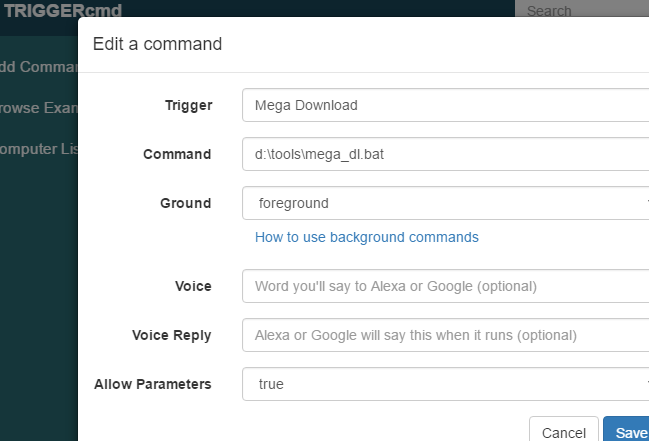
<p dir="auto">These are the contents of my d:\tools\mega_dl.bat file:</p>
<pre><code>%LOCALAPPDATA%\MEGAcmd\mega-get %1 d:\Mega_Downloads
</code></pre>
<p dir="auto">My command looks like this:</p>
<p dir="auto"><img src="/forum/assets/uploads/files/1622325462595-9e4e7755-eb30-496f-b25b-05cb50003a06-image.png" alt="9e4e7755-eb30-496f-b25b-05cb50003a06-image.png" class=" img-fluid img-markdown" /></p>
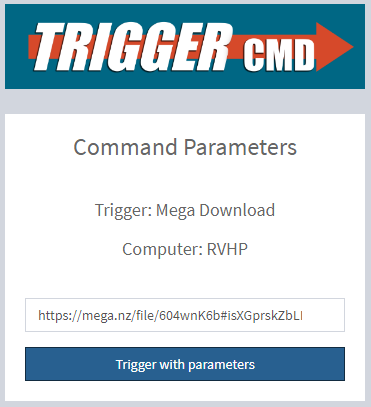
<p dir="auto">I tested it like this:</p>
<p dir="auto"><img src="/forum/assets/uploads/files/1622325507455-f64d9801-897d-4986-aaec-657aa620d60b-image.png" alt="f64d9801-897d-4986-aaec-657aa620d60b-image.png" class=" img-fluid img-markdown" /></p>
]]>
</description>
<link>https://www.triggercmd.com/forum/post/4116</link>
<guid isPermaLink="true">https://www.triggercmd.com/forum/post/4116</guid>
<dc:creator>
...</dc:creator>
<pubDate>Sat, 29 May 2021 21:58:29 GMT</pubDate>
</item>