<?xml version="1.0" encoding="UTF-8"?><rss xmlns:dc="http://purl.org/dc/elements/1.1/" xmlns:content="http://purl.org/rss/1.0/modules/content/" xmlns:atom="http://www.w3.org/2005/Atom" version="2.0"><channel><title><![CDATA[Raspberry Pi setup]]></title><description><![CDATA[<p dir="auto">Log into your Raspberry Pi as user pi with password raspberry.<br />
sudo raspi-config<br />
In raspi-config, enable SSH under Advanced Options.<br />
Run "ifconfig | more" to find your IP address.<br />
From your computer, run Putty, and SSH to the IP address.</p>
<p dir="auto">Run these commands on your Raspberry Pi:<br />
sudo su -<br />
apt-get -y update<br />
apt-get -y upgrade<br />
apt -y install npm nodejs<br />
wget <a href="https://agents.triggercmd.com/triggercmdagent_1.0.1_all.deb" rel="nofollow ugc">https://agents.triggercmd.com/triggercmdagent_1.0.1_all.deb</a><br />
dpkg -i triggercmdagent_1.0.1_all.deb<br />
triggercmdagent<br />
(  Paste in your token, and press ENTER. )<br />
(  Press CTRL-C to quit.  )<br />
/usr/share/triggercmdagent/app/src/installdaemon.sh</p>
<p dir="auto">Now you should see your Raspberry Pi in your TRIGGERcmd account.</p>
<p dir="auto">Edit /root/.TRIGGERcmdData/commands.json to add or remove commands.  On the Raspberry Pi, you should set ground = background because the background agent you installed (with <a href="http://installdaemon.sh" rel="nofollow ugc">installdaemon.sh</a>) adds, removes, and runs background commands as root.</p>
<p dir="auto">For example, the default commands.json file comes with 3 background commands, including this reboot command:</p>
<pre><code>  {
    "trigger":"Reboot",
    "command":"shutdown -r",
    "ground":"background",
    "voice":"reboot",
    "allowParams":"false"
  }
</code></pre>
<p dir="auto"><strong>EDIT:</strong>  I created a Windows script to make it easier to install the Raspbian OS and the agent on a new Pi:<br />
<a href="https://www.triggercmd.com/forum/topic/606/windows-script-to-prep-sd-card-for-raspberry-pi-with-triggercmd-agent">https://www.triggercmd.com/forum/topic/606/windows-script-to-prep-sd-card-for-raspberry-pi-with-triggercmd-agent</a></p>
<p dir="auto"><strong>EDIT 2:</strong> I created a Raspberry Pi image with the TRIGGERcmd agent pre-installed.<br />
<a href="https://www.triggercmd.com/forum/topic/2474/raspberry-pi-image-with-triggercmd-pre-loaded">https://www.triggercmd.com/forum/topic/2474/raspberry-pi-image-with-triggercmd-pre-loaded</a></p>
]]></description><link>https://www.triggercmd.com/forum/topic/12/raspberry-pi-setup</link><generator>RSS for Node</generator><lastBuildDate>Wed, 11 Mar 2026 00:57:37 GMT</lastBuildDate><atom:link href="https://www.triggercmd.com/forum/topic/12.rss" rel="self" type="application/rss+xml"/><pubDate>Thu, 06 Apr 2017 00:32:53 GMT</pubDate><ttl>60</ttl><item><title><![CDATA[Reply to Raspberry Pi setup on Sat, 26 Nov 2022 18:19:10 GMT]]></title><description><![CDATA[<p dir="auto">That's brilliant, thank you for the information.</p>
]]></description><link>https://www.triggercmd.com/forum/post/6448</link><guid isPermaLink="true">https://www.triggercmd.com/forum/post/6448</guid><dc:creator><![CDATA[Jorge Fuentes]]></dc:creator><pubDate>Sat, 26 Nov 2022 18:19:10 GMT</pubDate></item><item><title><![CDATA[Reply to Raspberry Pi setup on Sat, 26 Nov 2022 17:57:51 GMT]]></title><description><![CDATA[<p dir="auto"><a class="mention plugin-mentions-user plugin-mentions-a" href="https://www.triggercmd.com/forum/uid/18202">@Jorge-Fuentes</a>, yes, there is a way.</p>
<p dir="auto">You can use the <strong>Voice Reply</strong> field to do that.</p>
<p dir="auto"><a href="https://www.triggercmd.com/forum/topic/341/voice-reply-field-now-allows-placeholders-for-trigger-computer-and-params?_=1669483165597">This article</a> explains how.</p>
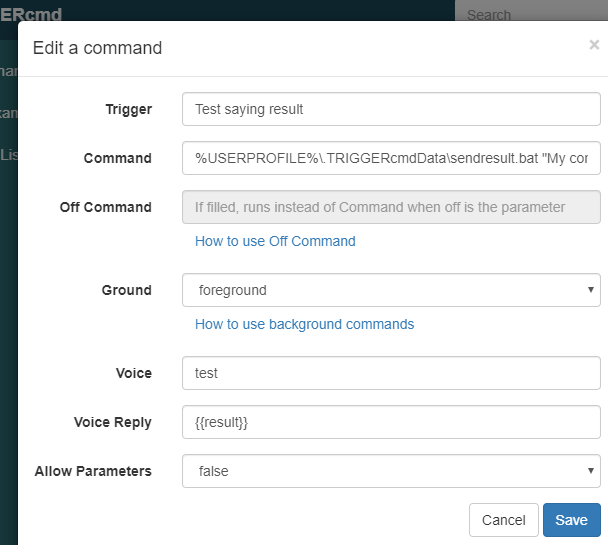
<p dir="auto">Basically, put "{{result}}" in your voicereply field and run the sendresult script that the TRIGGERcmd agent installs here:</p>
<p dir="auto">Windows:</p>
<pre><code>%USERPROFILE%\.TRIGGERcmdData\sendresult.bat
</code></pre>
<p dir="auto">Linux / Mac:</p>
<pre><code>~/.TRIGGERcmdData/sendresult.sh
</code></pre>
<p dir="auto">I know you're on a Raspberry Pi, but I'm pasting the Windows GUI editor screenshot just to make sure the concept is clear.</p>
<p dir="auto"><img src="/forum/assets/uploads/files/1669483873348-f3d13688-7d34-434a-874d-2168e6ef7daa-image.png" alt="f3d13688-7d34-434a-874d-2168e6ef7daa-image.png" class=" img-fluid img-markdown" /></p>
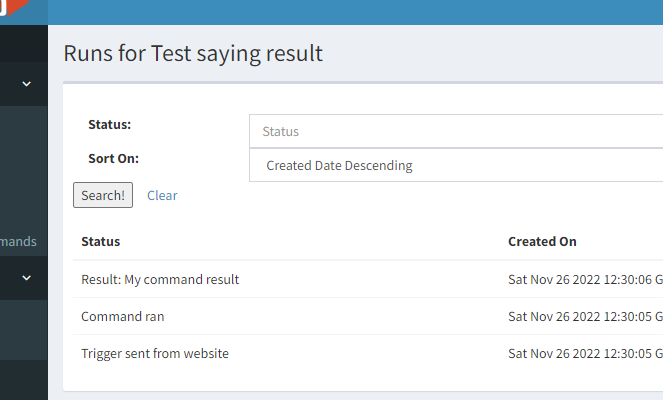
<p dir="auto">In the runs list you can see what the "sendresult" script is sending back to the server as the "result" of the command you ran.  If you include <strong>{{result&rsqb;&rsqb;</strong> in the Voice Reply field, The TC, TRIGGERcmd, or Trigger Command Alexa skills will say that text when you use one of those skills to trigger the command.<br />
<img src="/forum/assets/uploads/files/1669483905900-eb58845e-a91a-4835-bd03-15f7e9127f74-image.png" alt="eb58845e-a91a-4835-bd03-15f7e9127f74-image.png" class=" img-fluid img-markdown" /></p>
<p dir="auto">Instead of making the command in the commands.json file directly run the sendresult script, normally the commands.json would reference a script that would run the sendresult script last, and send back the value of an environment variable like this:</p>
<pre><code>~/.TRIGGERcmdData/sendresult.sh ${RESULT}
</code></pre>
<p dir="auto">The one problem with the above method is it uses one of the non-smart home TRIGGERcmd Alexa skills.  Those skills are not as reliable at matching the words in the sentence pattern it uses to run the command.  The TRIGGERcmd Smart Home Alexa skill does a much better job.</p>
<p dir="auto"><strong>TC</strong> / <strong>TRIGGERcmd</strong> / <strong>Trigger Command</strong> Alexa skill pattern:</p>
<ul>
<li>Alexa, ask TRIGGERcmd to run Calculator</li>
</ul>
<p dir="auto"><strong>TRIGGERcmd Smart Home</strong> Alexa skill pattern:</p>
<ul>
<li>Alexa, turn on Calculator</li>
</ul>
<p dir="auto">If you want to use the TRIGGERcmd Smart Home skill to run your command, you use <a href="https://www.triggercmd.com/forum/topic/2241/delayed-response/2?_=1669483499944">this method</a>.</p>
]]></description><link>https://www.triggercmd.com/forum/post/6447</link><guid isPermaLink="true">https://www.triggercmd.com/forum/post/6447</guid><dc:creator><![CDATA[Russ]]></dc:creator><pubDate>Sat, 26 Nov 2022 17:57:51 GMT</pubDate></item><item><title><![CDATA[Reply to Raspberry Pi setup on Sat, 26 Nov 2022 16:28:25 GMT]]></title><description><![CDATA[<p dir="auto">Hello, first of all thanks for this amazing integration/work.</p>
<p dir="auto">I've a question:</p>
<p dir="auto">Do you know if there's a way to add a parameter over the "commands.json" file in order to make Alexa speak when you execute the trigger? So she'll reply when you do a query. Would be great so it could be integrated with some bash scripts/ansible playbooks.</p>
<p dir="auto">Thank you,<br />
Kind regards.</p>
]]></description><link>https://www.triggercmd.com/forum/post/6446</link><guid isPermaLink="true">https://www.triggercmd.com/forum/post/6446</guid><dc:creator><![CDATA[Jorge Fuentes]]></dc:creator><pubDate>Sat, 26 Nov 2022 16:28:25 GMT</pubDate></item><item><title><![CDATA[Reply to Raspberry Pi setup on Sun, 02 Oct 2022 14:56:18 GMT]]></title><description><![CDATA[<p dir="auto"><a class="mention plugin-mentions-user plugin-mentions-a" href="https://www.triggercmd.com/forum/uid/17478">@Ar7hur</a>, no problem.  I'm glad you got it working.</p>
<p dir="auto">You could create a trigger that runs <strong>shutdown --poweroff</strong> but it won't actually power the Raspberry Pi off.  Raspberry Pi's also do not support wake-on-lan, so you couldn't power it on from another computer on your network like you could with a PC.</p>
<p dir="auto">The only thing I can think of is you could power the Pi on/off with a relay by connecting/disconnecting the vbus on the 5volt power input with an adapter you could build with something <a href="https://www.amazon.com/dp/B0BC3PYQHJ/ref=syn_sd_onsite_desktop_294?ie=UTF8&amp;psc=1&amp;pd_rd_plhdr=t" rel="nofollow ugc">like this</a>, or you could use a <a href="https://www.amazon.com/Amazon-smart-plug-works-with-Alexa/dp/B089DR29T6/ref=sr_1_5?keywords=smart+plug" rel="nofollow ugc">smart plug</a> to power it off/on.  You could <a href="https://www.triggercmd.com/forum/topic/1844/run-an-alexa-routine-when-a-command-runs">run a command that runs an Alexa routine</a> that powers the smart plug on or off.</p>
]]></description><link>https://www.triggercmd.com/forum/post/6309</link><guid isPermaLink="true">https://www.triggercmd.com/forum/post/6309</guid><dc:creator><![CDATA[Russ]]></dc:creator><pubDate>Sun, 02 Oct 2022 14:56:18 GMT</pubDate></item><item><title><![CDATA[Reply to Raspberry Pi setup on Sat, 01 Oct 2022 21:09:55 GMT]]></title><description><![CDATA[<p dir="auto"><a class="mention plugin-mentions-user plugin-mentions-a" href="https://www.triggercmd.com/forum/uid/1">@Russ</a> It was my mistake. I discovered where was wrong<img src="https://www.triggercmd.com/forum/assets/plugins/nodebb-plugin-emoji/emoji/android/1f605.png?v=6sa9akdcpc2" class="not-responsive emoji emoji-android emoji--sweat_smile" style="height:23px;width:auto;vertical-align:middle" title=":sweat_smile:" alt="😅" /> Sorry<br />
How to create a trigger to turn off? and is there how to turn on the pi by voice command?</p>
]]></description><link>https://www.triggercmd.com/forum/post/6308</link><guid isPermaLink="true">https://www.triggercmd.com/forum/post/6308</guid><dc:creator><![CDATA[Ar7hur]]></dc:creator><pubDate>Sat, 01 Oct 2022 21:09:55 GMT</pubDate></item><item><title><![CDATA[Reply to Raspberry Pi setup on Sat, 01 Oct 2022 19:04:21 GMT]]></title><description><![CDATA[<p dir="auto"><a class="mention plugin-mentions-user plugin-mentions-a" href="https://www.triggercmd.com/forum/uid/17478">@Ar7hur</a>, how do you get those errors?  Can you please give me the command you typed, or paste a screenshot?</p>
]]></description><link>https://www.triggercmd.com/forum/post/6307</link><guid isPermaLink="true">https://www.triggercmd.com/forum/post/6307</guid><dc:creator><![CDATA[Russ]]></dc:creator><pubDate>Sat, 01 Oct 2022 19:04:21 GMT</pubDate></item><item><title><![CDATA[Reply to Raspberry Pi setup on Sat, 01 Oct 2022 18:22:21 GMT]]></title><description><![CDATA[<p dir="auto"><a class="mention plugin-mentions-user plugin-mentions-a" href="https://www.triggercmd.com/forum/uid/1">@Russ</a> I wrote this, but appears what I mentioned</p>
]]></description><link>https://www.triggercmd.com/forum/post/6306</link><guid isPermaLink="true">https://www.triggercmd.com/forum/post/6306</guid><dc:creator><![CDATA[Ar7hur]]></dc:creator><pubDate>Sat, 01 Oct 2022 18:22:21 GMT</pubDate></item><item><title><![CDATA[Reply to Raspberry Pi setup on Sat, 01 Oct 2022 17:56:16 GMT]]></title><description><![CDATA[<p dir="auto"><a class="mention plugin-mentions-user plugin-mentions-a" href="https://www.triggercmd.com/forum/uid/17478">@Ar7hur</a>, the URL to download the Raspberry Pi installer is this:</p>
<p dir="auto"><a href="https://agents.triggercmd.com/triggercmdagent_1.0.1_all.deb" rel="nofollow ugc">https://agents.triggercmd.com/triggercmdagent_1.0.1_all.deb</a></p>
<p dir="auto">Does that answer your question?</p>
]]></description><link>https://www.triggercmd.com/forum/post/6305</link><guid isPermaLink="true">https://www.triggercmd.com/forum/post/6305</guid><dc:creator><![CDATA[Russ]]></dc:creator><pubDate>Sat, 01 Oct 2022 17:56:16 GMT</pubDate></item><item><title><![CDATA[Reply to Raspberry Pi setup on Sat, 01 Oct 2022 16:56:39 GMT]]></title><description><![CDATA[<p dir="auto">What I did wrong? It appears:<br />
E: Unable to locate package <a href="https://agents.triggercmd.com" rel="nofollow ugc">https://agents.triggercmd.com</a><br />
E: Couldn't find any packageb by glob '<a href="https://agents.triggercmd.com" rel="nofollow ugc">https://agents.triggercmd.com</a>'<br />
E: Couldn't find any packageb by regex '<a href="https://agents.triggercmd.com" rel="nofollow ugc">https://agents.triggercmd.com</a>'</p>
<p dir="auto">I'm a noob, and sorry for my english.</p>
]]></description><link>https://www.triggercmd.com/forum/post/6304</link><guid isPermaLink="true">https://www.triggercmd.com/forum/post/6304</guid><dc:creator><![CDATA[Ar7hur]]></dc:creator><pubDate>Sat, 01 Oct 2022 16:56:39 GMT</pubDate></item><item><title><![CDATA[Reply to Raspberry Pi setup on Sat, 16 Oct 2021 13:58:14 GMT]]></title><description><![CDATA[<p dir="auto"><a class="mention plugin-mentions-user plugin-mentions-a" href="https://www.triggercmd.com/forum/uid/4019">@George-Hatzisymeon</a>, sorry I never responded to this.  I just noticed it because someone upvoted it.</p>
<p dir="auto">I just verified that the offCommand commands.json value is supported in the current version of the Raspberry Pi agent.  If you were using that version and it didn't work, then maybe you were missing this part:</p>
<pre><code>"allowParams":"true"
</code></pre>
<p dir="auto">Here's an example entry I just tested.  It turns my led strip off if the parameter was off, and if the parameter was on, it turns the strip on and makes the leds green.</p>
<pre><code>    {
       "trigger":"Green",
       "command":"\/root\/killrun.sh leds.py green",
       "offCommand": "\/root\/killrun.sh leds.py off",
       "ground":"background",
       "voice":"green",
       "allowParams":"true"
    },
</code></pre>
]]></description><link>https://www.triggercmd.com/forum/post/4702</link><guid isPermaLink="true">https://www.triggercmd.com/forum/post/4702</guid><dc:creator><![CDATA[Russ]]></dc:creator><pubDate>Sat, 16 Oct 2021 13:58:14 GMT</pubDate></item><item><title><![CDATA[Reply to Raspberry Pi setup on Sat, 05 Sep 2020 20:09:40 GMT]]></title><description><![CDATA[<p dir="auto">It looks like offCommand is never called using this PI/Debian distribution, do you have an update? Did you forget to include this functionality for Linux, it works fine on Windows.</p>
]]></description><link>https://www.triggercmd.com/forum/post/2797</link><guid isPermaLink="true">https://www.triggercmd.com/forum/post/2797</guid><dc:creator><![CDATA[George Hatzisymeon]]></dc:creator><pubDate>Sat, 05 Sep 2020 20:09:40 GMT</pubDate></item><item><title><![CDATA[Reply to Raspberry Pi setup on Thu, 07 May 2020 23:06:51 GMT]]></title><description><![CDATA[<p dir="auto"><a class="mention plugin-mentions-user plugin-mentions-a" href="https://www.triggercmd.com/forum/uid/3300">@avs2020</a>, it looks like you figured it out because I see commands associated with your raspberrypi computer now.  Please confirm.</p>
]]></description><link>https://www.triggercmd.com/forum/post/2146</link><guid isPermaLink="true">https://www.triggercmd.com/forum/post/2146</guid><dc:creator><![CDATA[Russ]]></dc:creator><pubDate>Thu, 07 May 2020 23:06:51 GMT</pubDate></item><item><title><![CDATA[Reply to Raspberry Pi setup on Thu, 07 May 2020 03:51:20 GMT]]></title><description><![CDATA[<p dir="auto"><a class="mention plugin-mentions-user plugin-mentions-a" href="https://www.triggercmd.com/forum/uid/1">@Russ</a> said in <a href="/forum/post/14">Raspberry Pi setup</a>:</p>
<blockquote>
<p dir="auto">/usr/share/triggercmdagent/app/src/installdaemon.sh</p>
</blockquote>
<p dir="auto">I followed the steps here, but the list of commands is empty right after install. The command output is:</p>
<p dir="auto">pi@raspberrypi:~ $ sudo triggercmdagent<br />
Run <a href="http://installdaemon.sh" rel="nofollow ugc">installdaemon.sh</a> to install the triggercmdagent daemon so it runs during boot<br />
Daemon install: false<br />
No token exists.  Login to request one.<br />
prompt: token:  ey.........<br />
Token saved for next time.<br />
Tokenfile: /root/.TRIGGERcmdData/token.tkn<br />
ComputerIDfile: /root/.TRIGGERcmdData/computerid.cfg<br />
Logging in with saved token to run foreground tasks.<br />
Computer ID 5eb384a2ee82630019c61bac saved for next time.<br />
Write backup completed.<br />
Initiated command removals<br />
Initiated command adds</p>
<p dir="auto">|&gt;    Now connected to <a href="https://www.triggercmd.com" rel="nofollow ugc">https://www.triggercmd.com</a>.<br />
___/   For help, see: <a href="http://bit.ly/2q0QDpf" rel="nofollow ugc">http://bit.ly/2q0QDpf</a><br />
(using sails.io.js node SDK @v1.1.13)<br />
Connected at: Wed May 06 2020 20:46:43 GMT-0700 (PDT)</p>
<p dir="auto">{ message: 'Subscribed to 5eb384a2ee82630019c61bac!' }<br />
{ message: 'Subscribed to 5eb384a2ee82630019c61bac!' }<br />
Added Gnome Editor<br />
^C<br />
pi@raspberrypi:~ $ sudo /usr/share/triggercmdagent/app/src/installdaemon.sh<br />
Daemon install: true<br />
Logging in with saved token.<br />
Checking if the 5eb384a2ee82630019c61bac computer exists.<br />
This computer exists in your account.<br />
● triggercmdagent.service - TRIGGERcmd Agent<br />
Loaded: loaded (/etc/systemd/system/triggercmdagent.service; enabled; vendor preset: enabled)<br />
Active: active (running) since Wed 2020-05-06 20:35:25 PDT; 12min ago<br />
Main PID: 864 (node)<br />
CGroup: /system.slice/triggercmdagent.service<br />
└─864 node /usr/share/triggercmdagent/app/src/daemon.js --run /root/.TRIGGERcmdData</p>
<p dir="auto">May 06 20:35:33 raspberrypi env[864]:         (using sails.io.js node SDK @v1.1.13)<br />
May 06 20:35:33 raspberrypi env[864]:          Connected at: Wed May 06 2020 20:35:33 GMT-0700 (PDT)<br />
May 06 20:35:33 raspberrypi env[864]: Initiated command removals<br />
May 06 20:35:33 raspberrypi env[864]: { message: 'Subscribed to null!' }<br />
May 06 20:35:33 raspberrypi env[864]: Initiated command adds<br />
May 06 20:35:33 raspberrypi env[864]: Failed while trying add a trigger.<br />
May 06 20:35:33 raspberrypi env[864]: Failed while trying add a trigger.</p>
<p dir="auto">I have not edited any standard files.</p>
]]></description><link>https://www.triggercmd.com/forum/post/2134</link><guid isPermaLink="true">https://www.triggercmd.com/forum/post/2134</guid><dc:creator><![CDATA[avs2020]]></dc:creator><pubDate>Thu, 07 May 2020 03:51:20 GMT</pubDate></item><item><title><![CDATA[Reply to Raspberry Pi setup on Sun, 03 May 2020 20:11:38 GMT]]></title><description><![CDATA[<p dir="auto">I created a script to make it easier to install the Raspbian OS and the agent on a new Pi:</p>
<p dir="auto"><a href="https://www.triggercmd.com/forum/topic/606/windows-script-to-prep-sd-card-for-raspberry-pi-with-triggercmd-agent">https://www.triggercmd.com/forum/topic/606/windows-script-to-prep-sd-card-for-raspberry-pi-with-triggercmd-agent</a></p>
]]></description><link>https://www.triggercmd.com/forum/post/1898</link><guid isPermaLink="true">https://www.triggercmd.com/forum/post/1898</guid><dc:creator><![CDATA[Russ]]></dc:creator><pubDate>Sun, 03 May 2020 20:11:38 GMT</pubDate></item><item><title><![CDATA[Reply to Raspberry Pi setup on Fri, 07 Jun 2019 23:52:02 GMT]]></title><description><![CDATA[<p dir="auto"><a class="mention plugin-mentions-user plugin-mentions-a" href="https://www.triggercmd.com/forum/uid/2026">@erin-leiker</a>, please give this a try:</p>
<ol>
<li>Run this as your pi user to allow root to send stuff to your pi user's Xwindows:</li>
</ol>
<pre><code>xhost si:localuser:root
</code></pre>
<ol start="2">
<li>Install the background service as root with:</li>
</ol>
<pre><code>/usr/share/triggercmdagent/app/src/installdaemon.sh
</code></pre>
<ol start="3">
<li>Make sure this variable is set when your command runs as root in the context of your triggercmdagent:</li>
</ol>
<pre><code>export DISPLAY=:0.0
</code></pre>
<p dir="auto">Your agent will be running in background mode, so the commands need "ground": "background" to run that way.</p>
<p dir="auto">I suggest testing with <strong>galculator</strong>.  It's an xwindows calculator app.</p>
]]></description><link>https://www.triggercmd.com/forum/post/1452</link><guid isPermaLink="true">https://www.triggercmd.com/forum/post/1452</guid><dc:creator><![CDATA[Russ]]></dc:creator><pubDate>Fri, 07 Jun 2019 23:52:02 GMT</pubDate></item><item><title><![CDATA[Reply to Raspberry Pi setup on Thu, 06 Jun 2019 22:57:03 GMT]]></title><description><![CDATA[<p dir="auto"><a class="mention plugin-mentions-user plugin-mentions-a" href="https://www.triggercmd.com/forum/uid/1">@russ</a> whew, i think i figured it out! if i'm right, it all comes down to users.</p>
<p dir="auto">the instructions for installing on a raspberry pi are based on running all the commands/installations as a root user. the "chromuim-browser" command does not work when executed as the root user, only the default "pi" user. so i switched the command from "chromium-browser" to "xdg-open", which does essentially the same thing for my purposes, and it worked! well, almost.</p>
<p dir="auto">i'm trying to launch an html file, and the mime type is "text/html" which opens with chromium by default for the pi user (yay!), but with the geany text editor for root (boo). i solved this by tweaking the command to run under the pi user, and it works as expected!</p>
<p dir="auto">{"trigger":"myTriggerName","command":"su - pi -c 'xdg-open /home/pi/myFile.html'","ground":"foreground","voice":"myTriggerName","allowParams":"false"}</p>
<p dir="auto">the only downside is that there is a noticeable delay in triggering this command. and i also have to open a terminal window, switch to the root user, and then run "triggercmdagent" before i can successfully trigger it. with this info, do you happen to know if/how i can:</p>
<ol>
<li>
<p dir="auto">auto run triggercmdagent on boot? the install instructions seem to state that it will launch in the background on boot, so i changed the command to "background" but no dice. still have to run triggercmdagent from terminal as root.</p>
</li>
<li>
<p dir="auto">run/install triggercmdagent under the pi user instead of root? i think that would help speed up the execution of the command significantly.</p>
</li>
</ol>
<p dir="auto">thank you so much!</p>
]]></description><link>https://www.triggercmd.com/forum/post/1448</link><guid isPermaLink="true">https://www.triggercmd.com/forum/post/1448</guid><dc:creator><![CDATA[Erin Leiker]]></dc:creator><pubDate>Thu, 06 Jun 2019 22:57:03 GMT</pubDate></item><item><title><![CDATA[Reply to Raspberry Pi setup on Wed, 05 Jun 2019 02:11:55 GMT]]></title><description><![CDATA[<p dir="auto"><a class="mention plugin-mentions-user plugin-mentions-a" href="https://www.triggercmd.com/forum/uid/2026">@erin-leiker</a>, that's interesting.  You might need to specify the full path of chromium-browser, so your command would be something like:</p>
<pre><code>/path/to/chromium-browser file:///home/pi/myFile.html
</code></pre>
<p dir="auto">To find the path, type this:</p>
<pre><code>which chromium-browser
</code></pre>
<p dir="auto">If you're booting to the GUI, that's X Windows.  I'll boot up one of my Pi's and see if I can reproduce the problem you're having.</p>
<p dir="auto">EDIT:  I tried it on my Pi.  I found that it worked with or without the full path.  I tried <strong>/usr/bin/chromium-browser</strong> and just <strong>chromium-browser</strong> and both worked for me, so I don't know what's wrong in your case.<br />
Can you try a simpler command, like <strong>echo Testing &gt;&gt; /tmp/test.txt</strong> ?<br />
When I did that, it created a /tmp/test.txt file when I remotely ran the command.</p>
]]></description><link>https://www.triggercmd.com/forum/post/1436</link><guid isPermaLink="true">https://www.triggercmd.com/forum/post/1436</guid><dc:creator><![CDATA[Russ]]></dc:creator><pubDate>Wed, 05 Jun 2019 02:11:55 GMT</pubDate></item><item><title><![CDATA[Reply to Raspberry Pi setup on Mon, 03 Jun 2019 14:58:16 GMT]]></title><description><![CDATA[<p dir="auto"><a class="mention plugin-mentions-user plugin-mentions-a" href="https://www.triggercmd.com/forum/uid/1">@russ</a> thank you for the tips! i did some googling on x windows, and it sounds like it's a way to access or view the pi remotely. do i still need x windows if i have the pi booting to the desktop and i have a screen on it so i can access it directly?</p>
<p dir="auto">i updated the trigger to "foreground" and tried running triggercmdagent from the cli, but still i just see the log of the command having been run instead of the results of the command (opening that html file).</p>
]]></description><link>https://www.triggercmd.com/forum/post/1435</link><guid isPermaLink="true">https://www.triggercmd.com/forum/post/1435</guid><dc:creator><![CDATA[Erin Leiker]]></dc:creator><pubDate>Mon, 03 Jun 2019 14:58:16 GMT</pubDate></item><item><title><![CDATA[Reply to Raspberry Pi setup on Sat, 01 Jun 2019 13:50:09 GMT]]></title><description><![CDATA[<p dir="auto"><a class="mention plugin-mentions-user plugin-mentions-a" href="https://www.triggercmd.com/forum/uid/2026">@erin-leiker</a>, I think the problem is you're running the triggercmd agent as a background daemon, and your command is running with "ground": "background", so you can't see the result of your command.</p>
<p dir="auto">So to make it work, you'll need to:</p>
<ol>
<li>Run the agent in the foreground by running the "triggercmdagent" command in a terminal window in X Windows.</li>
<li>Trigger your command in the foreground with "ground": "foreground" in your commands.json file.</li>
</ol>
]]></description><link>https://www.triggercmd.com/forum/post/1429</link><guid isPermaLink="true">https://www.triggercmd.com/forum/post/1429</guid><dc:creator><![CDATA[Russ]]></dc:creator><pubDate>Sat, 01 Jun 2019 13:50:09 GMT</pubDate></item><item><title><![CDATA[Reply to Raspberry Pi setup on Fri, 31 May 2019 22:12:58 GMT]]></title><description><![CDATA[<p dir="auto">hello! my end goal is to launch an html file on my raspberry pi 3b+ using IFTTT (i have a small display plugged into my pi on which i'm expecting to see the file). i'm fairly sure i've gotten everything set up correctly in that i can see evidence of the command having run in IFTTT, my TRIGGERcmd dashboard, and in the CLI when i run "systemctl status triggercmdagent".</p>
<p dir="auto">i have almost no native idea what i am doing, but i'm a pretty good tinkerer and an excellent copy-and-paster so the command i cobbled together is:<br />
{"trigger":"myTriggerName","command":"chromium-browser file:///home/pi/myFile.html","ground":"background","voice":"myTriggerName","allowParams":"false"}</p>
<p dir="auto">when i try to trigger that command via IFTTT or my TRIGGERcmd Triggers list, nothing actually happens other than the three locations i mention above showing some acknowledgement that the command was run. but when i run "chromium-browser file:///home/pi/myFile.html" via the CLI, the file opens in chromium exactly as i expect, so this all leads me to believe i have formatted the command incorrectly somehow.</p>
<p dir="auto">any help here would be much appreciated!</p>
]]></description><link>https://www.triggercmd.com/forum/post/1426</link><guid isPermaLink="true">https://www.triggercmd.com/forum/post/1426</guid><dc:creator><![CDATA[Erin Leiker]]></dc:creator><pubDate>Fri, 31 May 2019 22:12:58 GMT</pubDate></item><item><title><![CDATA[Reply to Raspberry Pi setup on Sun, 03 Feb 2019 20:28:42 GMT]]></title><description><![CDATA[<p dir="auto"><a class="mention plugin-mentions-user plugin-mentions-a" href="https://www.triggercmd.com/forum/uid/1746">@gutopa</a>, you could uninstall the Raspberry Pi agent using these commands:</p>
<pre><code>systemctl stop triggercmdagent
/usr/share/triggercmdagent/app/src/removedaemon.sh
apt remove triggercmdagent
</code></pre>
<p dir="auto">Then you should delete the computer from your account on the website.</p>
]]></description><link>https://www.triggercmd.com/forum/post/1204</link><guid isPermaLink="true">https://www.triggercmd.com/forum/post/1204</guid><dc:creator><![CDATA[Russ]]></dc:creator><pubDate>Sun, 03 Feb 2019 20:28:42 GMT</pubDate></item><item><title><![CDATA[Reply to Raspberry Pi setup on Sun, 03 Feb 2019 16:35:45 GMT]]></title><description><![CDATA[<p dir="auto">Hi Russ..</p>
<p dir="auto">Could you give me some tips about how to remove it from raspbian?</p>
<p dir="auto">Thank you</p>
]]></description><link>https://www.triggercmd.com/forum/post/1200</link><guid isPermaLink="true">https://www.triggercmd.com/forum/post/1200</guid><dc:creator><![CDATA[gutopa]]></dc:creator><pubDate>Sun, 03 Feb 2019 16:35:45 GMT</pubDate></item><item><title><![CDATA[Reply to Raspberry Pi setup on Sun, 06 Jan 2019 15:27:17 GMT]]></title><description><![CDATA[<p dir="auto"><a class="mention plugin-mentions-user plugin-mentions-a" href="https://www.triggercmd.com/forum/uid/1743">@atmosphere</a>, in your commands.json file, make the ground field background instead of foreground.  That way it will run in the context of the background service.</p>
<pre><code> {
  "trigger": "GPIO 6 on",
  "command": "python /root/gpio6on.py",
  "ground": "background",
  "voice": "6 on"
 },
</code></pre>
<p dir="auto">Run this to install the background service:</p>
<pre><code>/usr/share/triggercmdagent/app/src/installdaemon.sh
</code></pre>
]]></description><link>https://www.triggercmd.com/forum/post/1114</link><guid isPermaLink="true">https://www.triggercmd.com/forum/post/1114</guid><dc:creator><![CDATA[Russ]]></dc:creator><pubDate>Sun, 06 Jan 2019 15:27:17 GMT</pubDate></item><item><title><![CDATA[Reply to Raspberry Pi setup on Fri, 28 Dec 2018 11:04:51 GMT]]></title><description><![CDATA[<p dir="auto"><a class="mention plugin-mentions-user plugin-mentions-a" href="https://www.triggercmd.com/forum/uid/1">@russ</a> said in <a href="/forum/post/714">Raspberry Pi setup</a>:</p>
<blockquote>
<p dir="auto">systemctl start triggercmdagent</p>
</blockquote>
<p dir="auto">Hi, i'm curious - i use python scripts to trigger my gpio pins on my raspberry... it appears that these are "Foreground" tasks... how do i do this in the background (so that when the pi reboots - it loads automatically again)</p>
<p dir="auto">Any tips?</p>
]]></description><link>https://www.triggercmd.com/forum/post/1113</link><guid isPermaLink="true">https://www.triggercmd.com/forum/post/1113</guid><dc:creator><![CDATA[Atmosphere]]></dc:creator><pubDate>Fri, 28 Dec 2018 11:04:51 GMT</pubDate></item></channel></rss>