<?xml version="1.0" encoding="UTF-8"?><rss xmlns:dc="http://purl.org/dc/elements/1.1/" xmlns:content="http://purl.org/rss/1.0/modules/content/" xmlns:atom="http://www.w3.org/2005/Atom" version="2.0"><channel><title><![CDATA[Open Specific Netflix Movie with Alexa]]></title><description><![CDATA[<p dir="auto">Requirements: Echo with "Trigger Command" Alexa Skill, TriggerCMD installed on desired computer, Nodejs - I recently upgraded to 8.9.3 - Just make sure you're not far behind on your installed Nodejs, I'm using Windows 10 - I believe you can get selenium-webdriver for MAC and LINUX.<br />
LINK FOR REFERENCE: <a href="http://seleniumhq.github.io/selenium/docs/api/javascript/" rel="nofollow ugc">http://seleniumhq.github.io/selenium/docs/api/javascript/</a></p>
<p dir="auto">INSTRUCTIONS</p>
<ol>
<li>Open <a href="https://www.npmjs.com/package/selenium-webdriver" rel="nofollow ugc">https://www.npmjs.com/package/selenium-webdriver</a></li>
<li>Open windows command prompt</li>
<li>cd to desired directory (I'm a web developer) so htdocs folder for me THEN type npm install selenium-webdriver.</li>
<li>Once selenium-webdriver is installed you may need to install additional components - There are links/downloads for these components in my LINK FOR REFERENCE above. I did not need to install this for Firefox. I guess I already had this installed. (If you need this the link is just to download whichever browsers developer browser executable to use with selenium. You will need to add a PATH variable to the directory of the executables.)</li>
<li>Open your IDE of choice and navigate to node_modules-&gt;selenium-webdrivers-&gt;examples-&gt;google_search.js. Try running this. You can do so by running the script from the command line-&gt;</li>
</ol>
<pre><code>node C:\MAMP\htdocs\automation\node_modules\selenium-webdriver\example&gt;node google_search.js
</code></pre>
<p dir="auto">If your component was installed correctly this will open up your browser and do a google search. Then you know its working and you can use my code below to have Alexa open up a specific movie.</p>
<pre><code class="language-//">// or more contributor license agreements.  See the NOTICE file
// distributed with this work for additional information
// regarding copyright ownership.  The SFC licenses this file
// to you under the Apache License, Version 2.0 (the
// "License"); you may not use this file except in compliance
// with the License.  You may obtain a copy of the License at
//
//   http://www.apache.org/licenses/LICENSE-2.0
//
// Unless required by applicable law or agreed to in writing,
// software distributed under the License is distributed on an
// "AS IS" BASIS, WITHOUT WARRANTIES OR CONDITIONS OF ANY
// KIND, either express or implied.  See the License for the
// specific language governing permissions and limitations
// under the License.

/**
 * @fileoverview An example WebDriver script.
 *
 * Before running this script, ensure that Mozilla's geckodriver is present on
 * your system PATH: &lt;https://github.com/mozilla/geckodriver/releases&gt;
 *
 * Usage:
 *   // Default behavior
 *   node selenium-webdriver/example/google_search.js
 *
 *   // Target Chrome locally; the chromedriver must be on your PATH
 *   SELENIUM_BROWSER=chrome node selenium-webdriver/example/google_search.js
 *
 *   // Use a local copy of the standalone Selenium server
 *   SELENIUM_SERVER_JAR=/path/to/selenium-server-standalone.jar \
 *     node selenium-webdriver/example/google_search.js
 *
 *   // Target a remote Selenium server
 *   SELENIUM_REMOTE_URL=http://www.example.com:4444/wd/hub \
 *     node selenium-webdriver/example/google_search.js
 */

const {Builder, By, Key, until} = require('..');

var driver = new Builder()
    .forBrowser('firefox')
    .build();


var command = "";
///GETTING COMMAND FROM AGRUMENTS
 process.argv.map((value, index) =&gt; {
        if(index &gt; 2) {
           return command = command + " " + value;
        } else if( index === 2) {
            return command = value;
        }
});
// .then(_ =&gt; driver.wait(until.titleIs('webdriver - Google Search'), 1000))

driver.get('https://www.netflix.com/login')
    .then(_ =&gt;
driver.findElement(By.name('email')).sendKeys('netflixuser@gmail.com'))
.then(_ =&gt;
driver.findElement(By.name('password')).sendKeys('netflixpassword'), Key.ENTER)
.then(_ =&gt;
driver.sleep(2000))
.then(_ =&gt;
    driver.findElement(By.className('login-button')).click())
.then(_ =&gt;
    driver.sleep(1000))
.then(_ =&gt;
driver.findElement(By.xpath('/html/body/div[1]/div/div/div[2]/div/div/ul/li[1]/div/a/div/div')).click())
.then(_ =&gt;
driver.findElement(By.className('searchTab')).click())
.then(_ =&gt;
driver.findElement(By.css('.searchInput &gt; input:nth-child(2)')).sendKeys(command))
.then(_ =&gt;
driver.sleep(3000))
.then(_ =&gt;
driver.findElement(By.id('title-card-0-0')).click())
.then(_ =&gt;
driver.sleep(2000))
.then(_ =&gt;
driver.findElement(By.className('play')).click())
.then(_ =&gt;
driver.sleep(2000))
.then(_ =&gt;
    driver.findElement(By.css('body')).click());
</code></pre>
<ol start="6">
<li>Run Test with Netflix script -&gt; Lets say you want to just copy my code and replace the google_search.js file you tested with. In your command prompt cd to your selenium-webdriver-&gt;example directory and in the command prompt type "node google_search.js boss baby and press enter. This will run the script and open up boss baby.</li>
</ol>
<p dir="auto">Here's mine.</p>
<pre><code>C:\MAMP\htdocs\automation\node_modules\selenium-webdriver\example&gt;node google_search.js boss baby
</code></pre>
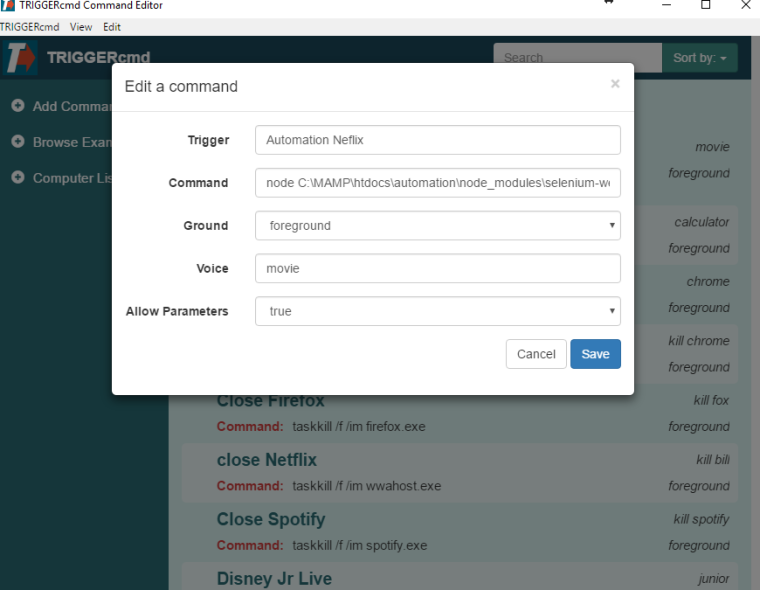
<p dir="auto">So, "boss baby" is the parameter that you are going to pass to "Alexa". Once you have the Alexa skill enabled and the script working just say the command you created. Such as: "Alexa open trigger command and movie with parameter boss baby"<br />
<img src="/forum/assets/uploads/files/1513571752698-upload-9081311b-3e03-472e-8891-6e0cd2040c4d-resized.png" alt="0_1513571752649_upload-9081311b-3e03-472e-8891-6e0cd2040c4d" class=" img-fluid img-markdown" /><br />
I realize you cannot see my full command its just the same path as the google_search.js script above - C:\MAMP\htdocs\automation\node_modules\selenium-webdriver\example&gt;node google_search.js</p>
<p dir="auto">If you have any troubles with this let me know. I have noticed that there are times when the script fails because it says that an element on the page isn't there yet. You can increase the sleep time on the script. Like instead of 2 seconds (2000) change to three (3000). Now you can start building your own scripts. The driver class methods being used has helpful comments in the C:\MAMP\htdocs\automation\node_modules\selenium-webdriver\lib\webdriver.js file. I used this to learn how to change up the script to my needs (Netflix by specific movie). My kid loves it!</p>
<p dir="auto">I split video in two to cut out my login/users page - but this is how it works for me.</p>
<p dir="auto"><a href="https://drive.google.com/file/d/1_V-5zjNurB_a-DyaBgNE4CljzUBhhqLW/view?usp=sharing" rel="nofollow ugc">https://drive.google.com/file/d/1_V-5zjNurB_a-DyaBgNE4CljzUBhhqLW/view?usp=sharing</a><br />
<a href="https://drive.google.com/file/d/1t82l-Y6Tb5JLhKpMElxP4YRD1Ta7Z7TL/view?usp=sharing" rel="nofollow ugc">https://drive.google.com/file/d/1t82l-Y6Tb5JLhKpMElxP4YRD1Ta7Z7TL/view?usp=sharing</a></p>
]]></description><link>https://www.triggercmd.com/forum/topic/115/open-specific-netflix-movie-with-alexa</link><generator>RSS for Node</generator><lastBuildDate>Mon, 10 Aug 2026 14:24:35 GMT</lastBuildDate><atom:link href="https://www.triggercmd.com/forum/topic/115.rss" rel="self" type="application/rss+xml"/><pubDate>Mon, 18 Dec 2017 05:11:53 GMT</pubDate><ttl>60</ttl><item><title><![CDATA[Reply to Open Specific Netflix Movie with Alexa on Fri, 22 Oct 2021 22:09:19 GMT]]></title><description><![CDATA[<p dir="auto">@Nico-Ramirez, Google Translate translated what you said to this:<br />
Question, I use python, when I make sure that the argument is empty, could you help me with what serious or problem, please</p>
<p dir="auto">I'm not sure what the problem is.  Please clarify.</p>
]]></description><link>https://www.triggercmd.com/forum/post/4732</link><guid isPermaLink="true">https://www.triggercmd.com/forum/post/4732</guid><dc:creator><![CDATA[Russ]]></dc:creator><pubDate>Fri, 22 Oct 2021 22:09:19 GMT</pubDate></item><item><title><![CDATA[Reply to Open Specific Netflix Movie with Alexa on Thu, 21 Oct 2021 20:58:07 GMT]]></title><description><![CDATA[<p dir="auto">@AdalbertUma pergunta, eu uso python, quando procuro que o argumento está vazio, você poderia me ajudar com qual seria o problema, por favor</p>
]]></description><link>https://www.triggercmd.com/forum/post/4726</link><guid isPermaLink="true">https://www.triggercmd.com/forum/post/4726</guid><dc:creator><![CDATA[[[global:former-user]]]]></dc:creator><pubDate>Thu, 21 Oct 2021 20:58:07 GMT</pubDate></item><item><title><![CDATA[Reply to Open Specific Netflix Movie with Alexa on Thu, 15 Apr 2021 21:03:50 GMT]]></title><description><![CDATA[<p dir="auto"><a class="plugin-mentions-user plugin-mentions-a" href="/forum/user/devilsir" aria-label="Profile: Devilsir">@<bdi>Devilsir</bdi></a> alexa cnt recognize "parametro" commands, if i tell her turn on "netflix" it works, but without parameters</p>
]]></description><link>https://www.triggercmd.com/forum/post/3924</link><guid isPermaLink="true">https://www.triggercmd.com/forum/post/3924</guid><dc:creator><![CDATA[Devilsir]]></dc:creator><pubDate>Thu, 15 Apr 2021 21:03:50 GMT</pubDate></item><item><title><![CDATA[Reply to Open Specific Netflix Movie with Alexa on Thu, 15 Apr 2021 20:15:34 GMT]]></title><description><![CDATA[<p dir="auto"><img src="/forum/assets/uploads/files/1618517702985-sem-t%C3%ADtulo.png" alt="Sem título.png" class=" img-fluid img-markdown" /><br />
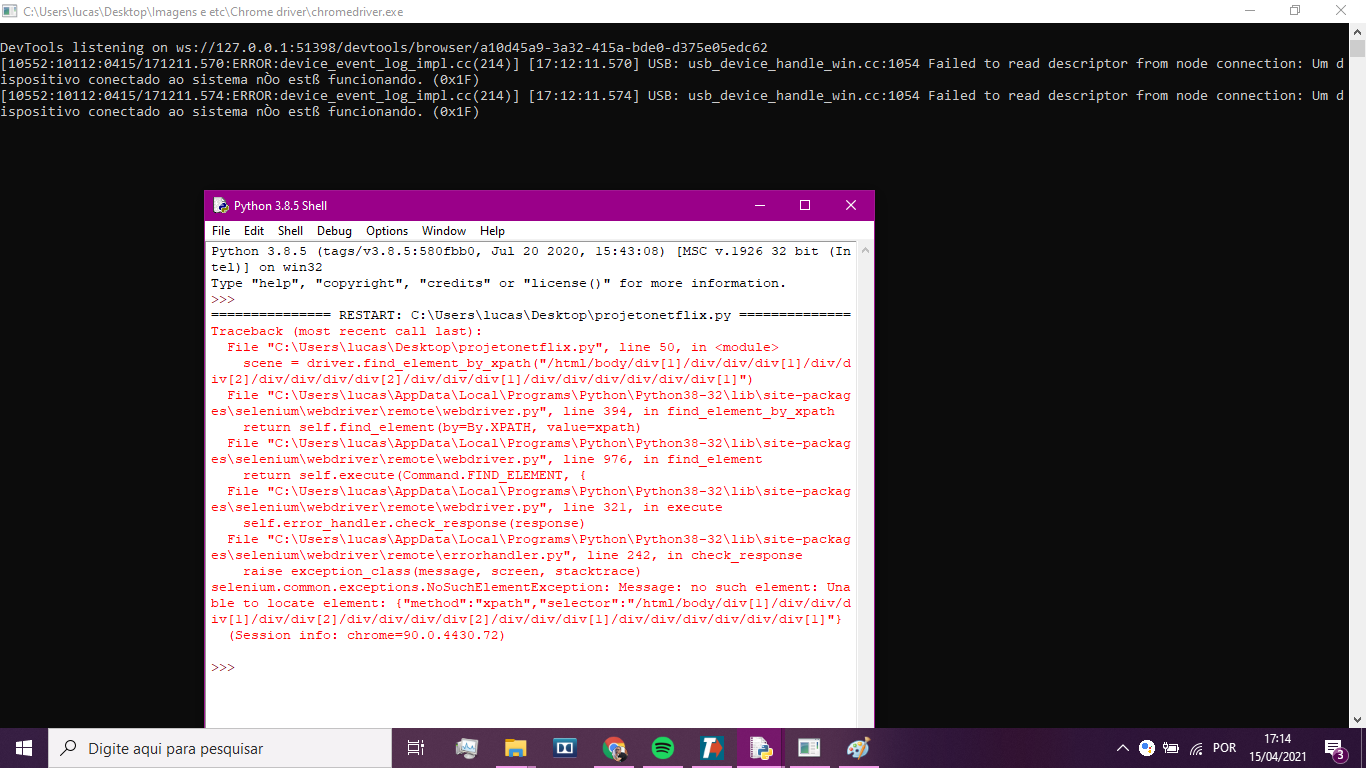
plz, everything worked fine, but seach bar isnt working :(, what can i do?</p>
]]></description><link>https://www.triggercmd.com/forum/post/3923</link><guid isPermaLink="true">https://www.triggercmd.com/forum/post/3923</guid><dc:creator><![CDATA[Devilsir]]></dc:creator><pubDate>Thu, 15 Apr 2021 20:15:34 GMT</pubDate></item><item><title><![CDATA[Reply to Open Specific Netflix Movie with Alexa on Mon, 26 Oct 2020 11:42:21 GMT]]></title><description><![CDATA[<p dir="auto"><a class="plugin-mentions-user plugin-mentions-a" href="/forum/user/andr%C3%A9-ricardo-da-costa" aria-label="Profile: André-Ricardo-da-Costa">@<bdi>André-Ricardo-da-Costa</bdi></a></p>
<ul>
<li>You will need to install Python and Selenium</li>
<li>Video for reference (PT-BR):
<ul>
<li>Python: <a href="https://www.youtube.com/watch?v=FcfalMf9bRY" rel="nofollow ugc">https://www.youtube.com/watch?v=FcfalMf9bRY</a></li>
<li>Selenium: <a href="https://www.youtube.com/watch?v=Ot10qzrb13c" rel="nofollow ugc">https://www.youtube.com/watch?v=Ot10qzrb13c</a> (choose the version compatible with your browser)</li>
</ul>
</li>
<li>Remember to put Python on windows PATH (during installation)</li>
</ul>
<pre><code>from selenium import webdriver
from selenium.webdriver.common.keys import Keys
from selenium.webdriver.common.by import By
from selenium.webdriver.support.ui import WebDriverWait
from selenium.webdriver.support import expected_conditions as EC
import time
import sys

if len(sys.argv) == 2:
    movie = sys.argv[1]
else:
    movie = ' '.join(sys.argv[1:])

# You can put the chromedriver wherever you want - you can download it from http://seleniumhq.github.io/selenium/docs/api/javascript/
PATH = r"C:\chromedriver.exe"
# You can select any browser available for Selenium
driver = webdriver.Chrome(PATH)

#Netflix login initial page
driver.get("https://www.netflix.com/br/login")
element = driver.find_element_by_name("userLoginId")

#Insert your email
element.send_keys("netflixacc@gmail.com")
time.sleep(0.2)

#Insert your password
element2 = driver.find_element_by_name("password")
element2.send_keys("netflixpassword")
time.sleep(0.3)
element2.send_keys(Keys.RETURN)
time.sleep(2)

#Insert your profile name as seen after you log in
profile = driver.find_element_by_link_text("netflixprofilename")
profile.click()

time.sleep(3)
search = driver.find_element_by_class_name("searchBox")
search.click()

time.sleep(1)
searchbox = driver.find_element_by_name("searchInput")
searchbox.send_keys(movie)

time.sleep(0.5)
searchbox.send_keys(Keys.RETURN)

time.sleep(2)
scene = driver.find_element_by_xpath("/html/body/div[1]/div/div/div[1]/div/div[2]/div/div/div/div[2]/div/div/div[1]/div/div/div/div/div/div[1]")
scene.click()

time.sleep(0.5)
submit = driver.find_element_by_xpath("//button[@class='color-primary hasLabel hasIcon ltr-1jnopvq']")
submit.click()

time.sleep(5)
move = driver.find_element_by_xpath("//button[@class='touchable PlayerControls--control-element nfp-button-control default-control-button button-nfplayerBack tooltip-button tooltip-button-pos-center tooltip-button-align-right']")
move.send_keys(Keys.TAB)

time.sleep(0.5)
fullscreen = driver.find_element_by_xpath("//button[@class='touchable PlayerControls--control-element nfp-button-control default-control-button button-nfplayerFullscreen']")
fullscreen.click()
</code></pre>
<p dir="auto"><strong>On TRIGGERcmd</strong>:<br />
Trigger: Search on Netflix<br />
(EXAMPLE) Command: start C:\PycharmProjects\netflix\netflix.py<br />
(You need to put your py file directory)<br />
Ground: foreground<br />
Voice: netflix<br />
Allow parameters: true</p>
<p dir="auto">Portuguese:<br />
Activate Execute Comando skill on Alexa app<br />
To Alexa: "Alexa, pergunte Execute Comando executar netflix com parâmetro the alienist"</p>
<p dir="auto">English:<br />
Activate TRIGGERcmd skill on Alexa app<br />
To Alexa: "Alexa, ask TRIGGERcmd to run netflix on the alienist"</p>
<p dir="auto">Any updates I will edit the post. There are things that I want to improve (like the sleep time)</p>
]]></description><link>https://www.triggercmd.com/forum/post/3068</link><guid isPermaLink="true">https://www.triggercmd.com/forum/post/3068</guid><dc:creator><![CDATA[Adalberto]]></dc:creator><pubDate>Mon, 26 Oct 2020 11:42:21 GMT</pubDate></item><item><title><![CDATA[Reply to Open Specific Netflix Movie with Alexa on Mon, 26 Oct 2020 01:42:48 GMT]]></title><description><![CDATA[<p dir="auto"><a class="plugin-mentions-user plugin-mentions-a" href="/forum/user/adalberto" aria-label="Profile: Adalberto">@<bdi>Adalberto</bdi></a> eu tenho interesse em testar esse código de puder compartilhar amigo. Muito obrigado.</p>
]]></description><link>https://www.triggercmd.com/forum/post/3065</link><guid isPermaLink="true">https://www.triggercmd.com/forum/post/3065</guid><dc:creator><![CDATA[André Ricardo da Costa]]></dc:creator><pubDate>Mon, 26 Oct 2020 01:42:48 GMT</pubDate></item><item><title><![CDATA[Reply to Open Specific Netflix Movie with Alexa on Mon, 26 Oct 2020 09:49:11 GMT]]></title><description><![CDATA[<p dir="auto"><a class="plugin-mentions-user plugin-mentions-a" href="/forum/user/russ" aria-label="Profile: Russ">@<bdi>Russ</bdi></a> Hello, Russ. I didn't get lucky with this javascript here and I have created my own using Python + Selenium. It actually does the same thing. Opens the browser, inserts the credentials, searchs for the movie (parameter), plays it and puts it on fullscreen. If someone is interested, I can share the code.</p>
<p dir="auto">But actually, my reply is about the way we talk to Alexa to run the script. I'm from Brazil as well... When I'm using "Execute comando" it doesn't feel natural. Most of it is because the "pergunte" in the beginning. Something more like "Alexa, Execute Comando YYYY com parâmetro XXXX" would feel better.</p>
<p dir="auto">The "execute comando" needs to be part of the phrase and not the name of the service to feel more natural.</p>
]]></description><link>https://www.triggercmd.com/forum/post/3064</link><guid isPermaLink="true">https://www.triggercmd.com/forum/post/3064</guid><dc:creator><![CDATA[Adalberto]]></dc:creator><pubDate>Mon, 26 Oct 2020 09:49:11 GMT</pubDate></item><item><title><![CDATA[Reply to Open Specific Netflix Movie with Alexa on Fri, 23 Oct 2020 00:35:23 GMT]]></title><description><![CDATA[<p dir="auto"><a class="plugin-mentions-user plugin-mentions-a" href="/forum/user/felipe-guedes" aria-label="Profile: Felipe-Guedes">@<bdi>Felipe-Guedes</bdi></a>, you could use one device, like your computer to play it using that play button:  <img src="/forum/assets/uploads/files/1603413279872-1f596754-56ea-4a76-a7f5-92de54da7f62-image.png" alt="1f596754-56ea-4a76-a7f5-92de54da7f62-image.png" class=" img-fluid img-markdown" /> ... and use another device, like your phone to record it.</p>
]]></description><link>https://www.triggercmd.com/forum/post/3051</link><guid isPermaLink="true">https://www.triggercmd.com/forum/post/3051</guid><dc:creator><![CDATA[Russ]]></dc:creator><pubDate>Fri, 23 Oct 2020 00:35:23 GMT</pubDate></item><item><title><![CDATA[Reply to Open Specific Netflix Movie with Alexa on Thu, 22 Oct 2020 20:24:45 GMT]]></title><description><![CDATA[<p dir="auto"><a class="plugin-mentions-user plugin-mentions-a" href="/forum/user/russ" aria-label="Profile: Russ">@<bdi>Russ</bdi></a> How i send you my voice record?</p>
]]></description><link>https://www.triggercmd.com/forum/post/3048</link><guid isPermaLink="true">https://www.triggercmd.com/forum/post/3048</guid><dc:creator><![CDATA[Felipe Guedes]]></dc:creator><pubDate>Thu, 22 Oct 2020 20:24:45 GMT</pubDate></item><item><title><![CDATA[Reply to Open Specific Netflix Movie with Alexa on Sun, 02 Aug 2020 23:08:27 GMT]]></title><description><![CDATA[<p dir="auto">its that !<br />
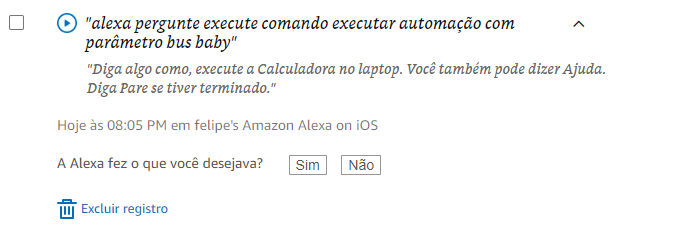
<img src="/forum/assets/uploads/files/1596409632670-alexa.png" alt="alexa.PNG" class=" img-fluid img-markdown" /></p>
]]></description><link>https://www.triggercmd.com/forum/post/2605</link><guid isPermaLink="true">https://www.triggercmd.com/forum/post/2605</guid><dc:creator><![CDATA[Felipe Guedes]]></dc:creator><pubDate>Sun, 02 Aug 2020 23:08:27 GMT</pubDate></item><item><title><![CDATA[Reply to Open Specific Netflix Movie with Alexa on Sat, 01 Aug 2020 22:09:28 GMT]]></title><description><![CDATA[<p dir="auto"><a class="plugin-mentions-user plugin-mentions-a" href="/forum/user/felipe-guedes" aria-label="Profile: Felipe-Guedes">@<bdi>Felipe-Guedes</bdi></a>, does this site work in Brazil or is this just the english or US version of Alexa web?<br />
<a href="https://alexa.amazon.com/spa/index.html#cards" rel="nofollow ugc">https://alexa.amazon.com/spa/index.html#cards</a><br />
I was hoping you could use that site because it's helpful to know what Alexa is hearing.</p>
<p dir="auto">Also, if this is too much to ask, no problem, but would you mind sending me a recording of yourself saying, this?<br />
<strong>Alexa, pergunte Execute Comando executar automação com o parâmetro bos baby.</strong><br />
I might be able to use the recording to "train" Alexa to hear it correctly.</p>
<p dir="auto">Thank you for your patience.</p>
]]></description><link>https://www.triggercmd.com/forum/post/2600</link><guid isPermaLink="true">https://www.triggercmd.com/forum/post/2600</guid><dc:creator><![CDATA[Russ]]></dc:creator><pubDate>Sat, 01 Aug 2020 22:09:28 GMT</pubDate></item><item><title><![CDATA[Reply to Open Specific Netflix Movie with Alexa on Sat, 01 Aug 2020 21:04:48 GMT]]></title><description><![CDATA[<p dir="auto">Sorry, i don't see this msg.<br />
Yes, Alexa answer exactly this.</p>
<p dir="auto">Diga algo como execute a calculadora no laptop, você também pode dizer para se já estiver terminado.</p>
]]></description><link>https://www.triggercmd.com/forum/post/2597</link><guid isPermaLink="true">https://www.triggercmd.com/forum/post/2597</guid><dc:creator><![CDATA[Felipe Guedes]]></dc:creator><pubDate>Sat, 01 Aug 2020 21:04:48 GMT</pubDate></item><item><title><![CDATA[Reply to Open Specific Netflix Movie with Alexa on Tue, 14 Jul 2020 23:30:51 GMT]]></title><description><![CDATA[<p dir="auto"><a class="plugin-mentions-user plugin-mentions-a" href="/forum/user/felipe-guedes" aria-label="Profile: Felipe-Guedes">@<bdi>Felipe-Guedes</bdi></a>, are you saying Alexa answered this way again?</p>
<pre><code>Diga algo como execute a calculadora no laptop, você também pode dizer para se já estiver terminado.
</code></pre>
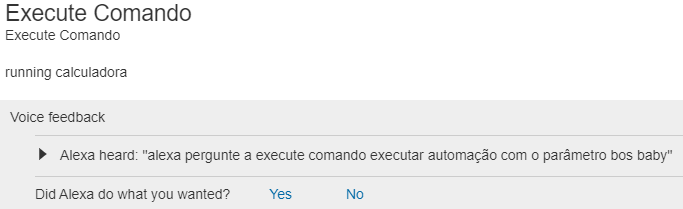
<p dir="auto">Also, if you go to <a href="https://alexa.amazon.com/" rel="nofollow ugc">https://alexa.amazon.com/</a> you can see the words Alexa thinks you said.  Can you copy/paste that here?</p>
<p dir="auto">This is what mine showed:</p>
<p dir="auto"><img src="/forum/assets/uploads/files/1594769410016-ec4ad4f7-5cd4-42b8-a9aa-669b820f6932-image.png" alt="ec4ad4f7-5cd4-42b8-a9aa-669b820f6932-image.png" class=" img-fluid img-markdown" /></p>
]]></description><link>https://www.triggercmd.com/forum/post/2522</link><guid isPermaLink="true">https://www.triggercmd.com/forum/post/2522</guid><dc:creator><![CDATA[Russ]]></dc:creator><pubDate>Tue, 14 Jul 2020 23:30:51 GMT</pubDate></item><item><title><![CDATA[Reply to Open Specific Netflix Movie with Alexa on Tue, 14 Jul 2020 01:35:04 GMT]]></title><description><![CDATA[<p dir="auto">When i said the command like you said, alexa anwser me a helper to execute the command.</p>
]]></description><link>https://www.triggercmd.com/forum/post/2521</link><guid isPermaLink="true">https://www.triggercmd.com/forum/post/2521</guid><dc:creator><![CDATA[Felipe Guedes]]></dc:creator><pubDate>Tue, 14 Jul 2020 01:35:04 GMT</pubDate></item><item><title><![CDATA[Reply to Open Specific Netflix Movie with Alexa on Sun, 12 Jul 2020 22:27:07 GMT]]></title><description><![CDATA[<p dir="auto"><a class="plugin-mentions-user plugin-mentions-a" href="/forum/user/felipe-guedes" aria-label="Profile: Felipe-Guedes">@<bdi>Felipe-Guedes</bdi></a>, no, I updated the code on the server to handle the problem when Alexa sends <strong>comando</strong> with the trigger word.  I'm hoping that solves the problem you're having.</p>
]]></description><link>https://www.triggercmd.com/forum/post/2514</link><guid isPermaLink="true">https://www.triggercmd.com/forum/post/2514</guid><dc:creator><![CDATA[Russ]]></dc:creator><pubDate>Sun, 12 Jul 2020 22:27:07 GMT</pubDate></item><item><title><![CDATA[Reply to Open Specific Netflix Movie with Alexa on Sun, 12 Jul 2020 21:28:14 GMT]]></title><description><![CDATA[<p dir="auto">i need to update something?</p>
]]></description><link>https://www.triggercmd.com/forum/post/2513</link><guid isPermaLink="true">https://www.triggercmd.com/forum/post/2513</guid><dc:creator><![CDATA[Felipe Guedes]]></dc:creator><pubDate>Sun, 12 Jul 2020 21:28:14 GMT</pubDate></item><item><title><![CDATA[Reply to Open Specific Netflix Movie with Alexa on Sat, 11 Jul 2020 22:10:45 GMT]]></title><description><![CDATA[<p dir="auto">Thank you <a class="plugin-mentions-user plugin-mentions-a" href="/forum/user/felipe-guedes" aria-label="Profile: Felipe-Guedes">@<bdi>Felipe-Guedes</bdi></a>!  That helps.  I found and fixed one problem so far:</p>
<p dir="auto">I said, "Alexa, pergunte Execute Comando executar calculadora." and Alexa sent this to my server, which is wrong.  The value should have been calculadora, not comando calculadora.</p>
<pre><code>  "name": "Trigger",
  "value": "comando calculadora",
</code></pre>
<p dir="auto">I've had this problem before.  Alexa sends extra words in the trigger field.  I fixed that, but I'm not sure that's the problem you were having.</p>
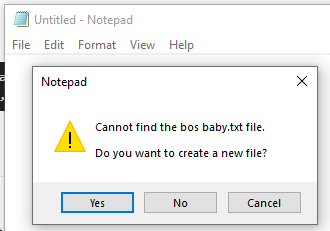
<p dir="auto">After that it worked for me.  I said, "Alexa, pergunte Execute Comando executar automação com o parâmetro boss baby" and it ran my command and passed "bos baby" as the parameter.</p>
<p dir="auto"><img src="/forum/assets/uploads/files/1594475069213-c1b06f06-51f3-4d66-a701-584834ba1358-image.png" alt="c1b06f06-51f3-4d66-a701-584834ba1358-image.png" class=" img-fluid img-markdown" /></p>
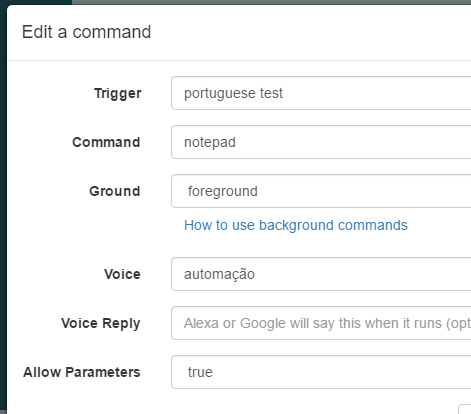
<p dir="auto">This is my test command:</p>
<p dir="auto"><img src="/forum/assets/uploads/files/1594475149217-8ad7e2ef-e4fe-4da7-96e6-15c56d392f17-image.png" alt="8ad7e2ef-e4fe-4da7-96e6-15c56d392f17-image.png" class=" img-fluid img-markdown" /></p>
<p dir="auto">Will you please test again and tell me if that helped?</p>
]]></description><link>https://www.triggercmd.com/forum/post/2506</link><guid isPermaLink="true">https://www.triggercmd.com/forum/post/2506</guid><dc:creator><![CDATA[Russ]]></dc:creator><pubDate>Sat, 11 Jul 2020 22:10:45 GMT</pubDate></item><item><title><![CDATA[Reply to Open Specific Netflix Movie with Alexa on Fri, 10 Jul 2020 23:30:55 GMT]]></title><description><![CDATA[<p dir="auto"><a class="plugin-mentions-user plugin-mentions-a" href="/forum/user/russ" aria-label="Profile: Russ">@<bdi>Russ</bdi></a> I try to say in this order:</p>
<pre><code>Alexa, Abrir Execute Comando
Alexa, Execute automação com parâmetro boss baby
Alexa says: Diga algo como execute a calculadora no laptop, você também pode dizer para se já estiver terminado.
</code></pre>
<p dir="auto">Other way:</p>
<pre><code>Alexa, pergunte Execute Comando executar automação com o parâmetro X.
Alexa says: Diga algo como execute a calculadora no laptop, você também pode dizer para se já estiver terminado.
</code></pre>
]]></description><link>https://www.triggercmd.com/forum/post/2505</link><guid isPermaLink="true">https://www.triggercmd.com/forum/post/2505</guid><dc:creator><![CDATA[Felipe Guedes]]></dc:creator><pubDate>Fri, 10 Jul 2020 23:30:55 GMT</pubDate></item><item><title><![CDATA[Reply to Open Specific Netflix Movie with Alexa on Thu, 09 Jul 2020 22:28:17 GMT]]></title><description><![CDATA[<p dir="auto"><a class="plugin-mentions-user plugin-mentions-a" href="/forum/user/felipe-guedes" aria-label="Profile: Felipe-Guedes">@<bdi>Felipe-Guedes</bdi></a>, what does Alexa say back to you?</p>
]]></description><link>https://www.triggercmd.com/forum/post/2497</link><guid isPermaLink="true">https://www.triggercmd.com/forum/post/2497</guid><dc:creator><![CDATA[Russ]]></dc:creator><pubDate>Thu, 09 Jul 2020 22:28:17 GMT</pubDate></item><item><title><![CDATA[Reply to Open Specific Netflix Movie with Alexa on Thu, 09 Jul 2020 21:24:17 GMT]]></title><description><![CDATA[<p dir="auto"><a class="plugin-mentions-user plugin-mentions-a" href="/forum/user/russ" aria-label="Profile: Russ">@<bdi>Russ</bdi></a> it's doesn't work.<br />
No problem</p>
]]></description><link>https://www.triggercmd.com/forum/post/2496</link><guid isPermaLink="true">https://www.triggercmd.com/forum/post/2496</guid><dc:creator><![CDATA[Felipe Guedes]]></dc:creator><pubDate>Thu, 09 Jul 2020 21:24:17 GMT</pubDate></item><item><title><![CDATA[Reply to Open Specific Netflix Movie with Alexa on Wed, 08 Jul 2020 22:00:20 GMT]]></title><description><![CDATA[<p dir="auto"><a class="plugin-mentions-user plugin-mentions-a" href="/forum/user/felipe-guedes" aria-label="Profile: Felipe-Guedes">@<bdi>Felipe-Guedes</bdi></a>, does this work?</p>
<p dir="auto"><strong>Alexa, pergunte Execute Comando execute automacao com o parâmetro boss baby.</strong></p>
<p dir="auto">I think I need to fix the portuguese text on the voice command cheat sheet page.</p>
<p dir="auto">EDIT:  I updated <a href="https://www.triggercmd.com/user/command/printlist" rel="nofollow ugc">that voice command cheat sheet page</a>.  I hope that works better.</p>
]]></description><link>https://www.triggercmd.com/forum/post/2484</link><guid isPermaLink="true">https://www.triggercmd.com/forum/post/2484</guid><dc:creator><![CDATA[Russ]]></dc:creator><pubDate>Wed, 08 Jul 2020 22:00:20 GMT</pubDate></item><item><title><![CDATA[Reply to Open Specific Netflix Movie with Alexa on Wed, 08 Jul 2020 00:02:42 GMT]]></title><description><![CDATA[<p dir="auto"><a class="plugin-mentions-user plugin-mentions-a" href="/forum/user/felipe-guedes" aria-label="Profile: Felipe-Guedes">@<bdi>Felipe-Guedes</bdi></a> Otherwise, is this configuration set maximized chrome.</p>
<pre><code>var chrome = require("selenium-webdriver/chrome");

/** 
 * Set chrome command line options/switches
*/      
var chromeOptions = new chrome.Options();
chromeOptions.addArguments("test-type");
chromeOptions.addArguments("start-maximized");
chromeOptions.addArguments("--js-flags=--expose-gc");
chromeOptions.addArguments("--enable-precise-memory-info");
chromeOptions.addArguments("--disable-popup-blocking");
chromeOptions.addArguments("--disable-default-apps");
chromeOptions.addArguments("--disable-infobars");

var driver = new Builder()
    .forBrowser('chrome')
    .setChromeOptions(chromeOptions)
    .build();
</code></pre>
<p dir="auto">I'm still searching how to set full screen in video, and how to stop and play.<br />
i'll post here when i find</p>
]]></description><link>https://www.triggercmd.com/forum/post/2473</link><guid isPermaLink="true">https://www.triggercmd.com/forum/post/2473</guid><dc:creator><![CDATA[Felipe Guedes]]></dc:creator><pubDate>Wed, 08 Jul 2020 00:02:42 GMT</pubDate></item><item><title><![CDATA[Reply to Open Specific Netflix Movie with Alexa on Tue, 07 Jul 2020 23:46:42 GMT]]></title><description><![CDATA[<p dir="auto">Perfect, now i can execute the command in trigger cmd and i have other problem hhahahahah.<br />
When i say - "Alexa, Execute comando" -&gt; "Execute automacao com parametro boss baby" -&gt; She don't recognize my command. Isn't an exemple with parameters in portuguese.<br />
Help me, we almost there !</p>
]]></description><link>https://www.triggercmd.com/forum/post/2472</link><guid isPermaLink="true">https://www.triggercmd.com/forum/post/2472</guid><dc:creator><![CDATA[Felipe Guedes]]></dc:creator><pubDate>Tue, 07 Jul 2020 23:46:42 GMT</pubDate></item><item><title><![CDATA[Reply to Open Specific Netflix Movie with Alexa on Tue, 07 Jul 2020 00:21:46 GMT]]></title><description><![CDATA[<p dir="auto"><a class="plugin-mentions-user plugin-mentions-a" href="/forum/user/felipe-guedes" aria-label="Profile: Felipe-Guedes">@<bdi>Felipe-Guedes</bdi></a>, thanks for that info.  That helps.</p>
<p dir="auto">I'm still thinking it's a problem with the working directory.  Node knows how to find module dependencies based on the working directory.  Would you mind trying this?</p>
<p dir="auto">Create a script called <strong>c:\scripts\google.bat</strong> with these contents:</p>
<pre><code>cd /d C:\Users\Artista\Documents\node_modules\selenium-webdriver\exemple
node google.js
</code></pre>
<p dir="auto">Then make this your triggercmd command: <strong>c:\scripts\google.bat</strong></p>
]]></description><link>https://www.triggercmd.com/forum/post/2464</link><guid isPermaLink="true">https://www.triggercmd.com/forum/post/2464</guid><dc:creator><![CDATA[Russ]]></dc:creator><pubDate>Tue, 07 Jul 2020 00:21:46 GMT</pubDate></item></channel></rss>