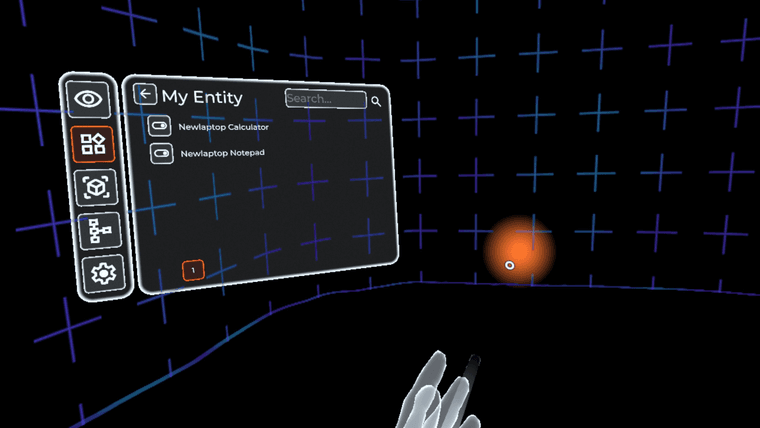
<?xml version="1.0" encoding="UTF-8"?><rss xmlns:dc="http://purl.org/dc/elements/1.1/" xmlns:content="http://purl.org/rss/1.0/modules/content/" xmlns:atom="http://www.w3.org/2005/Atom" version="2.0"><channel><title><![CDATA[Home Assistant]]></title><description><![CDATA[home-assistant.io]]></description><link>https://www.triggercmd.com/forum/category/18</link><generator>RSS for Node</generator><lastBuildDate>Fri, 10 Jul 2026 17:49:59 GMT</lastBuildDate><atom:link href="https://www.triggercmd.com/forum/category/18.rss" rel="self" type="application/rss+xml"/><pubDate>Fri, 04 Jul 2025 17:25:36 GMT</pubDate><ttl>60</ttl><item><title><![CDATA[Trigger your commands in VR with Immersive Home]]></title><description><![CDATA[<p dir="auto">This screenshot doesn't show the room I could see while in VR.  Apparently the Quest filters that out of screenshots.</p>
<p dir="auto">I placed a switch in my room and now I can turn it on in VR to run Calculator on my "NewLaptop" computer via TRIGGERcmd.</p>
<p dir="auto"><img src="/forum/assets/uploads/files/1751649568692-7a005c73-2c09-4994-a76d-3e6c704948bf-quest_immersive_home-resized.png" alt="7a005c73-2c09-4994-a76d-3e6c704948bf-quest_immersive_home.png" class=" img-fluid img-markdown" /></p>
<p dir="auto">It's pretty cool, but it needs work.  It's opensource.  I downloaded it for free and installed it with SideQuest, but you can also install it from the Meta Quest app store for $5.  It reads your devices from your Home Assistant server.</p>
<p dir="auto"><a href="https://immersive-home.org/" rel="nofollow ugc">https://immersive-home.org/</a></p>
]]></description><link>https://www.triggercmd.com/forum/topic/3261/trigger-your-commands-in-vr-with-immersive-home</link><guid isPermaLink="true">https://www.triggercmd.com/forum/topic/3261/trigger-your-commands-in-vr-with-immersive-home</guid><dc:creator><![CDATA[Russ]]></dc:creator><pubDate>Fri, 04 Jul 2025 17:25:36 GMT</pubDate></item><item><title><![CDATA[ESP32 infrared receiver for Home Assistant to run 21 commands]]></title><description><![CDATA[<p dir="auto">I published this Home Assistant blueprint to trigger 21 different commands, one for each button on this 21 button infrared remote control.<br />
<a href="https://github.com/rvmey/TRIGGERcmd-Agent/blob/master/ha_blueprints/ir_remote.yaml" rel="nofollow ugc">https://github.com/rvmey/TRIGGERcmd-Agent/blob/master/ha_blueprints/ir_remote.yaml</a></p>
<p dir="auto"><img src="/forum/assets/uploads/files/1736293459078-iresp32.jpg" alt="iresp32.jpg" class=" img-fluid img-markdown" /></p>
<p dir="auto">Install the "Mosquitto broker" Home Assistant add-on if you don't already have it.</p>
<p dir="auto">Create a Home Assistant user for Tasmota to log into MQTT using this web page:<br />
<a href="http://homeassistant.local:8123/config/users" rel="nofollow ugc">http://homeassistant.local:8123/config/users</a></p>
<p dir="auto">Connect your ESP32 device to your PC via USB and install Tasmota firmware using this web page:<br />
<a href="https://tasmota.github.io/install" rel="nofollow ugc">https://tasmota.github.io/install</a></p>
<p dir="auto">Connect it to your wifi, open the Tasmota web interface, and enable MQTT.  Point it to your Home Assistant IP address, and input the username and password for the user you just created for it.</p>
<p dir="auto">In the Tasmota Module configuration, enable IRrecv on GPIO 15:<br />
<img src="/forum/assets/uploads/files/1736293684881-138e7976-e53f-48a9-9d8e-def514e3f04c-image.png" alt="138e7976-e53f-48a9-9d8e-def514e3f04c-image.png" class=" img-fluid img-markdown" /></p>
<p dir="auto">Add this to your Home Assistant configuration.yaml.  This will make the IR receiver(s) available as entities you can select on your automation.</p>
<pre><code>mqtt: 
  sensor:
  - name: "IR Receiver Blue"
    state_topic: "tele/tasmota_778254/RESULT"
    value_template: "{{ value_json.IrReceived.Data }}"
  - name: "IR Receiver White"
    state_topic: "tele/tasmota_47F4CC/RESULT"
    value_template: "{{ value_json.IrReceived.Data }}"
</code></pre>
<p dir="auto">Modify it for your specific tasmota name(s) instead of tasmota_778254 or tasmota_47F4CC.  You'll find yours on the MQTT configuration page.</p>
<p dir="auto">Go to this page and install the blueprint with the IMPORT BLUEPRINT button.<br />
<a href="http://homeassistant.local:8123/config/blueprint/dashboard" rel="nofollow ugc">http://homeassistant.local:8123/config/blueprint/dashboard</a><br />
<img src="/forum/assets/uploads/files/1736292275829-4717fc04-65af-44a3-8d86-3154900b16a4-image.png" alt="4717fc04-65af-44a3-8d86-3154900b16a4-image.png" class=" img-fluid img-markdown" /></p>
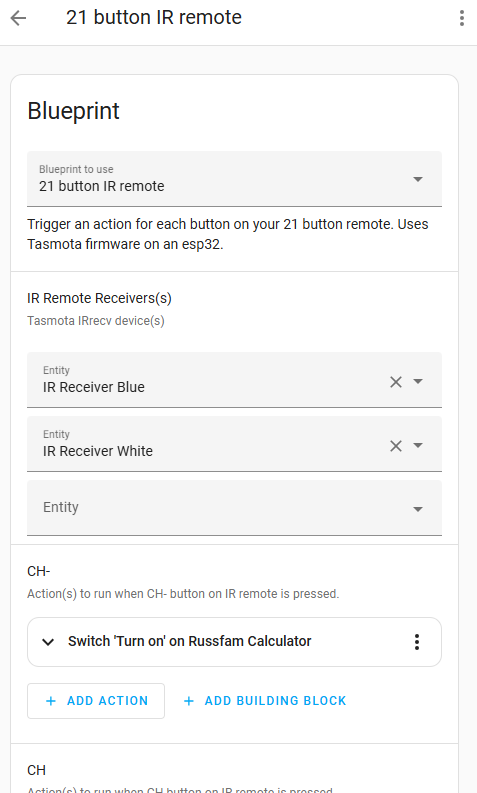
<p dir="auto">Click the blueprint and configure your automation with an action for each of the 21 buttons on the IR remote.  Notice the automation can use multiple IR receivers if you want.</p>
<p dir="auto"><img src="/forum/assets/uploads/files/1736292197395-b0a8fb92-b0e5-4e44-81bb-921af67b0bab-image.png" alt="b0a8fb92-b0e5-4e44-81bb-921af67b0bab-image.png" class=" img-fluid img-markdown" /></p>
<p dir="auto">The IR remotes are cheap enough you can buy a bunch and have them all over:<br />
<img src="/forum/assets/uploads/files/1736293744180-46c1ebbb-cf03-432f-8b4f-1a3694c415fe-image.png" alt="46c1ebbb-cf03-432f-8b4f-1a3694c415fe-image.png" class=" img-fluid img-markdown" /><br />
<a href="https://www.amazon.com/HiLetgo-HX1838-Infrared-Wireless-Control/dp/B01HTC5JX4" rel="nofollow ugc">https://www.amazon.com/HiLetgo-HX1838-Infrared-Wireless-Control/dp/B01HTC5JX4</a></p>
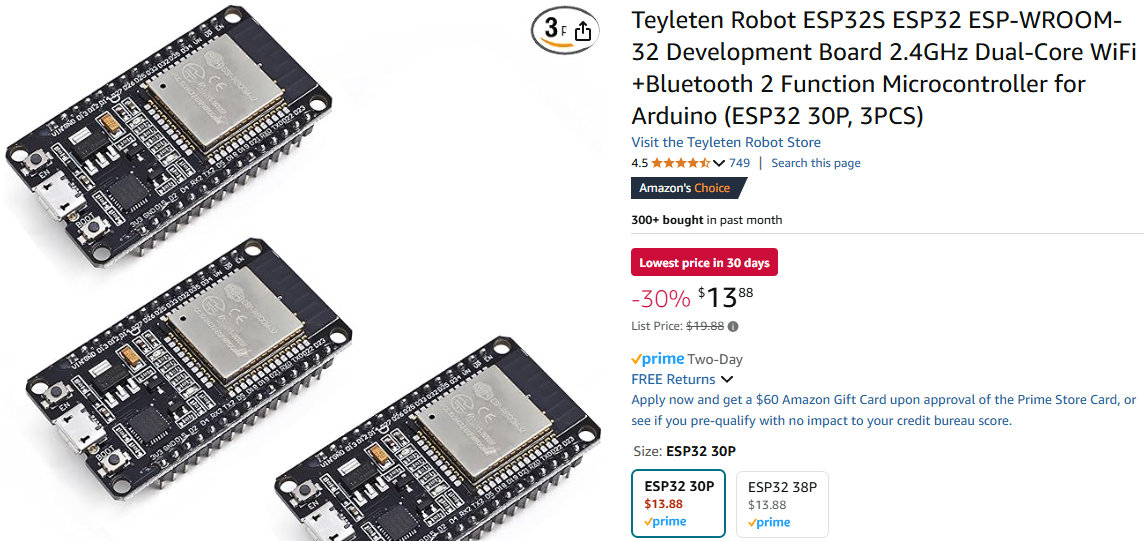
<p dir="auto"><img src="/forum/assets/uploads/files/1736295148208-23cd24c9-2fd9-4341-b66a-f47807c73178-image.png" alt="23cd24c9-2fd9-4341-b66a-f47807c73178-image.png" class=" img-fluid img-markdown" /><br />
<a href="https://www.amazon.com/Teyleten-Robot-ESP-WROOM-32-Development-Microcontroller/dp/B08246MCL5" rel="nofollow ugc">https://www.amazon.com/Teyleten-Robot-ESP-WROOM-32-Development-Microcontroller/dp/B08246MCL5</a></p>
<p dir="auto">Optionally, you might also want to run this command in the console to prevent it from losing its config when the power going out and back on too many times:</p>
<pre><code>SetOption65 1
</code></pre>
<p dir="auto">If you prefer a Raspberry Pi solution that uses the same IR remote, check out <a href="https://www.triggercmd.com/forum/topic/2474/raspberry-pi-image-with-triggercmd-pre-loaded">this post</a>.</p>
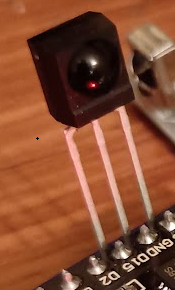
<p dir="auto">EDIT 4/12/25:   I've learned that these basic IR receivers work more consistently:<br />
<a href="https://www.amazon.com/Vishay-TSOP4838-Infrared-Receiver-Pack/dp/B00UO9VO8O" rel="nofollow ugc">https://www.amazon.com/Vishay-TSOP4838-Infrared-Receiver-Pack/dp/B00UO9VO8O</a></p>
<p dir="auto"><img src="/forum/assets/uploads/files/1744497850184-ead08945-26b3-49f2-81c2-4adf3dc695e5-image.png" alt="ead08945-26b3-49f2-81c2-4adf3dc695e5-image.png" class=" img-fluid img-markdown" /></p>
<p dir="auto">These work well too:<br />
<img src="/forum/assets/uploads/files/1744499621346-ed3111b9-6376-4ab8-acb9-8eaf88c7beb5-image.png" alt="ed3111b9-6376-4ab8-acb9-8eaf88c7beb5-image.png" class=" img-fluid img-markdown" /></p>
]]></description><link>https://www.triggercmd.com/forum/topic/3199/esp32-infrared-receiver-for-home-assistant-to-run-21-commands</link><guid isPermaLink="true">https://www.triggercmd.com/forum/topic/3199/esp32-infrared-receiver-for-home-assistant-to-run-21-commands</guid><dc:creator><![CDATA[Russ]]></dc:creator><pubDate>Tue, 07 Jan 2025 23:21:37 GMT</pubDate></item><item><title><![CDATA[sending parameter to a home assistant TCMD switch]]></title><description><![CDATA[<p dir="auto">Thanks <a class="mention plugin-mentions-user plugin-mentions-a" href="https://www.triggercmd.com/forum/uid/18307">@metablast</a>.</p>
<p dir="auto">I've been thinking about how I could allow other parameters.  Would you want to create an HA automation that triggers the command, and do you want the properties of the device that triggered the automation to be selectable as command parameters?  I think I could build a way to do that.</p>
]]></description><link>https://www.triggercmd.com/forum/topic/3197/sending-parameter-to-a-home-assistant-tcmd-switch</link><guid isPermaLink="true">https://www.triggercmd.com/forum/topic/3197/sending-parameter-to-a-home-assistant-tcmd-switch</guid><dc:creator><![CDATA[Russ]]></dc:creator><pubDate>Fri, 03 Jan 2025 19:12:16 GMT</pubDate></item><item><title><![CDATA[Quick Home Assistant setup with Docker]]></title><description><![CDATA[<p dir="auto">I wrote this <code>start.sh</code> bash script to run Home Assistant for the <a href="https://www.youtube.com/watch?v=w_91agon9rg" rel="nofollow ugc">Youtube demo</a> but you could also use it to try out Home Assistant and/or the TRIGGERcmd integration for it:</p>
<pre><code>#!/bin/bash

mkdir -p ~/ha/config
docker run -d \
  --name homeassistant \
  --privileged \
  -e TZ=America/Detroit \
  -v ~/ha/config:/config \
  -v /run/dbus:/run/dbus:ro \
  -p 8123:8123 \
  --rm \
  ghcr.io/home-assistant/home-assistant:stable
</code></pre>
<p dir="auto">This shows my session where I ran it, then confirmed it's running with the <strong>docker ps</strong> command:</p>
<pre><code>russ@RussHP:~/ha$ cat start.sh
#!/bin/bash

mkdir -p ~/ha/config
docker run -d \
  --name homeassistant \
  --privileged \
  -e TZ=America/Detroit \
  -v ~/ha/config:/config \
  -v /run/dbus:/run/dbus:ro \
  -p 8123:8123 \
  --rm \
  ghcr.io/home-assistant/home-assistant:stable
russ@RussHP:~/ha$ ./start.sh
a32957000a3f029fda67ff1cc2d96b22d2fe4f13125536023e94723a5df2dc6f
russ@RussHP:~/ha$ docker ps
CONTAINER ID   IMAGE                                          COMMAND   CREATED       STATUS       PORTS                    NAMES
59c343cb87fa   ghcr.io/home-assistant/home-assistant:stable   "/init"   2 hours ago   Up 2 hours   0.0.0.0:8123-&gt;8123/tcp   homeassistant
</code></pre>
<p dir="auto">After it was running, I was able to access it at <a href="http://localhost:8123" rel="nofollow ugc">http://localhost:8123</a></p>
]]></description><link>https://www.triggercmd.com/forum/topic/3195/quick-home-assistant-setup-with-docker</link><guid isPermaLink="true">https://www.triggercmd.com/forum/topic/3195/quick-home-assistant-setup-with-docker</guid><dc:creator><![CDATA[Russ]]></dc:creator><pubDate>Wed, 01 Jan 2025 18:45:59 GMT</pubDate></item><item><title><![CDATA[Just adding a post to plug the blueprint I just published to support the Home Assistant integration.]]></title><description><![CDATA[<p dir="auto"><a href="https://www.triggercmd.com/forum/topic/3192/home-assistant-blueprint-for-triggercmd">https://www.triggercmd.com/forum/topic/3192/home-assistant-blueprint-for-triggercmd</a></p>
]]></description><link>https://www.triggercmd.com/forum/topic/3193/just-adding-a-post-to-plug-the-blueprint-i-just-published-to-support-the-home-assistant-integration</link><guid isPermaLink="true">https://www.triggercmd.com/forum/topic/3193/just-adding-a-post-to-plug-the-blueprint-i-just-published-to-support-the-home-assistant-integration</guid><dc:creator><![CDATA[Russ]]></dc:creator><pubDate>Tue, 31 Dec 2024 22:38:17 GMT</pubDate></item><item><title><![CDATA[Run one of your TRIGGERcmd commands from a python script via Home Assistant]]></title><description><![CDATA[<p dir="auto">Get your HA "Long-lived access tokens" from the Security page under your user profile.  Click your HA username in the lower left, to open your user profile.</p>
<p dir="auto">You should see this at the top of the page:<br />
<img src="/forum/assets/uploads/files/1735345259641-f9d78abf-2992-4714-86d1-df45a2813cf5-image.png" alt="f9d78abf-2992-4714-86d1-df45a2813cf5-image.png" class=" img-fluid img-markdown" /></p>
<pre><code>import requests

# Home Assistant settings
BASE_URL = "http://(your HA server IP):8123/api"
TOKEN = "(your long-lived HA access token)"

# Headers for authentication
HEADERS = {
    "Authorization": f"Bearer {TOKEN}",
    "Content-Type": "application/json"
}

def toggle_light(entity_id):
    """Toggle a light entity in Home Assistant."""
    url = f"{BASE_URL}/services/light/toggle"
    data = {"entity_id": entity_id}
    
    response = requests.post(url, json=data, headers=HEADERS)
    
    if response.status_code == 200:
        print(f"Successfully toggled {entity_id}.")
    else:
        print(f"Failed to toggle {entity_id}. Status code: {response.status_code}, Response: {response.text}")

# Example usage
if __name__ == "__main__":
    light_entity_id = "switch.laptop_calculator"  # Replace with your entity ID
    toggle_light(light_entity_id)
</code></pre>
<p dir="auto">The above script shows how to flip a switch, including the virtual switches you get from the official <a href="https://www.triggercmd.com/forum/topic/193/how-to-run-commands-from-home-assistant">TRIGGERcmd integration</a>.</p>
]]></description><link>https://www.triggercmd.com/forum/topic/3191/run-one-of-your-triggercmd-commands-from-a-python-script-via-home-assistant</link><guid isPermaLink="true">https://www.triggercmd.com/forum/topic/3191/run-one-of-your-triggercmd-commands-from-a-python-script-via-home-assistant</guid><dc:creator><![CDATA[Russ]]></dc:creator><pubDate>Sat, 28 Dec 2024 00:25:32 GMT</pubDate></item><item><title><![CDATA[How to run commands from Home Assistant]]></title><description><![CDATA[<p dir="auto"><a class="mention plugin-mentions-user plugin-mentions-a" href="https://www.triggercmd.com/forum/uid/26148">@Andru</a>, thanks for the idea.  I'll look into it.</p>
]]></description><link>https://www.triggercmd.com/forum/topic/193/how-to-run-commands-from-home-assistant</link><guid isPermaLink="true">https://www.triggercmd.com/forum/topic/193/how-to-run-commands-from-home-assistant</guid><dc:creator><![CDATA[Russ]]></dc:creator><pubDate>Sun, 17 Jun 2018 19:49:02 GMT</pubDate></item></channel></rss>